
01
Missed Search Demand
Microsoft Ads can capture high-intent searchers who may not be reached efficiently through Google alone.


SEO, GEO and AI visibility: get found on Google and cited in AI answers.
Paid search and social, run on conversion data your CRM confirms.
Fast websites, landing pages and CRO, with tracking built in from launch.
Use AI and automation to streamline marketing workflows, improve consistency, and move faster.

See how your site performs in search and AI visibility.
View Now →Programs built around one goal at a time: pipeline, demand, or AI visibility.
Talk to a strategist to find the best path for your goals.
Book a Discovery Call →Actionable insights, guides, and tools to help you grow.
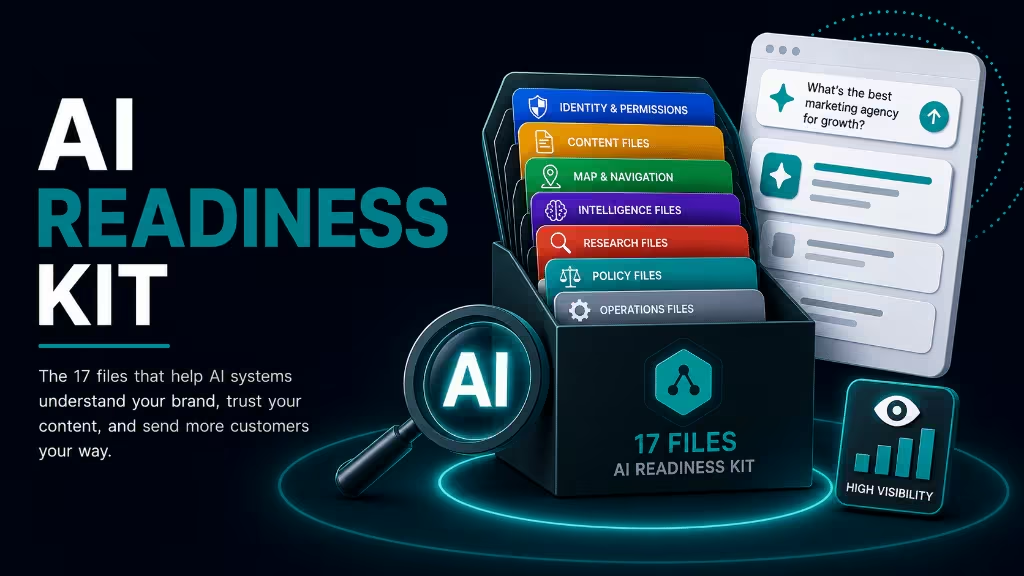
Learn how to increase your brand's visibility in AI search.
Download Kit →Learn about Silverback Marketing and what makes us different.
Let's start a conversation. We're here to help you grow.
Tell us about your goals and we'll build a plan that delivers results.
Get StartedSilverback manages Microsoft Ads campaigns to help brands reach high-intent searchers, B2B audiences, and lower-competition opportunities with smarter tracking, CRM feedback, LinkedIn profile targeting, and optimization based on what actually converts.
Microsoft Ads can be a valuable complement to Google Ads, especially when campaigns are built around audience quality, search intent, conversion tracking, and pipeline data. Silverback helps structure, manage, and optimize Microsoft Ads so the channel is measured by qualified demand, not just cheaper clicks.
Many brands put nearly all paid search investment into Google Ads and underuse Microsoft Ads. That can leave efficient search demand, B2B audience opportunities, and lower-competition inventory underdeveloped. Microsoft Ads deserves its own strategy, tracking, budget discipline, and performance analysis.
Microsoft Ads can capture high-intent searchers who may not be reached efficiently through Google alone.
Some categories see less competition and more efficient CPC opportunities in Microsoft Ads.
Microsoft's ecosystem can support valuable professional and business search audiences.
LinkedIn-powered targeting can help refine audiences by company, industry, job function, and professional attributes where available.
Microsoft Ads can reduce overdependence on one paid search platform.
CRM and offline conversion data help evaluate the channel based on lead quality, not clicks alone.
Microsoft Ads should not be treated as a set-it-and-forget-it channel. Silverback connects tracking, conversion actions, CRM feedback, audience data, and reporting so Microsoft Ads can be evaluated against qualified lead and pipeline goals.
Validate key conversion actions, landing page events, and form tracking.
Use Salesforce, HubSpot, or similar systems to understand which leads become qualified opportunities.
Connect offline conversion and lead-quality signals where available.
Check analytics, tagging, landing page performance, and channel visibility.
Use first-party lists, retargeting audiences, exclusions, and customer data where appropriate.
Store and analyze Microsoft Ads data alongside other paid media channels for clearer reporting.
Silverback manages Microsoft Ads as a distinct performance channel. We review search intent, audience quality, campaign structure, LinkedIn targeting opportunities, budget efficiency, tracking quality, and CRM feedback to identify where the channel can contribute to qualified pipeline.
Review existing campaigns, search demand, competition, budget, conversion quality, and account structure.
Confirm conversions, GTM, GA4, CRM fields, and offline conversion readiness.
Organize campaigns around intent, audience, funnel stage, match types, and budget priorities.
Use LinkedIn profile targeting, remarketing, customer lists, and exclusions where appropriate.
Evaluate performance through lead quality, SQLs, pipeline, and efficiency, not just CPC or CPL.
Compare Microsoft Ads against other channels and adjust spend based on performance trends.
Microsoft Ads can support paid media programs when the channel is evaluated by search coverage, audience quality, pipeline contribution, and cross-channel efficiency.
Capture searchers not efficiently reached through Google Ads alone.
Use Microsoft's professional audience strengths and LinkedIn profile targeting where available.
Test categories where CPCs and competition may be more efficient than Google.
Re-engage users through Microsoft audience networks and remarketing capabilities.
Reduce reliance on a single paid search platform.
Evaluate the channel based on qualified leads, opportunities, and business outcomes.
Review account structure, search demand, tracking, spend, competitors, and opportunity.
Confirm conversion actions, CRM data, GA4, GTM, offline conversion readiness, and reporting inputs.
Structure campaigns and audiences around search intent, professional attributes, funnel stage, and exclusions.
Improve bids, budgets, queries, audiences, ads, landing pages, and conversion quality signals.
Evaluate Microsoft Ads against Google Ads and other channels to understand incremental value.
Scale where performance supports it and reduce investment where lead quality or efficiency does not.
A Microsoft Ads engagement can include account review, campaign management, tracking validation, LinkedIn profile targeting, CRM feedback loops, audience strategy, and custom reporting.
Expand high-intent search reach beyond Google Ads.
Search coverage
Identify lower-competition opportunities where the channel can perform efficiently.
Efficiency signals
Use LinkedIn-powered targeting to improve audience quality where available.
LinkedIn profile targeting
Target accounts and industries.
Reach decision-makers and buyers.
Refine audience quality by role.
Connect Microsoft Ads performance to CRM and lifecycle data.
CRM feedback loop
Add another search channel to support paid media resilience.
Channel mix
Evaluate Microsoft Ads against Google Ads and other paid channels with custom reporting.
Cross-channel insights
Common questions about running Microsoft Ads, who it works for, and how it fits alongside Google Ads.
For most of our clients, yes. Competition is lighter, cost per click is usually lower, and the audience skews toward desktop, professional, and higher-income searchers that many advertisers overlook. It rarely replaces Google Ads, but it regularly adds qualified volume at a better blended cost.
Every high-performing paid media program is built on channel expertise, audience strategy, clean tracking, and honest reporting. These supporting services help you spend with confidence, improve lead quality, and connect every campaign to pipeline.
Silverback can audit your Microsoft Ads opportunity, evaluate tracking and CRM feedback loops, and identify where the channel can support more efficient qualified pipeline.