




 Preferred source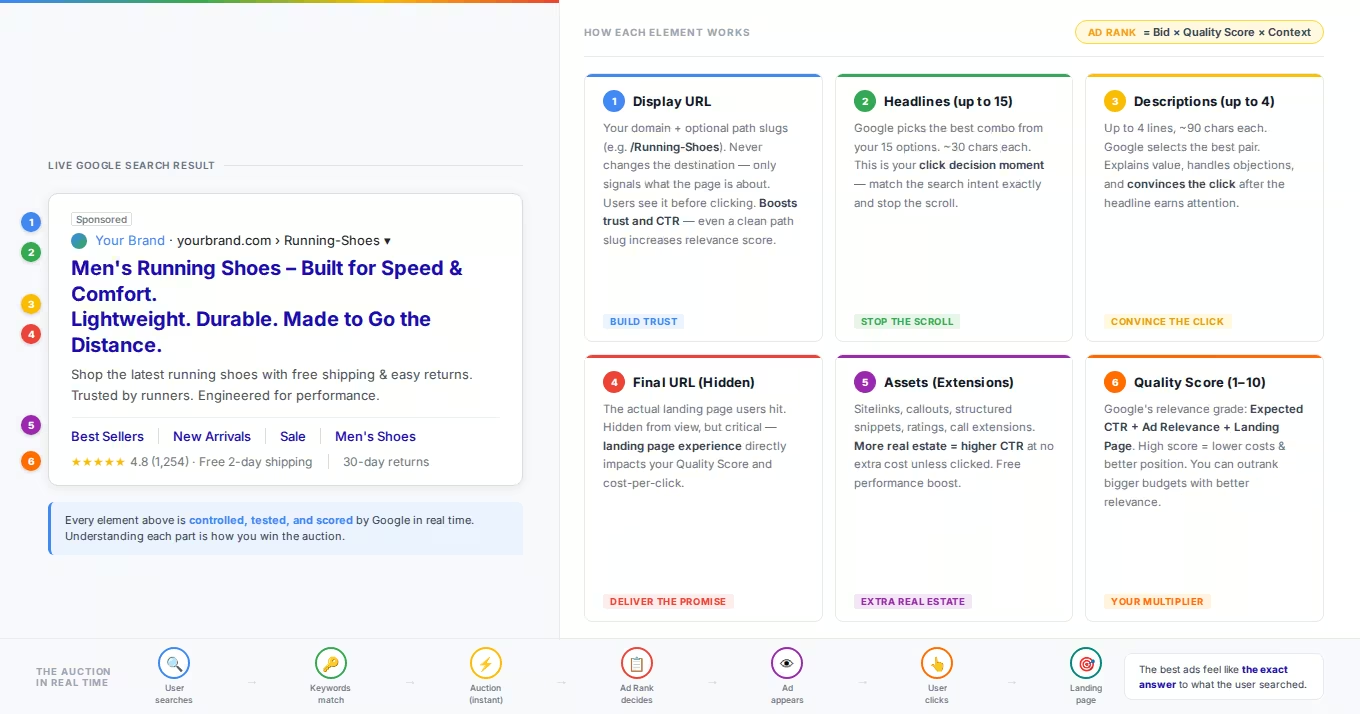
What shows up, what it means, and why it matters
Spend a few seconds looking at the top of a Google results page and you will see something most people scroll right past without a second thought. A small block of blue text, a web address, a couple of supporting lines, and a quiet little word that says "Sponsored." That block is a Google Search ad, and almost nobody outside the advertising world understands how much engineering, strategy, and money sits behind those few square inches of screen.
I have spent years building and optimizing these ads, and I can tell you that every single piece of that little block is there for a reason. Nothing is accidental. The headline you read was chosen by a machine learning system out of dozens of options. The order of the lines was decided in a live auction that finished in the time it took the page to load. Even the small text snippets underneath were bid on, tested, and ranked.
This guide takes that block apart piece by piece. By the end you will be able to look at any Search ad and read it the way a specialist does: knowing what each element is called, why it appears, and what it is quietly trying to accomplish.
First, what a Google Search ad actually is
A Google Search ad is a text-based advertisement that appears on the Google search results page when someone types a query that an advertiser has chosen to bid on. Unlike a banner ad or a social media ad that interrupts you while you are doing something else, a Search ad answers a question you just asked. That is the whole magic of it. The person has already raised their hand and told Google what they want. The ad simply tries to be the most relevant answer.
Today almost every Search ad is built using a format called the responsive search ad, usually shortened to RSA. Older formats like the expanded text ad have been retired, so when we talk about the anatomy of a modern Search ad, we are really talking about the anatomy of an RSA and the assets that surround it. Google describes responsive search ads as ads that "adapt to show more relevant messages to your customers," where you "enter multiple headlines and descriptions" and "over time, Google Ads tests different combinations and learns which combinations perform best," according to Google Ads Help. If you want hands-on help building and testing RSAs, our Google Ads team lives in this format every day.
That single sentence explains why no two people necessarily see the same version of your ad. The ad is not one fixed thing. It is a pool of ingredients that Google assembles on the fly.
The core components, from top to bottom
Let me walk down the ad the way your eye naturally travels, from the label at the top to the supporting links at the bottom. Each piece exists for a reason, each one is something you control as an advertiser, and each one is a small negotiation between what Google requires, what the searcher needs, and what you want to say. Knowing the parts by name is what lets you diagnose an underperforming ad instead of just staring at it.
The "Sponsored" label
At the very top sits the word "Sponsored," usually in bold black text with a small icon beside it. This is not decoration and it is not optional. It is the disclosure that tells searchers the result is a paid placement rather than an organic, unpaid listing. Google has standardized on this label across devices so that the line between advertising and editorial search results stays clear. As a searcher, this is your signal that a business paid to be here. As an advertiser, it is a reminder that you have to earn the click despite that label, because plenty of users deliberately skip anything marked as an ad.
The business name and logo
Just below or beside the label, many ads now show the advertiser's business name and a small logo. These come from brand assets you add at the account level, and Google requires verification before they display, which is part of why they carry trust: they confirm who is actually behind the ad. Their job is recognition before reading. A searcher scanning a results page makes a split-second credibility judgment, and a familiar name with a clean logo wins that judgment before the headline gets involved, which matters enormously when your brand is competing against names people already know. If you have not uploaded these assets, Google may pull a name and image from your domain on its own, so supplying them yourself is the difference between controlling that first impression and leaving it to an algorithm's best guess.
The headlines
The headlines are the bold blue clickable text, and they are the single most important part of the entire ad. This is what pulls the eye and earns the click. In a responsive search ad you can provide up to fifteen separate headlines, and each one is capped at thirty characters, as confirmed by Google Ads Help.
Here is the part that trips people up. You write fifteen, but the searcher never sees all fifteen. Google assembles and shows up to three headlines at a time, separated by vertical bars, and it picks which ones to show based on what it predicts will perform best for that specific search. Google notes that the second and third headlines "may appear based on what's predicted to perform best, or when there's enough space," which is also why the third headline sometimes vanishes entirely on a narrow phone screen.
Thirty characters is brutally tight. It is roughly four or five words. Every headline has to earn its place, which is why specialists obsess over verbs, numbers, and the exact phrasing a customer would recognize.
The display URL and paths
Underneath the headlines sits a green or black web address. This is the display URL, and it is worth understanding that it is not always the literal page the click sends you to. The display URL is built from the domain of your final landing page, plus up to two optional "path" fields you can add for readability. Each path field allows up to fifteen characters, per Google Ads Help.
So a real landing page buried at a long, ugly URL can display as something clean like example.com/Spring/Sale. The paths do not change where the click goes. They exist purely to reassure the searcher that they are heading somewhere relevant. That little touch of clarity can meaningfully lift clickthrough rate.
The descriptions
Below the URL come the description lines, the longer sentences that flesh out your offer. In a responsive search ad you can write up to four descriptions, each one allowing up to ninety characters, and Google shows up to two of them at a time depending on space and predicted performance. Those limits are spelled out in Google Ads Help.
Descriptions are where you make your case. The headline grabs attention, and the description closes the gap between curiosity and click. This is the space for your value proposition, your differentiator, and your call to action. Ninety characters is more breathing room than a headline, but it is still short enough that wandering, vague copy gets punished.
The assets, formerly known as extensions
Everything above is the ad itself. But a bare ad with only headlines and descriptions looks small and lonely on the page. The elements that make an ad large, detailed, and useful are called assets. If you have been in this world for a while, you knew these as "ad extensions" before Google renamed them. Google describes assets as the features "that add extra information to your ads, such as additional links, brand details, pricing, promotions, locations, images, and lead capture options," according to Google Ads Help.
Assets matter for two reasons. They give the searcher more ways to engage, and they physically make your ad bigger, which pushes competitors further down the page. There is no extra charge to add them, and you are only charged when someone clicks, exactly as with the main ad. Here are the ones you will see most often.
Sitelinks, callouts, and structured snippets
Sitelinks are the additional clickable links that sit beneath the main ad and send people to specific pages, such as a pricing page, a contact page, or a particular product category. They let a searcher skip your homepage and jump straight to what they want. You can create many of them, well beyond the handful that show at once, and Google decides how many to display based on the device and the layout. Callouts are short, non-clickable snippets of text that highlight selling points such as "Free Shipping," "24/7 Support," or "Family Owned Since 1985." Each callout is capped at twenty-five characters, and up to four can appear at once depending on space, as described by Google Ads Help. They cannot be clicked, so their entire job is reassurance and persuasion in passing. Structured snippets look similar to callouts but follow a fixed format: you pick a predefined header provided by Google, such as "Services," "Brands," "Courses," or "Destinations," and list values underneath it, previewing the breadth of what you offer in a tidy, scannable line.
Call, location, price, promotion, and image assets
Call assets add a phone number, and on mobile they can turn into a tappable call button. For a local plumber or a law firm, this is often the single most valuable asset on the ad, because it lets a customer reach you without ever visiting a website. Location assets pull in your business address and can connect to a map, which is powerful for any business that wants foot traffic; they tie the digital ad to a physical place. Price assets display a small menu of products or services with their prices, each linking to a relevant page, and promotion assets highlight a specific sale or discount. Both put concrete numbers in front of a shopper before they click, which tends to attract higher-intent traffic and filter out browsers who are not ready to spend. Image assets place a relevant photo beside your text ad, and they stand out especially on mobile, where a visual breaks up a wall of text and draws the eye. Google and most practitioners now treat images, sitelinks, callouts, structured snippets, business name, and logo as the core set worth implementing for nearly every advertiser.
Why two people can see two different ads
Here is the idea that separates people who run ads from people who merely buy them. The ad you write is not the ad that shows. You hand Google a pool of fifteen headlines, four descriptions, and a stack of assets, and Google's machine learning system assembles a custom version for each individual search. It weighs the searcher's location, their device, the time of day, the exact wording of their query, and what has performed well in similar situations before. Google describes this directly, noting that the system "tests different combinations and learns which combinations perform best" over time (Google Ads Help).
This is why your job as an advertiser is not to write one perfect ad. It is to give the system a deep, varied, high-quality set of raw materials so that whatever combination it builds is strong. Weak ingredients produce weak combinations no matter how clever the algorithm is.
Why the ad appears where it does
The last piece of anatomy is invisible, but it governs everything. Why does one ad sit in the coveted top spot while another lands at the bottom of the page or does not show at all? The answer is a live auction that runs every single time someone searches, and the deciding value is called Ad Rank.
Ad Rank, in Google's own words, is "a set of values that are used to determine whether your ads are eligible to show and if eligible, where on the page your ads are shown relative to other advertisers' ads," according to Google Ads Help. Crucially, Ad Rank is not just about who bids the most money. Google calculates it "based on many factors, including your bid amount, the quality of your ads and landing page, the Ad Rank thresholds, the competitiveness of an auction, the context of the person's search," and the expected impact of your assets. Strong CRO and landing pages directly affect that landing-page quality component.
That last part is the reason all those assets and that careful copywriting actually pay off. A well-built ad with strong, relevant assets can outrank a competitor who is bidding more money but offering a sloppier, less relevant experience. Google reinforces this by noting that "higher quality ads can often lead to lower CPCs," meaning you can literally pay less per click by being more relevant.
Sitting alongside the auction is Quality Score, which Google is careful to describe as "a diagnostic tool" rather than a direct input into the auction (Google Ads Help). It is built from three components: expected clickthrough rate, ad relevance, and landing page experience. Think of Quality Score as the dashboard warning light. It tells you whether the qualities that help your real Ad Rank are healthy or whether something under the hood needs attention.
Putting the whole anatomy together
Step back and the full picture comes into focus. A Google Search ad is a small, dense, and deeply intentional object. The Sponsored label discloses it. The business name and logo build trust. The headlines, capped at thirty characters and chosen three at a time from a pool of fifteen, do the heavy lifting of earning the click. The display URL with its optional fifteen-character paths reassures. The descriptions, up to ninety characters and shown two at a time, make the argument. The assets enlarge the ad and hand the searcher more useful ways to act. And underneath all of it, an auction driven by Ad Rank decides whether any of it gets seen at all.
For a searcher, knowing this anatomy makes you a sharper, more skeptical reader of what you click. For a business, it is the difference between throwing money at Google and actually engineering an ad that wins. Every character, every asset, and every bid is a lever. Once you can see the levers, you can start pulling the right ones, or run your account through our PPC Audit Scorecard to see where yours stand today.
Frequently Asked Questions
Common questions about GEO, SEO, and AI-driven search visibility.
A Search ad is a paid placement marked with a "Sponsored" label, and the advertiser is charged when someone clicks it. An organic result is unpaid and earns its position through Google's ranking systems evaluating relevance, quality, and authority. The two are generated by completely different systems that do not influence each other: no amount of ad spend improves an organic position, and strong organic rankings do not discount your ads. That separation is exactly why Google labels the paid placements so clearly. Visually the formats have converged over the years, which is deliberate, and it means the "Sponsored" label is often the only reliable tell. For a business, the practical difference is speed versus durability: ads buy immediate visibility that stops the moment the budget does, while organic positions take longer to earn but keep working without a per-click bill. Most mature search strategies run both and let each cover the other's weakness.
You can provide up to fifteen headlines of thirty characters each and up to four descriptions of ninety characters each. Google then shows up to three headlines and up to two descriptions at a time, choosing the combination it predicts will perform best for each individual search, as detailed by [Google Ads Help](https://support.google.com/google-ads/answer/7684791?hl=en). Those numbers explain the actual craft of responsive search ads: you are not writing one advertisement, you are supplying components for thousands of possible advertisements, and every headline needs to make sense next to any other headline it might be paired with. The practical guidance that follows: cover different angles across your fifteen slots rather than writing variations of the same message, front-load the most important words within each thirty-character budget, and use pinning sparingly, because every pin removes combinations the system could have tested and learned from.
Yes, assets are the current name for what used to be called ad extensions; Google renamed them, and the older term still circulates in articles and conversation, so it is worth knowing both. Assets add extra information around your core ad: sitelinks to specific pages, callouts highlighting selling points, structured snippets listing services or brands, phone numbers, locations, prices, and images. There is no additional cost to add them, and they often make your ad physically larger on the results page and more effective, as explained by [Google Ads Help](https://support.google.com/google-ads/answer/7331111?hl=en). Two things follow from how they work. Google decides which assets show for any given search, so supplying a full set gives the system more to work with rather than guaranteeing display. And because assets expand your ad's footprint at no extra cost, leaving them unconfigured is one of the few performance losses in paid search that cost nothing to fix.
Responsive search ads are assembled in real time. Google's system mixes and matches your headlines, descriptions, and assets based on the searcher's device, location, query wording, and accumulated performance data, so the exact combination you see can change from one search to the next ([Google Ads Help](https://support.google.com/google-ads/answer/7684791?hl=en)). That variability is the design, not a malfunction: the system is continuously testing which combinations earn engagement for which contexts, and it needs to serve different assemblies to learn. There is also a practical warning inside this answer: searching for your own ad repeatedly is a poor way to check on it, because your personal search history skews what you see, and your accumulated impressions without clicks can suppress delivery to you specifically. Use the Ad Preview and Diagnosis tool inside Google Ads instead, which shows how ads serve for a query and location without triggering real impressions or polluting your data.
No. Position is decided by Ad Rank, which blends your bid with the quality of your ad and landing page, the context of the search, and the expected impact of your assets. A more relevant, higher-quality ad can outrank a higher bid and can even pay less per click, according to [Google Ads Help](https://support.google.com/google-ads/answer/1722122?hl=en). This design is deliberate on Google's part, because showing irrelevant ads from deep-pocketed bidders would train users to ignore the ad block entirely, which protects nobody's investment. For advertisers, the strategic consequence is that relevance work is bidding power: tightening the match between query, ad copy, and landing page effectively raises your Ad Rank without raising your budget. Small advertisers beat larger competitors on exactly this arithmetic every day, by being unmistakably more relevant for a focused set of searches than a big generalist account can afford to be across thousands of them.
No, and the distinction trips up even experienced advertisers. Quality Score is a diagnostic tool scored from one to ten at the keyword level, reflecting expected clickthrough rate, ad relevance, and landing page experience. It is not a direct input into the live auction; think of it as a report card, not the grade that decides the game. Ad Rank is the real-time calculation that actually determines position and pricing for each individual auction, using live signals including your bid, auction-time quality assessments, search context, and expected asset impact, as Google explains in its [Quality Score documentation](https://support.google.com/google-ads/answer/6167118?hl=en). The two point at the same underlying qualities, which is why the diagnostic is useful: a keyword with a low Quality Score is telling you which of the three components needs work, and improving those components improves the auction-time assessments that feed your real Ad Rank. Use Quality Score to prioritize fixes, not as a number to chase for its own sake.
Clicks on a sitelink are charged the same as a click on your main headline: one click, one charge at your auction price, whichever part of the ad the click lands on. Callouts and structured snippets, by contrast, are not clickable at all, so they can never generate a charge; their job is persuasion in passing rather than navigation. There is never a fee simply for adding assets to your ad, which is worth internalizing because it removes the main hesitation advertisers have about using them. The billing logic runs on interactions, and Google does not charge twice for the same click even if a user interacts rapidly with multiple parts of the ad. The net effect is that a fully-built ad with sitelinks, callouts, and images costs exactly the same per click as a bare one, while occupying more of the page and giving searchers more reasons and routes to engage. Free surface area is rare in paid media; assets are it.
Sources
- About responsive search ads, Google Ads Help (opens in a new tab)
- About assets, Google Ads Help (opens in a new tab)
- About Ad Rank, Google Ads Help (opens in a new tab)
- About Quality Score for Search campaigns, Google Ads Help (opens in a new tab)
- About callout assets, Google Ads Help (opens in a new tab)