





Rebuild Without the Ranking Wreck: How to Protect Your SEO and KPIs During a Website Redevelopment
 Preferred source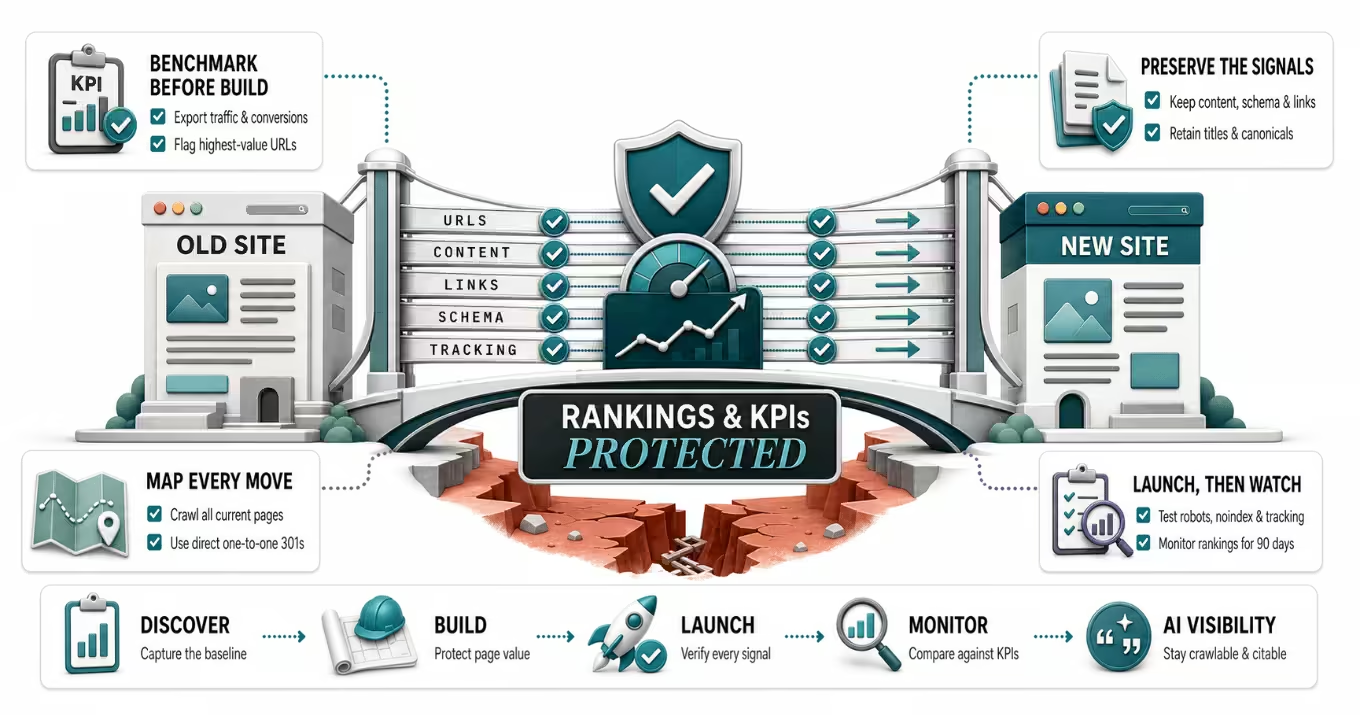
A website redevelopment should feel like an upgrade. Faster load times, a cleaner design, better conversion paths, content that finally reflects what your business does today. Yet a scary number of redesigns launch to applause on Monday and a traffic cliff by Friday. The new site looks great, and organic sessions, leads, and rankings quietly fall off a ledge.
This outcome is almost always preventable. Ranking losses during a redevelopment are rarely caused by the new design itself. They are caused by signals that got dropped, changed, or forgotten during the move. If you protect those signals, you can relaunch and hold your search visibility, and often improve it.
This guide walks through how to keep your SEO and your key performance indicators intact from planning through post-launch, using guidance straight from Google's own documentation rather than guesswork.
Why redesigns tank rankings in the first place
Search engines do not see your website the way your team does. To Google, your site is a collection of URLs, each with its own accumulated trust, links, and ranking history. When you redevelop, several of those things tend to change at once. URLs get restructured. Page titles and headings get rewritten. Old pages get merged or deleted. The content management system changes how pages are built and how fast they load.
Any single one of those changes can move rankings. Stack them all into one launch with no plan to carry the old signals forward, and you get the classic post-launch collapse. Google is explicit that a site move is evaluated on a per-URL basis, and that Googlebot has to recrawl every old and new URL at least once before it considers the move complete, which takes time and patience (Google Search Central).
In other words, the risk is not that you built a new site. The risk is that you broke the connections between your old, trusted URLs and their new homes. This is exactly why the technical foundation deserves as much attention as the visual design. It is also why our own web design and development work treats redirects, tracking, and schema as launch requirements, not afterthoughts.
Step one: benchmark your KPIs before you change anything
You cannot protect what you have not measured. Before a single page is rebuilt, capture a clear picture of how the current site performs so you have a baseline to compare against after launch. If traffic dips later, this baseline is how you tell the difference between a real problem and normal seasonal noise.
At a minimum, record the following for at least the trailing three to twelve months:
- Organic sessions and conversions from Google Analytics 4, segmented by landing page so you know which pages actually drive results.
- Total clicks, impressions, average position, and top queries from Google Search Console.
- Your highest-traffic and highest-converting URLs, since those are the pages you protect most fiercely.
- Rankings for your priority keywords, so movement after launch is measurable.
- Core Web Vitals and page speed scores, your performance baseline.
- Current conversion rates for the actions that matter, whether that is form fills, calls, or purchases.
Export all of it and store it somewhere safe. Screenshots are fine, but raw exports are better. This benchmark is the single most useful asset you can have if something goes sideways after launch, and it is the foundation of honest reporting. If your current tracking is messy or incomplete, fixing your analytics and tracking setup before the migration is time well spent.
Step two: crawl and map every existing URL
Your old site knows things the new site needs to inherit. Crawl the entire existing site with a tool like Screaming Frog to capture every indexable URL, along with its title tag, meta description, headings, canonical tag, and status code. Pull your XML sitemaps and your Search Console data too, so you also capture URLs that earn traffic or links even if they are not well linked internally.
The goal is a complete inventory. Google's migration guidance is built around preparing a URL mapping from current URLs to their new format, so this inventory becomes the backbone of your redirect plan (Google Search Central). Miss a URL here and you risk a dead end for both users and search engines later.
While you are at it, note which pages carry backlinks from other websites. Those pages hold hard-won authority, and they are the ones where a broken redirect hurts the most.
Step three: build a redirect map you can trust
If there is one non-negotiable in any redevelopment, it is the redirect plan. Whenever a URL changes, the old address needs to send both users and search engines to the closest matching new page using a permanent, server-side 301 redirect.
A 301 tells Google the move is permanent and that it should transfer the old page's signals to the new URL. Google specifically recommends server-side redirects over JavaScript or meta-refresh alternatives, because they are faster and more reliable for both users and crawlers (Google Search Central). A few rules separate a clean migration from a messy one:
- Map each old URL to the single most relevant new URL. Sending everything to the homepage is the classic mistake that wipes out rankings, because a generic redirect looks like a soft 404 to Google.
- Avoid redirect chains, where one URL points to another that points to another. Each hop adds delay and dilutes the signal, so redirect straight to the final destination.
- Keep your redirects in place for a long time. Google advises keeping them for at least one year so it can transfer all signals to the new URLs, and suggests keeping them indefinitely from the user's perspective.
- Keep your existing URL structure unchanged if you can. The best redirect is the one you never need, because fewer URL changes means fewer chances to lose a signal.
This is the kind of work that lives squarely in technical SEO, and it deserves a dedicated owner on the project, not a checkbox on launch day.
Step four: carry over your on-page and technical signals
Redirects get the traffic to the right page. The next job is making sure that new page still tells Google what the old one did. During a rebuild it is easy to let content and code get rewritten from scratch, which quietly strips out the signals that earned rankings in the first place.
Preserve or deliberately improve, never accidentally lose, the following on each migrated page:
- Title tags and meta descriptions, since a blank or duplicated title can tank a page that used to rank.
- Heading structure and the actual body copy, because thin or reworded content can change how Google understands the page.
- Image alt text and file names, which carry meaning for image search and accessibility.
- Canonical tags, so Google still knows which version of a page is authoritative.
- Structured data and schema markup, which help both classic search features and AI systems understand your content (Google Search Central).
- Internal links, which distribute authority and help crawlers find pages.
- Hreflang annotations, for multilingual sites.
If your new content management system generates URLs, titles, or canonicals differently than the old one, catch that in staging rather than in production. Google also recommends verifying every domain variant, such as the www and non-www versions and both http and https, in Search Console so you can monitor the whole move (Google Search Central).
Step five: do not quietly delete content
Redevelopments are a natural moment to prune old pages, and some pruning is healthy. But deleting or consolidating pages without a plan is one of the fastest ways to lose traffic. Before any page is cut, check whether it earns organic traffic, holds keyword rankings, or has backlinks pointing to it.
Pages worth keeping should carry their content and their URL forward, or redirect to an equivalent page. Pages you consolidate should redirect to the new combined page. Only pages with no traffic, no links, and no strategic value are safe to retire, and even those should return a proper status code rather than a broken link. Google's guidance on helpful, people-first content is a useful lens here, because the pages that survive a migration well are the ones that offer real expertise and something unique to a reader (Google Search Central).
If your redevelopment is also a content refresh, treat that as a related but separate workstream. A strong content strategy can absolutely lift a relaunched site, as long as the migration mechanics underneath it are sound.
Step six: lock down staging, then test everything
Your staging or development site should never be crawlable or indexable. If Google indexes your staging environment, you can end up with duplicate content and a leaked, unfinished site in the results. Protect it with password authentication rather than relying only on a robots.txt rule or a noindex tag, since those are easy to forget to remove at launch and easy for crawlers to slip past.
Before launch, run a full quality assurance pass on staging. Confirm that redirects resolve correctly, that titles and canonicals render as intended, that structured data validates, that the sitemap is accurate, and that analytics and conversion tracking actually fire on the new templates. It is far cheaper to catch a missing tracking tag on staging than to discover three weeks of lost conversion data after launch. Building this measurement infrastructure before go-live is a core part of how we run our redevelopment process.
Step seven: launch deliberately, then tell Google
When you flip the switch, do it in a controlled way. For large sites, Google says it can make sense to split the move into smaller stages if that is technically possible, which limits the blast radius if something is wrong (Google Search Central).
Right after launch, work through a tight checklist. Confirm the live redirects are working from real old URLs. Submit your new XML sitemap in Search Console. If you changed domains, submit a Change of Address in Search Console for the old site, though note that Google says you do not need the Change of Address tool for a simple move from http to https (Google Search Central). Verify that robots.txt is not accidentally blocking the site and that no stray noindex tags survived from staging. Then use the URL Inspection tool to spot-check that key pages are crawlable and indexable.
Step eight: monitor closely for the first ninety days
A migration is not done at launch. It is done when Google has recrawled everything and the numbers have stabilized. Google is clear that this takes time and that there are no fixed crawl frequencies, so patience is part of the plan (Google Search Central).
Watch both the old and new URLs in the weeks after launch. In Search Console, keep an eye on coverage and indexing reports, crawl stats, and any spike in 404s, which usually points to a missing redirect. Track clicks, impressions, and average position against your pre-launch benchmark. In GA4, compare organic sessions and conversions to that same baseline. Google even publishes guidance on debugging search traffic drops and on combining Search Console and Analytics data to diagnose issues, both of which are worth reading if something looks off (Google Search Central).
Expect a small, temporary wobble. It is normal for rankings to fluctuate for a few weeks while Google reprocesses the site. What you are watching for is a large, sustained drop, which almost always traces back to a fixable cause like a broken redirect, a blocked page, or a lost tag. Clear, ongoing SEO and GEO reporting is what turns that monitoring from a panic into a plan.
Do not forget AI visibility
Protecting classic search rankings is the well-known part of a migration. The newer consideration is AI visibility. Tools like Google's AI Overviews, ChatGPT, Gemini, and Perplexity draw heavily on content they can crawl, parse, and trust. When you break redirects, strip schema, or thin out content, you do not just lose Google rankings, you also make your brand harder for AI systems to cite.
The same disciplines protect both. Clean URLs and redirects, intact structured data, clear headings, and useful content are what keep you quotable in AI answers as well as ranked in search. If AI discovery is a priority for your business, a redevelopment is a smart moment to strengthen it, and our work on AI visibility is built around exactly these signals.
The KPIs to watch, and what realistic success looks like
Set expectations with stakeholders before launch so a two-week wobble does not get mistaken for a disaster. The metrics that tell the real story of a migration are organic sessions and conversions versus your benchmark, indexed page count in Search Console, clicks and impressions, average position for priority keywords, the count of 404 errors and redirect issues, Core Web Vitals, and your conversion rate on key actions.
A successful redevelopment usually shows a brief dip in the first two to four weeks, followed by a return to baseline and then, ideally, growth as the faster, better-structured site earns its keep. A redevelopment that skipped the fundamentals looks different, with a steep drop that does not recover on its own. If you see the second pattern, treat it as a diagnosable problem rather than bad luck, because it almost always is. Running a structured SEO and GEO audit against the new site is a fast way to surface what slipped.
The bottom line
A website redevelopment does not have to cost you rankings, traffic, or leads. Traffic losses come from dropped signals, not from new designs, and every one of those signals can be carried forward with planning. Benchmark before you build, map and redirect every URL, preserve your on-page and technical signals, protect your staging environment, launch deliberately, and monitor against your baseline. Do those things and your new site can launch stronger than the old one, in both search and AI.
If you would rather not stake your organic pipeline on getting every detail right, that is exactly the kind of migration our team plans and executes. You can request an audit and get a prioritized plan for protecting your SEO and KPIs through the rebuild.
Frequently Asked Questions
Common questions about GEO, SEO, and AI-driven search visibility.
A redesign only hurts SEO when it drops the signals search engines rely on, such as URLs, redirects, title tags, content, and structured data. The visual design itself does not cause ranking losses. If you keep your URL structure where possible, use permanent 301 redirects for any URLs that do change, preserve your on-page content and technical tags, and monitor closely after launch, you can redevelop your site without losing rankings, and often improve them because the new site is faster and better structured.
Start by crawling and inventorying every existing URL, then map each old URL to its closest new equivalent and set up server-side 301 redirects. Carry over your title tags, headings, body content, canonical tags, internal links, and schema markup to the new pages. Keep your staging site blocked from indexing until launch. After going live, submit a new sitemap in Google Search Console, submit a Change of Address if you moved domains, and watch both old and new URLs for crawl errors and traffic changes. Google recommends keeping redirects in place for at least one year so it can fully transfer ranking signals.
Track organic sessions and conversions in GA4, and clicks, impressions, average position, and indexed page count in Google Search Console, all measured against a pre-launch benchmark. Also monitor keyword rankings for priority terms, the number of 404 errors and redirect issues, Core Web Vitals and page speed, and conversion rates on key actions like forms, calls, or purchases. The benchmark matters most, because it lets you tell a real problem apart from normal post-launch fluctuation or seasonality.
A well-executed migration typically shows a brief dip in the first two to four weeks, then returns to its baseline and can grow from there. Google evaluates a site move on a per-URL basis and needs to recrawl every old and new URL at least once before the move is complete, and there are no fixed crawl times, so larger sites take longer. A recovery that stretches well beyond a couple of months usually signals a fixable issue such as a broken redirect, a blocked page, or missing tags rather than a normal migration curve.
Use 301 redirects for a permanent website relaunch. A 301 tells Google the move is permanent and to transfer the old page's ranking signals to the new URL, while a 302 signals a temporary move and tells Google to keep the original URL in its index. Since a redevelopment is a permanent change, 301 is the correct choice for any URL that has moved, and Google recommends implementing it server-side rather than through JavaScript or a meta refresh.
Yes. AI tools such as Google AI Overviews, ChatGPT, Gemini, and Perplexity rely on content they can crawl, parse, and trust, so the same broken redirects, missing schema, and thinned-out content that hurt classic rankings also make your brand harder for AI systems to cite. The fixes overlap, since clean URLs, intact structured data, clear headings, and useful content protect both search rankings and AI visibility. A redevelopment is a good moment to strengthen the structured data and content clarity that AI systems depend on.
Sources
- Google Search Central: Site moves and migrations (with URL changes) (opens in a new tab)
- Google Search Central: Redirects and Google Search (opens in a new tab)
- Google Search Central: Debug drops in Google Search traffic (opens in a new tab)
- Google Search Central: Using Search Console and Google Analytics data for SEO (opens in a new tab)
- Google Search Central: Creating helpful, reliable, people-first content (opens in a new tab)
- Google Search Central: Structured data markup that Google Search supports (opens in a new tab)
- Google Search Central: Learn about sitemaps (opens in a new tab)