





 Preferred source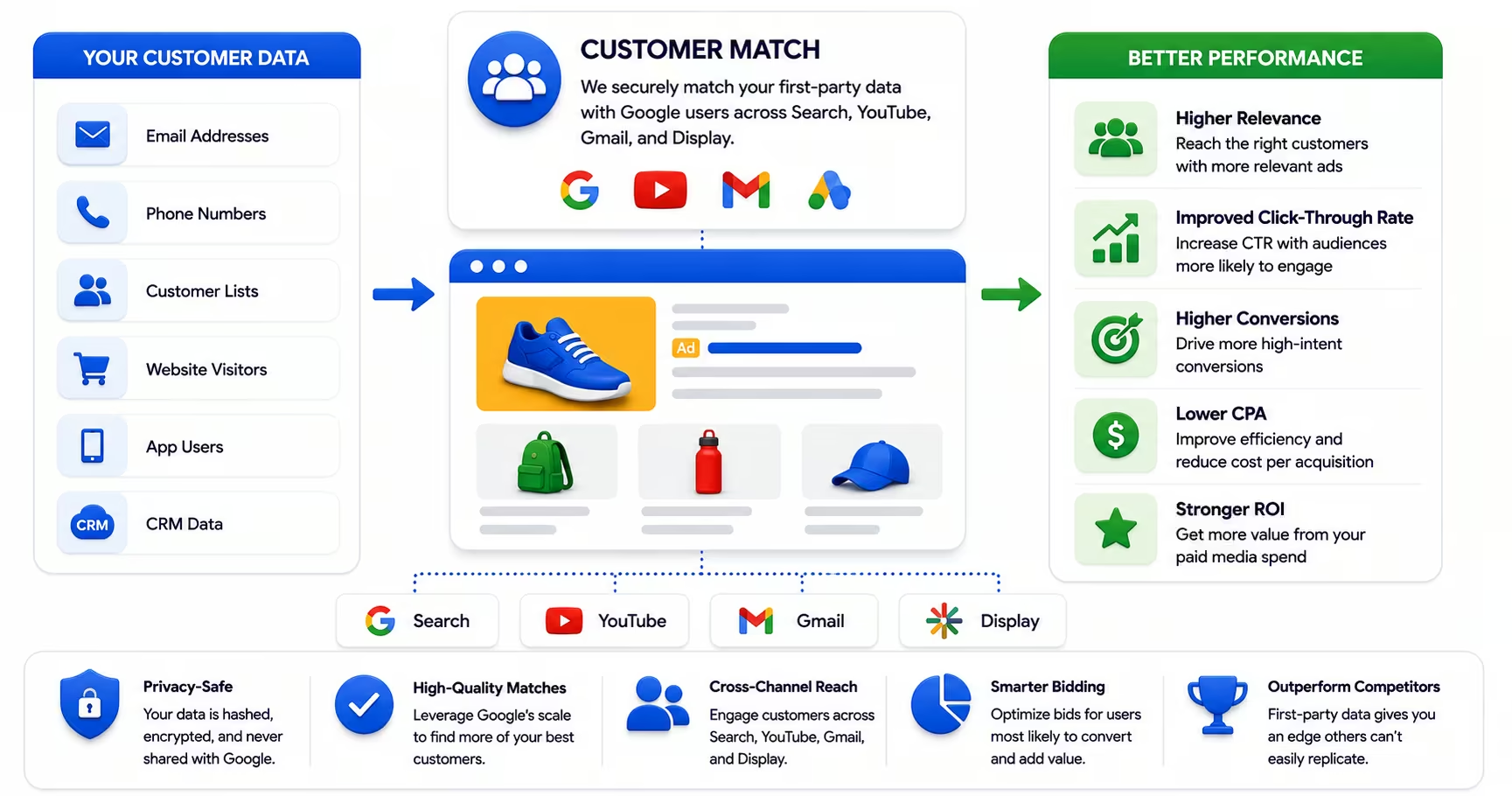
Most paid media programs spend the majority of their budget trying to find new customers who look like they might be interested in what the brand sells. The audience targeting available through Google, Meta, and LinkedIn is powerful, but it is fundamentally probabilistic: the platform is making its best guess about who is likely to be relevant based on behavioral and demographic signals. Customer Match does something fundamentally different. It takes people your business already knows, people who have already engaged with your brand, purchased your products, or been identified as high-value prospects, and brings that proprietary knowledge directly into your campaign targeting.
The performance advantages are substantial. When you are targeting people based on their verified relationship with your brand rather than platform-inferred interest signals, conversion rates improve, cost per acquisition decreases, and your ad budget concentrates on the audiences most likely to produce real business value. As third-party cookie deprecation continues to reduce the reliability of platform-inferred targeting, first-party audience strategies like Customer Match are becoming increasingly important for maintaining paid media performance over time. Offline conversion tracking completes the loop by telling Smart Bidding which matched users actually became customers.
What Customer Match Is and How It Works
Customer Match is a Google Ads feature that allows advertisers to upload first-party contact data, typically email addresses, phone numbers, or physical addresses, and use it to create audience segments for targeting or exclusion across Google's advertising ecosystem. Google hashes the uploaded data using SHA-256 encryption, matches it against signed-in Google accounts, and builds audiences you can apply across Search, YouTube, Gmail, Display, and Shopping. It is one of the highest-leverage tactics in a Google Ads or broader paid media program when your CRM data is clean.
The match rate, which is the percentage of your uploaded contacts that Google can match to an active Google account, depends on several factors: the quality and recency of your data, the number of data points you provide per contact, and the consent and compliance status of your list. Google's own guidance is to include as many match keys as possible, such as email address plus phone number, because every additional key gives Google another way to match a record that a single-key upload would drop. Google notes that most advertisers' match rates land between 29 and 62 percent, and multi-key uploads consistently sit toward the top of that range. The quality of the underlying data matters as much as the quantity of contacts.
The Most Impactful Use Cases
Customer Match has several high-value applications, and understanding which ones to prioritize depends on your business model and campaign objectives. Existing customer suppression is often the highest-ROI starting point. Uploading your current customer list and applying it as an exclusion from acquisition campaigns ensures your budget is not spent trying to convert people who already buy from you. For most advertisers, a meaningful percentage of "new lead" spend is going to existing customers who are responding to generic upper-funnel ads. Suppression corrects this immediately.
Retention and upsell targeting is the complementary application. Upload your existing customer list and use it to deliver specific messages designed to drive repeat purchase, upgrade, or cross-sell. These campaigns typically outperform cold acquisition campaigns significantly on conversion rate because you are speaking to an audience that has already demonstrated willingness to do business with you. The creative and offer strategy for a retention campaign is completely different from an acquisition campaign, and treating them separately produces better outcomes for both.
High-value prospect targeting is another powerful application. If your sales team maintains a list of identified prospects who have not yet converted, uploading that list and applying it to Search campaigns means you can increase bid adjustments for those users when they search for relevant terms. You are not creating new demand; you are ensuring your message is more competitive for people already in your funnel.
Data Hygiene and Consent Requirements
Customer Match performance is a direct function of your data quality and compliance practices. Lists built from old, inaccurate, or poorly maintained contact data produce low match rates and unreliable audience sizes. As a practical matter, Customer Match lists should be sourced from your active CRM records, filtered for contacts with recent engagement or purchase history, and refreshed on a regular cadence.
As of April 2025, Google Customer Match lists have a maximum lifespan of 540 days. Any lists set to last longer have been automatically shortened, and older data on lists will expire progressively. This policy change makes regular list refresh not just a best practice but a technical necessity for maintaining audience size. Build a quarterly or monthly update process into your Customer Match workflow to prevent audience attrition.
Consent compliance is non-negotiable. Data uploaded to Customer Match must have been collected with user consent for marketing communications. GDPR, CCPA, and similar regulations apply to first-party data used in advertising just as they apply to email marketing. Verify with your legal team that your data collection practices and consent management processes meet the requirements for your markets before uploading lists to advertising platforms.
Lookalike Segments After the Similar Audiences Retirement
Prior to their retirement in 2023, Similar Audiences in Google Ads automatically created lookalike segments from any audience list you created. That automation is gone. Lookalike Segments, now the equivalent feature in Google Ads, must be manually created on a per-campaign basis and are no longer auto-generated. This change requires advertisers to be more intentional about which Customer Match lists they use as seed audiences for lookalike expansion and in which campaigns they apply those segments.
A well-executed Lookalike Segment strategy layers your first-party audience insights onto Google's scale. By using your highest-value customer list as the seed audience, you direct Google's lookalike modeling toward finding users who resemble your best customers, rather than the full breadth of your contact database. This specificity in the seed audience directly improves the quality of the resulting lookalike segment.
Integration With Smart Bidding and PMAX
Customer Match integrates directly with Google's Smart Bidding system. When Smart Bidding campaigns have access to Customer Match lists, they automatically consider audience membership as a signal in bid calculations, adjusting bids upward for users on high-value lists and downward for users on suppression lists. This happens without manual bid adjustments on your part, as part of the automated bidding logic.
Performance Max campaigns, in particular, benefit from well-structured Customer Match inputs because they operate across all of Google's inventory with minimal manual controls. Read how to use PMAX without losing strategic control for the guardrails that make those signals useful.
Frequently Asked Questions
Common questions about GEO, SEO, and AI-driven search visibility.
Google accepts email addresses, phone numbers, physical mailing addresses composed of first name, last name, country, and zip code, and mobile device IDs, meaning IDFA for iOS and GAID for Android. All personally identifiable fields must be hashed using SHA-256 before upload, and Google's documentation specifies the exact normalization required first, such as lowercasing emails and trimming whitespace, because a hash of unnormalized data simply fails to match. Two practical notes improve results meaningfully. Uploading multiple identifiers per customer raises match rates, since a record that includes email, phone, and mailing address gives Google several chances to connect the person to a signed-in account. And data hygiene upstream matters more than the upload mechanics: deduplicate records, standardize formatting in your CRM, and prefer the personal email a customer actually uses over a role-based address, which will rarely match anything.
Google requires a minimum of 1,000 matched users before a Customer Match audience can serve in campaigns, and the word matched is the one that catches teams out: a 2,000-record upload with a 50% match rate lands exactly at the threshold with nothing to spare. The effective minimum for meaningful optimization signal is typically 5,000 to 10,000 matched users, because below that, segment-level performance data is too thin for confident decisions and Smart Bidding gets little value from the audience as a signal. Since match rates commonly land well below 100%, plan your source list accordingly; reaching 10,000 matched users can require substantially more records uploaded. If your list is small, aggregate rather than slice: one combined high-intent audience will outperform five under-sized segments, and lookalike-style expansion from a solid seed beats targeting a seed too small to serve.
After uploading a list, Google typically takes 24 to 48 hours to process the match and make the audience available in campaigns, and match rates appear in the Audience Manager section of Google Ads once processing completes. Populations can continue settling for a few days after the audience first shows as ready, so judge match rate after that stabilization rather than on first sight. Build this latency into your campaign operations: if a launch depends on a Customer Match audience, upload at least several days ahead rather than the night before, and remember the same processing window applies to suppression lists, meaning a new customer can still see acquisition ads during the gap between converting and their record processing into your exclusion audience. Teams running automated recurring uploads through the API inherit the same processing window per refresh, which matters in any service-level expectations you set internally.
Yes. Customer Match is available across Google Search, Shopping, Display, YouTube, and Gmail inventory, and the match mechanism works the same way everywhere: Google targets signed-in users whose contact data matches your uploaded list. The cross-channel availability is quietly one of the feature's biggest advantages, because the same uploaded audience can support meaningfully different jobs per channel. On Search, Customer Match lets you bid differently when an existing customer or known prospect searches your category. On YouTube, it turns your CRM into a video audience for retention or expansion messaging that email can no longer reach. In Performance Max, uploaded lists serve as audience signals that steer the automation toward users resembling your actual customers. Sign-in rates vary by surface, so expect match behavior to differ somewhat between channels, but strategically it is one asset deployable across the entire Google ecosystem.
Customer Match can work well for B2B when the lists are built from qualified business contacts rather than rented or scraped databases, but expectations about match rates need adjusting. B2B lists routinely match lower than B2C because corporate email addresses are less frequently attached to the Google accounts people actually sign into, so a CRM full of work emails leaves matches on the table. Where you can capture a personal email alongside the corporate one, match rates recover substantially, and phone numbers help bridge the gap as well. The strategic uses that survive lower match rates are still valuable: suppressing current customers from acquisition spend, re-engaging aging pipeline on Search when they research the category, and seeding Performance Max with your closed-won profile. For pure title-and-company targeting, LinkedIn's matched audiences remain the better instrument, and the strongest B2B programs run both rather than choosing.
Quarterly at minimum, monthly where lists see frequent additions and changes, and continuously via API or a connected CRM integration if you have the operational maturity to support it. Two clocks make refresh cadence matter. Google's membership duration policy caps how long uploaded members persist, with a maximum lifespan of 540 days, so any list that is not refreshed steadily shrinks as older records expire out of the audience. And your own data ages independently: people change jobs and email addresses, prospects become customers, and customers churn. Stale suppression lists are the expensive version of the problem, because every new customer missing from your exclusion audience is someone you pay to acquire twice. A practical pattern is aligning the refresh to whatever rhythm your CRM already exports on, so the lists stay current without becoming another manual task someone has to remember.
No. Customer Match audience data is private to your Google Ads account, and the matched segments you build are not visible to competitors or any other advertiser. Google uses your uploaded, hashed data only to perform matching for your own targeting and does not share list membership with third parties, and because hashing happens before upload, the raw contact data itself never needs to leave your systems in readable form. The privacy obligations that do apply run in the other direction: you must have collected the data yourself with appropriate consent under Google's Customer Match policies, purchased or rented lists are prohibited, and regulations such as GDPR and state privacy laws govern what you can upload for users in covered regions. Keep your consent language current and honor deletion requests in your CRM promptly, since a suppressed contact should exit your uploaded audiences on the next refresh cycle.