



 Preferred source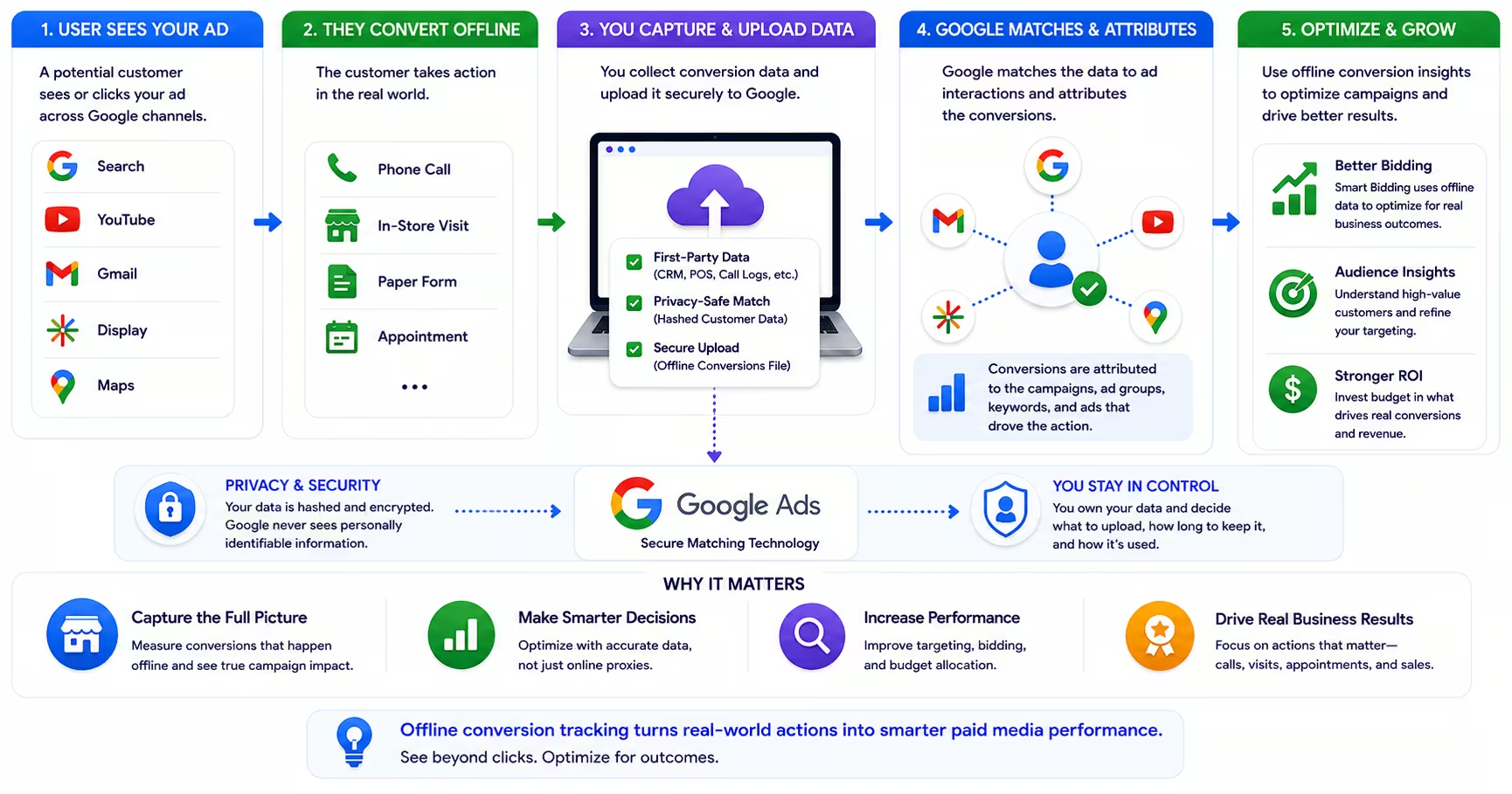
Most paid media campaigns are optimized on incomplete data. The tracking setup captures form submissions, phone call initiations, and maybe a few other on-site micro-conversions, and the bidding algorithm treats these as the north star. The problem is that for a significant portion of businesses, especially in B2B, professional services, and high-consideration consumer categories, these on-site events are not the actual business outcomes that matter. What matters is whether the lead became a customer, whether the phone call turned into a signed contract, whether the inquiry converted to revenue.
Offline conversion tracking closes that gap. It takes data from your CRM or sales system, matches it to the original ad clicks that initiated those customer journeys, and feeds that higher-quality signal back to your advertising platform. Setting this up correctly is core analytics and tracking work, not a one-time tag fix. For campaigns running Smart Bidding in Google Ads, that shift in signal quality is not incremental; it is transformative.
Why Online Tracking Alone Is Insufficient
The journey from ad click to customer is rarely a single session event. A prospect clicks an ad, reads a service page, submits a contact form, receives a follow-up email, joins a sales call, and signs a contract three weeks later. Standard web analytics tracking captures the form submission and declares a conversion. But the conversion of genuine business value was the signed contract, and there is no connection between that event and the original ad click in most tracking configurations.
The consequence for campaign performance is significant. When your bidding algorithm is told that form submissions are conversions, it optimizes for form submissions. But not all form submissions are equal. Some leads close. Most do not. If your sales data shows that leads from one campaign segment close at 40% while another segment closes at 8%, that difference should drive your bidding and budget allocation. Without offline conversion tracking connecting closed revenue back to ad clicks, the algorithm cannot see that difference. It treats all form submissions as equivalent and optimizes accordingly.
How Offline Conversion Tracking Works
The technical foundation of Google Ads offline conversion tracking is the Google Click Identifier, or GCLID. When a user clicks a Google ad and arrives at your website, Google automatically appends a GCLID parameter to the landing page URL. This parameter is a unique identifier that links the specific click to the specific user's ad interaction record in Google's system. Your website or CRM must capture this GCLID at the moment the lead is created, storing it alongside the lead record.
When that lead converts downstream, whether through a closed sale, a qualified opportunity stage in your CRM, or any other meaningful business event, you upload that conversion event to Google Ads along with the GCLID captured at lead creation. Google matches the upload to the original ad click and records it as a conversion in your campaign data. The Smart Bidding algorithm then uses these higher-quality conversion signals to optimize bids toward the user behaviors that actually predict revenue.
Enhanced Conversions for Leads
For businesses where GCLID capture is technically complex, Google offers Enhanced Conversions for Leads as an alternative pathway. Enhanced Conversions uses hashed first-party data, typically an email address captured in a lead form, to match offline conversion events back to ad clicks through Google's own identity graph rather than relying on GCLID persistence in your CRM.
The match rate for Enhanced Conversions is generally lower than for GCLID-based tracking, but the implementation is simpler and requires less technical coordination between your marketing and sales teams. Google reports that early adopters of enhanced conversions saw a median conversion rate increase of 5 percent on Search and 17 percent on YouTube. Pair that with Customer Match when you want audience signals and suppression lists in the same stack. For businesses new to offline tracking, Enhanced Conversions is often the right starting point before investing in a full GCLID integration.
Conversion Import Methods and Timelines
Google Ads supports offline conversion imports through several methods: manual CSV uploads via the Google Ads interface, the Google Ads API for automated imports, and direct CRM integrations through platforms like Salesforce, HubSpot, and others that have built native Google Ads connectors. The right method depends on your sales cycle length, your technical resources, and the frequency with which you want to update conversion data.
Timing matters significantly for bidding optimization. Offline conversion data should be uploaded within 90 days of the original click for Google to use it in Smart Bidding optimization. For longer sales cycles, this creates a challenge: if a deal closes 120 days after the initial ad click, the data arrives outside the optimization window. In those cases, consider tracking intermediate conversion events, such as SQL qualification or demo completion, that occur within the 90-day window and correlate reliably with eventual revenue.
What Changes When You Implement It
The most visible change after implementing offline conversion tracking is in your campaign performance data. Cost per acquisition numbers will shift because the denominator changes from on-site leads to actual closed customers. Paid media reporting should reflect closed revenue, not just form fills, once imports are live. Campaigns that appeared efficient based on form submission costs may reveal lower close rates when offline data connects. Campaigns that seemed expensive by CPL metrics may prove to be your most efficient revenue drivers.
Smart Bidding strategies also respond to the improved signal quality. Target CPA and Target ROAS bidding become more accurate when the conversion they are optimizing for is closer to actual business value. The algorithm learns which user segments, times of day, devices, and keyword categories predict closed revenue rather than just initial contact, and it adjusts bids accordingly. That matters especially for PMAX campaigns optimizing across broad inventory. Most advertisers who implement offline tracking correctly see both improved campaign efficiency and better budget allocation within sixty to ninety days.
Frequently Asked Questions
Common questions about GEO, SEO, and AI-driven search visibility.
Yes. Meta Ads, Microsoft Advertising, and LinkedIn Campaign Manager all offer offline conversion capabilities built on the same principle as Google's GCLID: capture a click identifier at lead creation, then upload conversion events from your CRM so the platform can connect closed business back to the click that started it. Meta's Conversions API accepts offline events matched on customer information, Microsoft Advertising uses its MSCLKID parameter almost identically to Google's implementation, and LinkedIn matches CRM records back to campaigns through its conversions API. The practical implication for a multi-platform advertiser is that the CRM work you do once, capturing click identifiers and building a clean conversion export, pays off across every channel you run. Implementation details differ by platform, but a team that has built the pipeline for Google Ads has already solved the hard parts for the rest.
Most major CRMs can be configured to capture GCLIDs, though few do it out of the box, so plan for some configuration work regardless of platform. Salesforce and HubSpot both have established patterns: a custom field to store the value, plus form handling that reads the GCLID from the landing page URL and writes it into the lead record. Microsoft Dynamics and most other enterprise CRMs support the same approach through custom fields and documented workarounds. The critical detail sits outside the CRM itself: the GCLID must survive the user's journey from ad click to form submission, which usually means a small script that persists the parameter across page views, commonly through a cookie or session storage, so it is still available when the form finally fires. Your marketing operations team or a technical partner can typically stand up the full capture path in most CRM environments within days, not months.
Track intermediate conversion events that occur inside the attribution window and reliably correlate with eventual revenue, then let the platform optimize toward those. Common options include marketing qualified leads, sales accepted leads, demo completions, and proposal submissions. The exercise that makes this work is mapping your funnel honestly: look at historical closed-won deals and identify which early milestone best predicted them, because that milestone becomes your uploadable conversion. If your data shows that a completed demo converts to revenue at a stable rate, uploading demos with a value that reflects their expected contribution gives Smart Bidding a signal that is both timely and economically meaningful. Revisit the mapping a couple of times a year, since funnel conversion rates drift as pricing, product, and sales process change, and a stale proxy quietly optimizes your spend toward the wrong buyers.
Run the test the way a real prospect would. Click one of your own live ads, submit a test lead through the landing page form, and then check whether the GCLID appeared in your CRM attached to that lead record. If the field is empty, the break is in one of two places: the URL parameter is not surviving the path from landing page to form submission, or the CRM field mapping is not writing the captured value into the record. Test the multi-page case too, because a GCLID that works when the form sits on the landing page often disappears when a prospect browses to a different page before converting, which is exactly what real buyers do. Make this an ongoing habit rather than a one-time check: a monthly test lead, plus a quick report on what percentage of paid-attributed leads carry a GCLID, catches silent breakage from site updates before it costs you a month of data.
Not negatively, and over time the effect runs firmly in your favor. Uploading higher-quality conversion data gives Smart Bidding more accurate signals about which clicks actually become revenue, which typically improves delivery efficiency as the algorithm learns to find more of the users who resemble your real buyers rather than your form fillers. Expect a recalibration period when you first switch your primary conversion action to an offline event: bids and volume can fluctuate for a few weeks while the system relearns against the new definition, particularly if the offline event is much rarer than the on-site event it replaced. The practical way to manage the transition is to keep budgets steady through the adjustment window and resist reacting to short-term swings. Advertisers who hold course typically come out the other side with lower cost per qualified opportunity, which is the metric that mattered all along.
Yes, and it is particularly valuable for Performance Max because of how much of PMAX sits outside your direct control. The campaign type automates targeting, placement, and creative assembly across Search, Display, YouTube, Gmail, Discover, and Maps, which means the conversion signal you feed it is effectively the steering wheel: it is the one input that tells the automation what a good outcome looks like. When PMAX optimizes toward on-site proxy events like form fills, it happily finds cheap form fills wherever they live, including from audiences that never become customers. When it optimizes toward uploaded offline conversions that represent qualified pipeline or closed revenue, the same automation redirects its reach toward users who resemble actual buyers. PMAX campaigns using offline conversion data as their primary conversion action consistently outperform those optimizing toward proxy events, and the gap widens as the campaign accumulates learning.
The effort depends almost entirely on your existing stack, but the required pieces are consistent. Your landing pages must pass the GCLID into your form submission handler, your CRM needs a custom field to capture and store it on the lead record, and a process must exist to export conversion events with their GCLIDs and upload them to Google Ads, either on a schedule or through a native integration. For a team on a mainstream CRM with standard web forms, that can be a few hours to a few days of configuration, and both Salesforce and HubSpot offer direct integrations that remove the manual upload step entirely. The multi-week version usually involves custom form infrastructure, legacy CRM systems, or data governance review, and even then the work is front-loaded: once the pipeline runs, ongoing maintenance is a monitoring task, and the signal quality improvement pays for the setup many times over.
Sources
- Google Ads: About offline conversion imports (opens in a new tab)
- Google Ads: Set up offline conversion imports (opens in a new tab)
- Google Ads: Enhanced conversions (opens in a new tab)
- Google Ads: Smart Bidding (opens in a new tab)
- Google: Privacy in ad performance with enhanced conversions (opens in a new tab)