





 Preferred source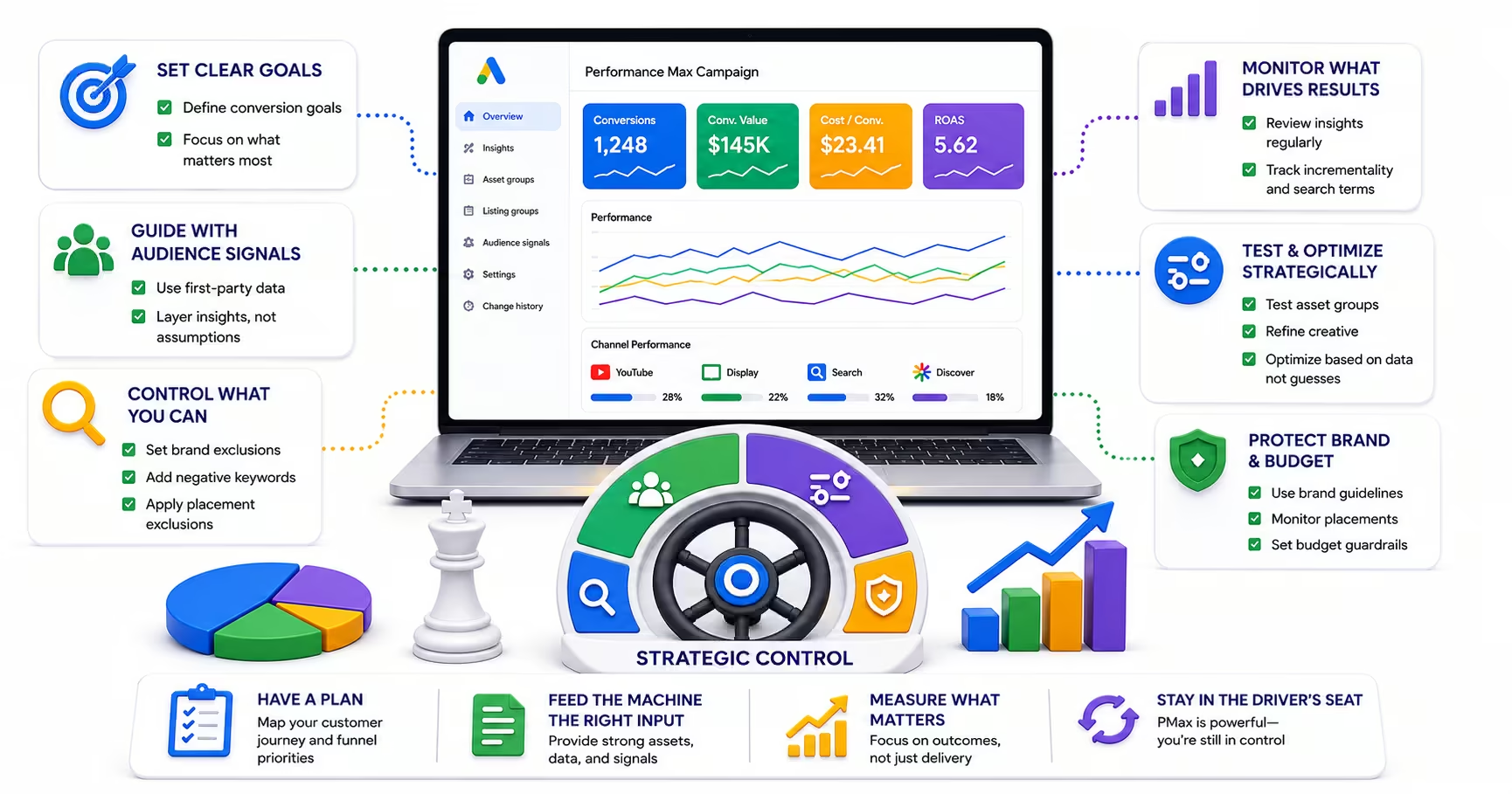
Performance Max, or PMAX, is the most ambitious campaign type Google has ever released. It runs across every Google channel simultaneously, Search, Shopping, Display, YouTube, Gmail, and Discover, using machine learning to optimize bids, placements, audiences, and creative combinations in real time. Silverback manages Google Ads and paid media programs with structured guardrails so automation does not replace strategy.
PMAX is also the most opaque campaign type Google offers. Advertisers who deploy it without understanding its control levers often find themselves with a campaign that is spending confidently but performing in ways they cannot fully explain or interrogate. Budget is consumed across channels with limited visibility into where it is going. Creative assets are mixed and matched by an algorithm that provides performance ratings rather than transparent attribution. Audience targeting is automated in ways that can drift far from the intended customer profile. The criticism is not that PMAX does not work; it frequently does. The criticism is that without deliberate structural controls, it is difficult to know why it is working or how to improve it systematically.
Why PMAX Requires Active Management
The most common misconception about Performance Max is that its automation is a substitute for strategic thinking. Advertisers who treat PMAX as a "set it and forget it" campaign consistently underperform those who engage with its available controls actively. Google's algorithm needs directional guidance, particularly in the early weeks of a campaign, to understand what kind of conversions it is optimizing toward and which users and placements are most likely to produce them.
Without that guidance, PMAX will spend broadly and optimize toward whatever conversion signal is available, which may not reflect your actual business priorities. A campaign with poor conversion definitions will optimize toward the wrong outcomes. A campaign without negative keywords will appear for irrelevant search queries. A campaign without structured asset groups will mix creative from different product lines in ways that produce confused messaging. The controls exist. Using them is what separates PMAX campaigns that perform from those that spend without producing.
Conversion data is the foundation of PMAX performance
PMAX's optimization engine needs a critical mass of conversion data to function effectively. Google's own guidance puts the minimum at 20 to 30 conversions per month per campaign. Below that threshold, the algorithm does not have enough signal to make meaningful bid and targeting decisions, and performance is likely to be erratic. If your account does not generate sufficient conversion volume, consider whether PMAX is the right campaign type at this stage, or whether starting with standard Search campaigns while building conversion history is the more practical path.
The quality of the conversion signal matters as much as the volume. PMAX campaigns that are optimizing toward on-site micro-conversions rather than meaningful business outcomes will produce traffic that looks efficient by those metrics but does not translate to revenue. Connecting offline conversion data, closed sales or qualified pipeline from your CRM, to PMAX's optimization signal produces better campaign performance because the algorithm is directed toward the outcomes that actually matter.
Structuring Asset Groups for Control
Asset groups are the primary organizational unit within a PMAX campaign. Each asset group contains a set of creative assets, including headlines, descriptions, images, and videos, along with audience signals that guide the algorithm toward relevant users. The temptation is to build a single asset group with all your creative and let the algorithm figure it out. This approach sacrifices meaningful control over how your messaging is applied across products, services, and audience segments.
A more effective structure organizes asset groups by product or service line, with distinct creative assets that are specific to each offering. If you sell three distinct products to different buyer personas, create separate asset groups for each combination. This structure allows you to monitor performance by product line, apply relevant audience signals that match the buyer profile for each offering, and optimize creative based on performance data that is not conflated across unrelated offers.
Negative Keywords and Placement Controls
For many advertisers, the most urgent control to implement in PMAX is negative keywords. By default, PMAX can appear for a broad range of search queries that may have little relevance to your product or service. Campaign-level negative keywords, which can include up to 10,000 terms, allow you to prevent specific search terms from triggering your ads. Review your search query reports regularly and add irrelevant terms to your negative keyword list as they surface.
Placement exclusions give you control over which websites and apps your Display and YouTube inventory appears on. PMAX will, by default, appear on any placement that the algorithm identifies as potentially relevant. Low-quality placements, including app inventory that generates accidental clicks and content that is misaligned with your brand, can be excluded at the campaign level. Review your placement reports at least monthly and build an exclusion list proactively rather than reactively.
Audience signals guide the algorithm
Audience signals are not targeting restrictions in PMAX. They are directional guidance: you are telling the algorithm which user profiles represent your best customers, which it uses as a starting point before expanding to find similar users at scale. Strong audience signals dramatically improve early campaign performance by giving the algorithm a clearer starting point rather than letting it explore from scratch.
The most effective audience signals are your first-party data lists, particularly Customer Match audiences built from your existing customer or high-value prospect data. Supplementing these with custom intent audiences, built around the search terms that your best customers are likely to use, and remarketing audiences from users who have engaged meaningfully with your website provides the algorithm with a multi-dimensional profile of your target customer. The more specific and accurate your signals, the less budget the algorithm spends learning before it starts performing.
Creative Asset Management and Optimization
PMAX reports asset performance at the individual element level using a rating of Low, Good, or Best. These ratings reflect how often an asset is selected by the algorithm relative to other assets in the same asset group, which is a proxy for its performance contribution. Low-rated assets should be replaced rather than supplemented, since adding more assets does not remove the underperforming ones from rotation.
Aiming for "Excellent" Ad Strength, which requires a sufficient number of varied headlines, descriptions, images, and video assets, is worth the effort: Google reports that advertisers who improve their Performance Max Ad Strength to Excellent see on average 6 percent more conversions. The creative quality bar in PMAX is meaningful because the same assets run across multiple channels simultaneously. Images that work well in Display formats may not be suitable for YouTube, and short headlines that work in Search may not carry sufficient message in a Gmail placement. Providing a diverse creative library gives the algorithm the raw material to optimize effectively across channels.
Frequently Asked Questions
Common questions about GEO, SEO, and AI-driven search visibility.
Not necessarily, and the accounts where PMAX shines share a recognizable profile: sufficient conversion volume for the automation to learn from, diverse products or services that benefit from broad multi-channel reach, and the willingness to invest in comprehensive creative assets, because PMAX assembles ads from what you supply and thin inputs produce thin results. Accounts outside that profile should be more cautious. Very limited conversion history starves the algorithm of learning signal, narrow or compliance-constrained targeting requirements conflict with PMAX's expansive delivery, and businesses that need query-level visibility and control will chafe against its reporting by design. Lead generation accounts deserve extra scrutiny, since PMAX will happily optimize toward cheap, low-quality form fills unless the conversion signal reflects lead quality. The honest framing: PMAX is a powerful default for e-commerce at scale, an option to test carefully for lead gen, and a poor fit for accounts that cannot feed it good data.
Full channel-level spend transparency is limited in PMAX by design, which remains one of the legitimate criticisms of the campaign type, but the visibility available has improved and is worth using systematically. The Insights page surfaces search themes, audience segments, and performance movements the automation is acting on. Asset group performance reporting shows which combinations are earning impressions and conversions. Placement reports under the Campaigns section reveal where Display and video inventory actually served, which is your early warning for placement quality concerns. Third-party scripts and analysis tools can approximate the channel split between Search, Shopping, Display, and YouTube from available data, and many agencies run them precisely because the native reporting will not break it out. The working posture: monitor what is observable, judge the campaign primarily on the business outcomes you can fully measure, and route spend you need full control over into standard campaign types instead.
Yes, and the combination is arguably the default architecture for sophisticated accounts. Standard Search campaigns give you precise query-level control, transparent bidding, and guaranteed coverage on your highest-priority terms, while PMAX handles broader discovery across Search, Shopping, Display, YouTube, Gmail, and Maps. The interaction rule that makes the pairing work: when a query exactly matches an eligible keyword in your Search campaign, the Search campaign is generally prioritized, but for everything else PMAX can and will compete for the traffic. That makes brand exclusions the critical configuration, because without them PMAX tends to absorb branded queries and claim conversions your Search campaigns or even organic listings would have captured anyway, flattering PMAX performance while adding little incremental value. Configure brand lists, watch your Search terms and PMAX search themes for overlap, and evaluate the account's total performance rather than letting the campaign types grade themselves.
PMAX needs enough budget to generate learning volume quickly, so the right starting number is derived rather than fixed: work back from your industry's average cost per click toward a budget that buys roughly 30 to 50 clicks per day, and sanity-check it against your conversion economics, since the algorithm learns from conversions and a budget that produces one conversion a week teaches it almost nothing. In practical terms that lands many advertisers between $50 and a few hundred dollars per day depending on vertical, with competitive categories requiring the upper end. Launching with a very small budget does not save money so much as stretch the expensive learning period across more weeks and produce noisier optimization signals at the end of it. If the calculated number exceeds what you can commit, the better move is usually running a tighter standard campaign well rather than running PMAX undernourished, then graduating to PMAX when volume supports it.
Expect two to four weeks of learning, during which delivery and performance can swing in ways that would alarm you in a mature campaign: uneven daily spend, fluctuating cost per acquisition, and channel mix shifts are all normal while the system explores. The discipline that matters is restraint. Significant changes to budget, bidding targets, conversion goals, or asset groups during this window reset portions of the learning process, which means a nervous edit in week two can buy you another month of instability. Set expectations with stakeholders before launch so nobody demands action on week-one data, and define in advance what you will evaluate at the thirty-day mark. After stabilization, make adjustments in measured increments, since large jumps in targets or budget can push the campaign back into learning. The meta-rule for automated campaign types: change fewer things, less often, with more conviction, and let the data windows be long enough to mean something.
Yes. Google retired Smart Shopping and automatically migrated those campaigns into Performance Max in 2022, making PMAX the direct successor for e-commerce advertisers. The product feed remains central: PMAX connects to Google Merchant Center the same way, and feed quality carries even more weight than it did under Smart Shopping because the campaign extends beyond Shopping placements into Search, Display, YouTube, Gmail, and Discover, assembling ads from your feed data and creative assets across all of them. For teams that ran Smart Shopping well, the operational lesson transfers directly. Complete, accurate product data with strong titles, images, pricing, and availability is the highest-leverage input, and it now also feeds the AI shopping experiences that match products against buyer constraints. Treat the feed as a living asset with an owner and a review cadence, not a one-time integration, and PMAX's expanded reach works in your favor.
Launching without a clear conversion strategy is the most common and most costly mistake, because PMAX is an optimization engine that does exactly what its conversion signal tells it. Pointed at the wrong event, or at low-quality proxy events like raw form fills and pageviews, it will spend confidently and efficiently toward outcomes that do not become revenue, and its reporting will look healthy the entire time. The highest-leverage preparation is defining what a meaningful conversion actually is for your business, implementing that definition correctly in Google Ads, and assigning honest values so the automation can distinguish a qualified lead from a tire-kicker. For lead generation, that usually means offline conversion tracking feeding CRM outcomes back into the campaign; for e-commerce, accurate purchase values with margin-aware adjustments where possible. Everything else about PMAX, from asset quality to budget setting, refines performance at the margin. The conversion signal decides what the machine is actually optimizing for.
Sources
- Google Ads: About Performance Max campaigns (opens in a new tab)
- Google Ads: Performance Max asset groups (opens in a new tab)
- Google Ads: Performance Max reporting (opens in a new tab)
- Google Ads: Campaign-level brand exclusions (opens in a new tab)
- Google Ads: Performance Max Ad Strength (opens in a new tab)