




How Google Search Console Data Should Guide SEO Strategy
 Preferred source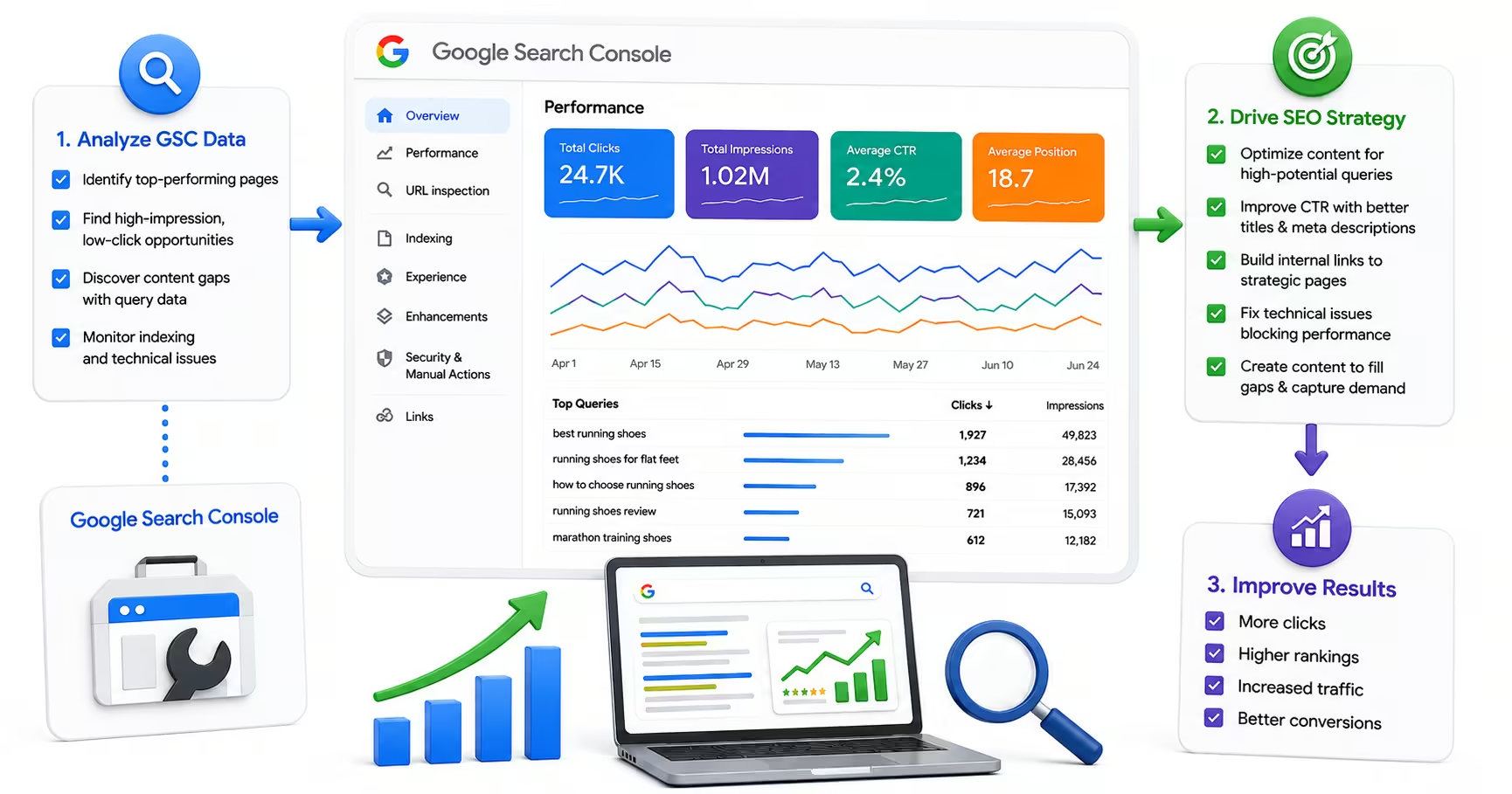
Most marketing teams treat Google Search Console as a dashboard to glance at during monthly reporting. They check that rankings have not dropped dramatically, confirm that indexation looks clean, and move on. That approach leaves a significant amount of actionable intelligence untouched. Search Console is the only tool that shows you exactly how Google sees and processes your site, and the data it contains should be shaping every significant SEO decision your team makes. Pair that data with analytics and tracking that connects search behavior to pipeline and revenue.
This is especially true now that Search Console has evolved beyond a technical monitoring tool into a visibility intelligence platform that includes AI Mode data, branded versus non-branded query segmentation, and richer Core Web Vitals reporting. The teams that use Search Console strategically, rather than reactively, consistently find opportunities that pure third-party tools miss, because Search Console pulls from Google's own systems rather than estimating from sampled data. Here is how to use it.
Strategy starts in the Performance report
The Performance report is the most strategically valuable section of Search Console, and most teams use only a fraction of its capability. At its core, it shows impressions (how often your pages appeared in search results), clicks (how many users actually clicked), click-through rate, and average position for every query your site has appeared for. That data, used well, is a complete roadmap for content prioritization.
Start by sorting your query data by impressions rather than clicks. Pages with high impressions but low click-through rates are generating awareness without capturing traffic. Those are your title tag and meta description optimization opportunities. A page ranking in position four for a high-volume query but generating a 2% CTR when competitors are generating 6% is leaving traffic on the table through weak messaging, not weak ranking.
Conversely, pages with strong CTR but low position are proving that users want what you are offering. These are your investment candidates: the pages where improving content depth, earning additional backlinks, or fixing technical issues is most likely to produce disproportionate traffic gains because the demand signal is already confirmed.
Separating Branded and Non-Branded Traffic
In late 2025, Google added a branded versus non-branded filter to the Performance report. This is a useful addition that helps SEO teams answer a question executives often ask: how much of our organic traffic growth is from SEO effort versus brand awareness that would have driven searches regardless? Our guide on SEO reporting metrics executives actually care about walks through how to present that split.
Non-branded organic traffic is the most direct measure of SEO performance, because it reflects users finding you through search queries that do not include your company name. Tracking this segment separately allows you to demonstrate the incremental value of your SEO program and to identify gaps where competitors are capturing non-branded traffic that should be yours. Branded traffic data is useful for brand health tracking, but conflating it with SEO performance overstates the channel's ROI.
The Coverage report makes indexation a prerequisite for ranking
The Coverage report answers the most fundamental question in SEO: are your pages actually in Google's index? Pages that are not indexed cannot rank, and the Coverage report is the fastest way to identify pages that are failing to be indexed and why. It categorizes pages as Valid, Excluded, Warning, or Error, with each category broken down by specific reason.
Error pages require immediate attention; they represent content Google is attempting to crawl but failing to process correctly. Common causes include server errors, redirect chains that exceed Google's redirect limit, and pages that Google's crawler cannot render due to JavaScript issues. For a systematic crawl-and-index review, use our technical SEO checklist for growing websites. Excluded pages are divided into intentionally excluded (noindex-tagged or in robots.txt) and unexpectedly excluded (such as pages blocked by Google's duplicate content detection). Review your excluded pages regularly, as common CMS configurations produce canonical issues and duplicate content exclusions at scale without triggering any visible alerts.
Core Web Vitals connect performance to specific URLs
Search Console's Core Web Vitals report is distinct from PageSpeed Insights in an important way: it shows real-world performance data sourced from actual Chrome users (CrUX data), segmented by mobile and desktop, and tied to specific URL groups on your site. This makes it the most reliable source for identifying which sections of your site have performance problems affecting real users, rather than the theoretical scores from lab-based testing tools.
When Core Web Vitals issues appear in Search Console, address the mobile version first. Google's mobile-first indexing means that mobile performance problems affect rankings more directly than equivalent desktop issues. Pages listed as "Poor" require urgent attention. Pages in "Needs Improvement" status should be queued for the next development sprint, as they represent a meaningful ranking risk if left unaddressed as competitors improve their scores.
AI Mode data is the newest report
In June 2025, Google began incorporating AI Mode data into the Performance report, with clicks and impressions from AI-driven search experiences appearing under the "Web" search type. This makes Search Console the primary tool available to most SEO teams for measuring AI search visibility, at least until dedicated AI citation tracking tools become more widely available.
Monitor your AI Mode impression trends alongside traditional search impressions to understand how the channel is evolving for your specific queries and pages. Pages that generate high impressions in AI Mode but low clicks may be appearing in AI-generated summaries that satisfy the user's query without requiring a click, a behavior worth tracking alongside broader AI visibility work.
Turning Data Into an Editorial Calendar
The most practical application of Search Console data is using it to drive your content decisions. Pages with declining average position are candidates for content refreshes. Queries generating impressions but no page currently targeting them represent content gaps. High-impression, low-CTR pages need title tag and meta description work. Coverage errors indicate pages that need technical attention before any content investment will pay off.
Building a monthly review rhythm around Search Console data, rather than quarterly reporting-cycle reviews, gives teams the feedback loop they need to optimize continuously rather than reacting to problems that have compounded for months. Set up email alerts for coverage errors and manual actions so that critical issues surface immediately, and schedule a monthly review of the Performance report to identify emerging opportunities before competitors capture them.
Frequently Asked Questions
Common questions about GEO, SEO, and AI-driven search visibility.
Search Console and third-party tools serve different purposes, and the teams that get the most from their stack treat them as complements rather than substitutes. Search Console is the only place you get Google's own record of how your site is crawled, indexed, and performing in search results, including query-level impressions and clicks that no external tool can see, and it is free. Its limits are just as real: it shows only your site, samples some data, and offers no competitive context. Third-party platforms fill exactly those gaps with competitor analysis, backlink tracking, rank monitoring, and keyword research. The practical division of labor is to treat Search Console as the source of truth for how Google actually interacts with your site, and third-party tools as the lens for the market around you. When the two disagree about your own performance, trust Search Console.
Search Console retains performance data for sixteen months, which is enough for a year-over-year comparison and for identifying seasonal patterns in your organic traffic, but nothing older than that is recoverable once it rolls off. That limit matters more than most teams realize, because the moment you want to compare against two years ago, the data is simply gone. The fix is cheap and worth doing early: set up a scheduled export into a spreadsheet, BigQuery, or your data warehouse so history accumulates under your control. Search Console offers a native bulk export to BigQuery that captures more detail than the interface shows, including queries that the UI's sampling omits. Teams that start archiving in their first month of ownership never face the problem; teams that start after a traffic question arises always wish they had.
Average position is the mean ranking position of your page for a given query across all searches where it appeared. A position of 1.0 means your page consistently appeared first, while a position of 4.5 means it averaged between fourth and fifth across those searches. The number needs careful reading, because it is an average of only the searches where you appeared at all. A page that briefly starts appearing for a new high-volume query at position forty can drag its average down even though nothing got worse; the page simply became visible somewhere new. That is why average position is most useful tracked over time for a stable set of queries, or read alongside impressions and CTR to diagnose specific pages. Rising impressions with a falling average position often signals expanding visibility, which is usually good news wearing a worrying disguise.
Search Console does not directly explain ranking drops, but it provides most of the evidence needed to investigate one, and the diagnosis usually follows a readable pattern. A sudden drop in clicks while impressions hold stable points at a CTR problem, often a SERP layout change such as a new AI Overview or a competitor's rich result pushing your listing down visually. Falling impressions point at an actual ranking change or lost index coverage. From there, check the Page indexing report for coverage errors, confirm the page still resolves and is not caught in a redirect or canonical change, and check Security and Manual Actions for notices, which are rare but decisive when present. Cross-reference the drop date against your own deploys and against known Google update windows before assuming a penalty; self-inflicted technical changes explain more drops than algorithm updates do.
A manual action is a penalty applied by a human Google reviewer, which makes it categorically different from an algorithmic ranking change. Manual actions result from violations of Google's spam policies, such as unnatural links, thin or scraped content at scale, or deceptive structured data, and they can demote specific pages or remove an entire site from search results until resolved. They appear in Search Console under Security and Manual Actions, with a notice describing the violation, and they are serious enough to treat as an all-hands-now problem. Recovery requires actually fixing the violation and then submitting a reconsideration request explaining what changed, which a human reviews. The encouraging news is that manual actions are rare for sites doing honest work, they come with an explicit explanation, and unlike algorithmic suppression, a clean reconsideration produces a definite resolution.
For a new site, verify ownership in Search Console immediately at launch, ideally with domain-level verification through DNS so every subdomain and protocol variant is covered in one property. Submit your XML sitemap on day one, then watch the Page indexing report closely through the first sixty days, because that window is where new sites hit indexation delays, unexpected crawl blocks left over from staging, and stray noindex tags that quietly cap discovery. Use the URL Inspection tool to confirm your most important pages are indexed and to request indexing for priority pages rather than waiting on the crawl cycle. Early performance data will be thin, and that is normal; the value in the first months is confirming Google can reach, render, and index everything you shipped, so that content and authority work lands on a sound technical foundation.
Yes, and the access level you grant matters. Adding your agency as a user in Search Console lets them work from the same live data you see, which improves the quality of recommendations and eliminates the errors that creep in when analysis runs on exported snapshots, stale screenshots, or third-party estimates of data Google provides directly. Full users can view everything and take most actions, while restricted users get read access, which is a sensible default for a new relationship. Keep actual ownership of the property in your own organization's account, so access can be granted and revoked as relationships change and your history is never held by a vendor. A practical hygiene habit is reviewing the users list once or twice a year and removing anyone who no longer needs access; old agency accounts with standing access are a common and avoidable exposure.