





Website Migration SEO: How to Keep Your Rankings When Everything Else Changes
 Preferred source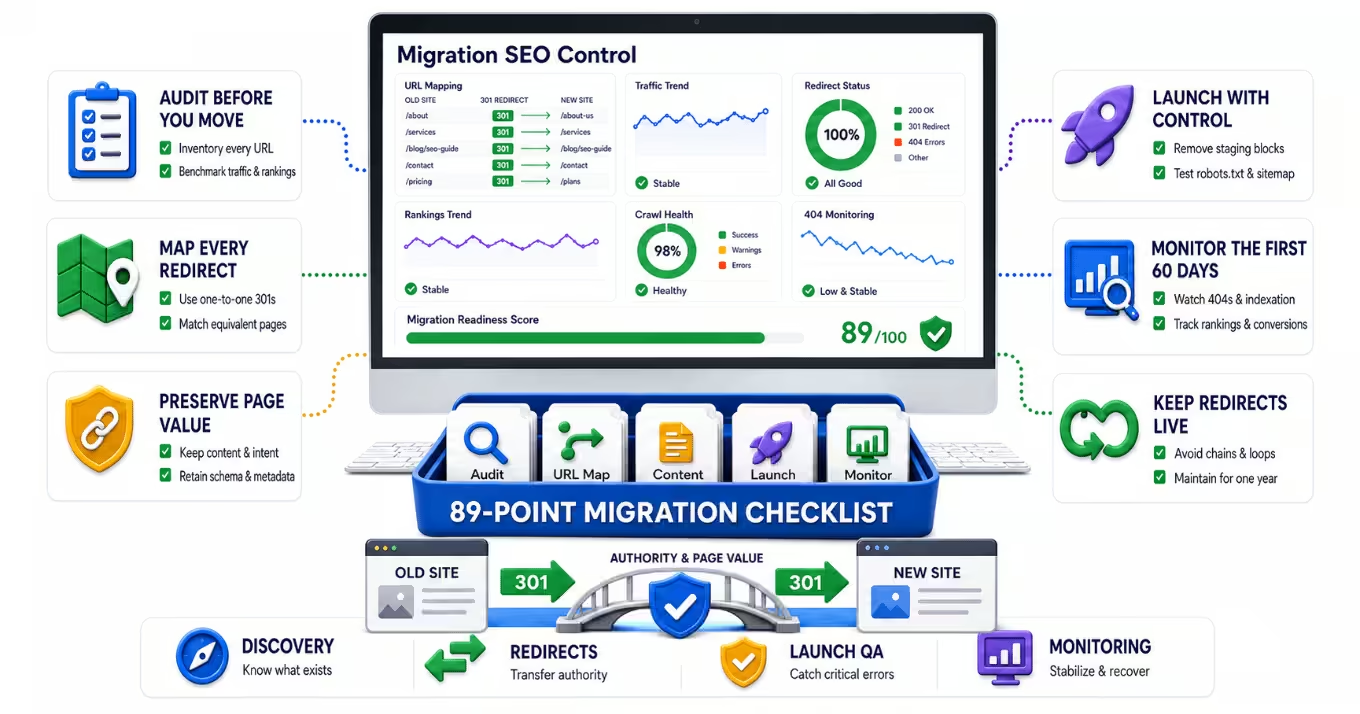
A website migration is one of the riskiest things a business can do to its own search visibility.
Not because migrations are inherently bad. New platforms, cleaner designs, and faster infrastructure are all good reasons to move. The risk comes from what gets lost in transit: URLs, content, internal links, structured data, tracking, and years of accumulated trust that search engines have assigned to specific pages.
Here is the uncomfortable truth. Rankings do not belong to your brand. They belong to your URLs, your content, and the signals attached to them. Change those things carelessly and the rankings do not follow you to the new site. They simply disappear.
Migration risk is almost entirely manageable. Teams that treat a migration as a governed project, with a full audit up front and a detailed migration checklist driving every phase, routinely come through with rankings intact. Teams that treat it as a design project with an SEO review bolted on at the end are the ones writing traffic post-mortems.
This guide walks through what actually happens during a migration, where rankings get lost, and how to run the process so they don't.
What Counts as a Website Migration
A migration is any significant change to your website's structure, technology, content, or location. In practice, that includes:
- Moving to a new domain or consolidating multiple domains
- Replatforming to a new CMS
- A full redesign, even when the domain stays the same
- Restructuring URLs, navigation, or site architecture
- Merging or splitting websites after an acquisition or rebrand
- Moving from HTTP to HTTPS or changing hosting infrastructure
Many teams assume a redesign on the same domain is safe. It isn't. If templates, internal links, content, or URLs change, search engines have to re-evaluate the site. Google's own site move documentation treats URL changes as a formal migration event that requires planning, redirect mapping, and monitoring, regardless of whether the domain changes.
What Is Actually at Stake
Organic search is not a channel most businesses can afford to gamble with. Gartner has projected that traditional search engine volume will drop 25% by 2026 as AI assistants absorb more queries, which means the organic visibility you still have is getting harder to earn and more valuable to protect. A migration that damages your rankings now costs you twice: once in lost traffic, and again in the uphill climb to recover it in a more competitive landscape.
The mechanics of the risk are well documented:
Redirects govern whether authority transfers. Google confirms that 301 and other permanent redirects do not cause a loss in PageRank. But that protection only applies to redirects that exist, point to relevant destinations, and stay in place. Every changed URL that launches without a redirect sends its accumulated equity to a 404 page.
Redirect chains dilute the signal. Googlebot will follow up to 10 redirect hops, but Google recommends redirecting to the final destination directly and keeping any chain to three hops or fewer. Migrations stacked on top of previous migrations are where chains quietly multiply.
Redirects need to live longer than you think. Google's site move guidance says to keep redirects in place for at least 180 days, and Google's John Mueller has recommended keeping them for at least a year so the change is recorded permanently. Removing redirects at 90 days because the project closed is a common and completely avoidable way to lose rankings months after a "successful" launch.
Re-indexing takes time even when everything goes right. Google notes that a medium-sized site can take a few weeks for most pages to move in the index, and larger sites take longer. Some ranking volatility in the weeks after launch is normal. The question is whether it stabilizes and recovers, and that depends on the quality of the work before launch.
Even Moz, one of the best-known names in SEO, publicly documented losing a significant share of organic traffic after its own site restructure, largely due to overlooked internal linking and URL changes. If it can happen to the people who literally teach redirection best practices, it can happen to anyone who skips the process.
Migrations fail through many small mistakes, not one big one
Very few migrations fail because of a single catastrophic error. They fail because a dozen small things slip through at the same time:
- A noindex tag copied from staging into production
- A robots.txt file that still blocks crawlers after launch
- Redirects mapped to the homepage instead of equivalent pages
- Priority pages that lost half their copy in the new design
- Internal links still pointing at old URLs, forcing everything through redirects
- Schema markup that existed on the old templates and never made it to the new ones
- Analytics and conversion tracking that silently broke, so nobody can even measure the damage
Each of these is individually easy to catch. Collectively, they are impossible to catch from memory, under launch-week pressure, across three teams working in parallel. That is precisely the problem a checklist exists to solve.
The Audit Comes First, Not After
You cannot protect what you never measured. Before anything moves, you need a complete benchmark of the current site, because after launch it will be too late to ask what the old site looked like.
A proper pre-migration audit captures:
A full URL inventory. Every URL that exists, pulled from crawls, XML sitemaps, analytics, Search Console, and backlink data. Semrush's migration guidance treats this inventory as the foundation of the entire project, and for good reason: the redirect map, the content parity review, and the post-launch QA all depend on it.
Page-level value data. Which URLs drive traffic, rankings, conversions, and backlinks. This is how you build a risk score for every page and decide where preservation is non-negotiable.
Performance baselines. Rankings, organic landing page traffic, Core Web Vitals, crawl data, and conversion numbers, all exported and dated. Measuring migration impact is only possible against a baseline captured before launch.
Current technical state. Existing redirects, canonicals, schema, indexation controls, and tracking. Old redirect layers in particular need auditing, because they are where chains come from.
Our Website Migration SEO Checklist dedicates its entire first phase to this discovery and benchmarking work, and it is the largest phase in the checklist by far. That is deliberate. Migrations are won or lost before launch day.
The Three Phases of a Safe Migration
Phase 1: Pre-Launch
This is where the majority of the work lives. The critical path items:
Map every changing URL one-to-one. Each old URL should redirect to the single most equivalent new page, not to the homepage and not to a category page unless no better match exists. Google is explicit that mapping every indexed URL to its new destination is the core of a site move.
Verify content parity on priority pages. Compare old and new versions of your most valuable pages. Headings, body copy, search intent alignment, and metadata all need to survive the redesign. A page that kept its URL but lost its content can still lose its ranking.
Update internal links to final URLs. Do not launch a new site whose navigation and body links all route through redirects. Point them directly at the new destinations.
Lock down staging correctly. Password protection is the safe method. Relying on robots.txt disallow plus noindex together is a known trap, because blocking crawlers can prevent them from ever seeing the noindex directive.
Rebuild what is invisible. Schema markup, canonicals, hreflang, analytics, and conversion tracking need to be specified per template and tested on staging, not discovered missing in week two.
Phase 2: Launch
Launch day is an execution checklist, not a decision-making session. Remove staging restrictions, publish the redirect file, test priority redirects immediately, verify the production robots.txt, submit the new XML sitemap, run a full production crawl, and confirm analytics is recording. If the move involves a domain change, notify Google with the Change of Address tool in Search Console, which tells Google to prioritize crawling the new site and forward signals from the old one.
Google also recommends that small and medium sites move all URLs simultaneously rather than in stages, because a clean, complete move is easier for its systems to detect and process.
Phase 3: Post-Launch
The first 60 days decide whether small problems stay small. Check daily during week one: index coverage, 404 reports, redirect behavior, rankings on priority terms, and conversion tracking. Then move to weekly checks for the next 30 to 60 days. Resolve 404s deliberately, monitor ranking volatility against your baseline, and re-crawl after every batch of fixes. And leave the redirects alone. They stay up for a year minimum.
Why a Checklist Beats Experience, Every Time
Experienced teams still miss things. Not because they lack knowledge, but because migrations involve hundreds of small dependencies across design, development, content, and analytics, executed under deadline pressure. Human memory is the wrong tool for that job. A checklist is the right one.
A good migration checklist does three things a smart team cannot do on its own:
- It makes the invisible work visible. Schema, canonicals, consent behavior, and tracking do not show up in design reviews. A checklist forces them onto the project plan with owners and due dates.
- It sequences the work correctly. Benchmarks before changes, redirect testing before launch, sitemap submission after go-live. Order matters, and a checklist encodes it.
- It survives handoffs. People rotate on and off projects. The checklist is the institutional memory that does not leave with them.
Our free Website Migration SEO Checklist covers 89 items across 12 sections and all three phases: 57 pre-launch tasks spanning discovery, staging control, redirect strategy, content parity, architecture, technical QA, schema, and tracking; 17 launch-phase tasks covering signoff and launch-day execution; and 15 post-launch tasks covering 60-day monitoring and baseline exports. It is interactive, it tracks your progress as you go, it classifies issues by severity so your team knows what to fix immediately versus what can wait, and you can export a scored report to share with stakeholders.
It also covers ground most migration checklists ignore entirely, including GEO and AI visibility items like entity clarity, answer-readiness, and llms.txt files, so the site you launch is ready for AI search, not just the ten blue links.
Protect the Rankings You Spent Years Earning
A migration compresses years of SEO risk into a single launch window. The businesses that come through cleanly are not lucky. They audited first, mapped every URL, verified parity, tested before launch, and monitored relentlessly afterward, working from a checklist that made sure nothing depended on somebody remembering.
Start with the Website Migration SEO Checklist before your next redesign or replatform. And if you would rather have a team that has run this playbook many times handle the critical path, our Website Migration SEO service runs the entire process end to end, from URL mapping and redirect QA to launch-day execution and 60-day monitoring.
The best time to protect your rankings is before anything moves.
Frequently Asked Questions
Common questions about GEO, SEO, and AI-driven search visibility.
Some short-term volatility is normal. Google notes that even a well-executed move takes weeks for a medium-sized site to be fully re-indexed, and larger sites take longer. A properly planned migration with complete redirects, content parity, and post-launch monitoring typically stabilizes and recovers. Lasting losses almost always trace back to skipped steps, such as missing redirects, lost content, or blocked crawlers.
Google's site move documentation says at least 180 days, and Google's John Mueller has recommended keeping them for at least a year so the change is recorded permanently. In practice, redirects for pages with meaningful backlinks or traffic should be treated as permanent infrastructure, not a temporary launch artifact.
Google has confirmed that 301 and other permanent redirects do not cause a loss in PageRank. The risk comes from implementation: missing redirects, redirects that point to irrelevant pages, and long redirect chains. Google recommends redirecting to the final destination directly and keeping any chain to three hops or fewer.
Yes. If URLs, templates, content, internal links, or site architecture change, search engines must re-evaluate the site even though the domain stayed the same. Same-domain redesigns are one of the most common sources of unexpected ranking losses, precisely because teams assume they are low risk and skip the audit and checklist process.
Everything you would need to rebuild or verify later: a complete URL inventory from crawls, sitemaps, analytics, and backlink data; page-level traffic, ranking, and conversion value; existing redirects, canonicals, schema, and indexation controls; Core Web Vitals and performance baselines; and analytics and conversion tracking. These benchmarks are what make post-launch problems detectable and fixable.
Because migrations fail through accumulation, not through one big mistake. Hundreds of small dependencies across design, development, content, and analytics get executed under deadline pressure, and memory does not scale to that. A structured checklist like the Silverback Website Migration SEO Checklist at https://silverbackmarketing.com/resources/website-migration-seo-checklist, with 89 items across pre-launch, launch, and 60-day post-launch monitoring, assigns owners, sequences the work, and catches the quiet failures before they become traffic losses.