
0
Audit categories
Crawlability through advanced optimization
Full-site coverage
Source: Silverback Matrix, 2026


SEO, GEO and AI visibility: get found on Google and cited in AI answers.
Paid search and social, run on conversion data your CRM confirms.
Fast websites, landing pages and CRO, with tracking built in from launch.
Use AI and automation to streamline marketing workflows, improve consistency, and move faster.

See how your site performs in search and AI visibility.
View Now →Programs built around one goal at a time: pipeline, demand, or AI visibility.

Talk to a strategist to find the best path for your goals.
Book a Discovery Call →Actionable insights, guides, and tools to help you grow.

Learn how to increase your brand's visibility in AI search.
Download Kit →Learn about Silverback Marketing and what makes us different.
Let's start a conversation. We're here to help you grow.
Tell us about your goals and we'll build a plan that delivers results.
Get StartedPrioritize what matters, fix what costs you, rank where it counts. This matrix ranks 80+ technical SEO issues from critical crawl failures to incremental refinements, with clear P1–P4 priorities and developer-ready resolution guidance for 2026.
Start with Section 1 regardless of what feels most urgent. Crawlability and indexation issues invalidate every other optimization. A perfectly optimized page that is blocked or noindexed produces exactly zero organic traffic.
Use the P1/P2/P3/P4 priority ratings as your work queue, not as suggestions. Every P1 issue in this matrix represents an active and ongoing cost. P2 issues are revenue losses that compound daily without intervention. P3 issues are improvements that produce consistent gains when the P1 and P2 queue is clear.
Bring both crawl data and Search Console data to each section. Screaming Frog or Sitebulb for on-site technical data. Search Console Coverage, Performance, and Enhancements reports for Google's actual view of your site. Conclusions drawn from one data source without the other are incomplete.
Document every finding with the affected URL set, the estimated impact, and the implementation owner before starting any remediation. Technical SEO changes can produce unintended consequences. A change log makes it possible to correlate any ranking shifts with specific technical interventions.
Active ranking loss or crawl failure. Fix within 48 hours. These issues corrupt foundational signals and the damage compounds every day they remain unresolved.
Measurable revenue impact. Address within two weeks. These represent direct and quantifiable ranking suppression or organic traffic loss.
Incremental improvement. Schedule within 60 days. Each item produces consistent gains when implemented after P1 and P2 issues are resolved.
Marginal gains or high effort relative to return. Defer to quarterly maintenance. These are refinements, not foundational fixes.
Notes for Silverback / clientTechnical SEO issues rarely have a single owner. Crawl configuration lives with the dev team. Content decisions live with the editorial team. Schema implementation crosses both. Establish which team owns each issue category before the audit produces its findings, or recommendations will stall at the handoff point. Silverback audits every category in this matrix before issuing prioritized recommendations. A re-audit at 60 and 90 days is part of the engagement.
Sections 1–2: robots.txt, indexation, status codes, HTTPS, and security.
Sections 3–4: Core Web Vitals, page speed, caching, and delivery infrastructure.
Sections 5–7: Internal linking, canonicalization, duplicate content, and JavaScript rendering.
Sections 8–10: Structured data, international SEO, E-E-A-T, and GEO readiness.
Section contextWHY THIS SECTION IS FIRST: 42% of B2B product pages are either under-crawled or not indexed at all. Googlebot cannot rank a page it cannot find, and it cannot find a page your crawl configuration actively blocks or ignores. Every other optimization in this matrix produces zero return on a page that sits outside the index.
A misconfigured robots.txt is the fastest way to disappear from search without triggering any visible error. Open the file and cross-reference every Disallow directive against your list of high-priority URLs. Pay particular attention to staging directives that survived a site migration, wildcard rules that accidentally match canonical product or service paths, and blanket blocks applied to JavaScript or CSS files that Googlebot needs to render your pages. Use Google Search Console URL Inspection to confirm that important pages return "Allowed" before assuming the file is clean.
Thin content, internal search results, filtered e-commerce URLs, user account pages, and staging subdirectories found in the index are a crawl budget drain and a duplicate content risk. Audit the index using site:yourdomain.com in Search Console combined with a crawl tool to identify pages that carry a noindex directive in code but not in the HTTP header, pages that were meant to be canonicalized but were not, and pages that accumulated index coverage through internal link equity rather than deliberate inclusion. The goal is not a large index; it is a clean one.
A 404 on a page that carries backlinks or internal link equity does not just remove one URL from the index; it breaks the link equity chain that should be passing authority to connected pages. Crawl your site weekly with Screaming Frog or a comparable tool and triage status code errors by inbound link count, not just by URL count. A single 404 on a page with 50 referring domains is a higher priority than 200 orphaned parameter URLs returning the same error. Redirect broken high-authority URLs to the most relevant live equivalent.
A sitemap submitted to Search Console should contain exactly the URLs you want indexed, each returning a 200 status code, each pointing to its canonical version, and nothing else. Sitemaps that include redirecting URLs, noindex pages, canonicalized-away variants, or URLs blocked by robots.txt send Google a contradictory set of signals and waste the crawl allocation the sitemap is meant to direct efficiently. Regenerate your sitemap dynamically from your CMS or a sitemap generator that validates status codes and canonical alignment before submission.
A noindex directive set during development that survives a site launch is one of the most common and most damaging technical SEO errors. It produces no crawl error, no ranking drop alert, and no visible indication of failure, because the page renders normally. The only signal is the absence of organic traffic. Cross-check your highest-value URLs against the Coverage report in Search Console and filter for "Excluded by noindex tag." Any page you intend to rank that appears in this filter needs immediate remediation.
Google's crawling behavior is influenced by page depth relative to the site root. Pages buried more than four clicks from the homepage receive less frequent crawl attention, which means new content on deep pages gets indexed later and refreshed less often. Audit your site architecture for pages in important categories that sit at depth five or beyond. The solution is almost always an internal linking improvement: add contextual links from higher-authority hub pages to push important deep pages higher in the crawl tree.
Research consistently shows that roughly 25% of web pages receive no internal links at all. An orphaned page depends entirely on its sitemap entry or direct external links to be crawled, which means it is rarely refreshed and carries minimal internal link equity. Identify orphaned pages with a crawl tool and evaluate each one: either connect it to the internal link graph through contextually relevant anchor text on related pages, or consolidate it with the nearest topically related page via a 301 redirect if it does not justify standing alone.
Server logs tell you exactly which URLs Googlebot crawled, how often, and what it received in return. Without log data, every crawl budget discussion is an inference from external crawl tools rather than a direct observation. Log analysis identifies pages that are crawled frequently but never indexed, pages that Google visits repeatedly without surfacing in rankings, and redirect chains that consume crawl capacity. Integrate log file analysis into quarterly technical audits for any site with more than 5,000 indexable URLs.
Section contextHTTPS IN 2026: HTTPS is table stakes, not a differentiator. But the implementation errors around it remain surprisingly common: mixed content warnings, broken redirect chains from HTTP to HTTPS, and expired certificates that go undetected until a browser throws a security warning. Any one of these can suppress rankings, trigger user drop-off, and erode trust signals that E-E-A-T depends on.
A page served over HTTPS that loads images, scripts, or stylesheets over HTTP is a mixed content page. Modern browsers either block the insecure resources silently or display a security warning, both of which damage user experience and undermine the trust signal HTTPS is supposed to convey. Audit mixed content with your browser developer tools or a crawler that inspects asset URLs. The fix is straightforward: update every hardcoded HTTP asset URL to HTTPS or to a protocol-relative reference. Particular attention should go to third-party embeds and legacy content managed outside the CMS.
The correct redirect path is a single 301 from the HTTP root to the HTTPS root. Chains that go HTTP to HTTPS to www, or that include additional hops for subdomain normalization, bleed link equity at each step and slow page load times through additional round trips. Map every variant of your root domain: HTTP, HTTPS, www, and non-www, and confirm that all four resolve to a single canonical HTTPS URL in a single redirect hop. Any chain longer than one hop is a consolidation opportunity.
An expired SSL certificate produces a browser-level security error that blocks users from reaching the site entirely, which results in a complete loss of organic traffic for affected pages until the certificate is renewed. Set automated monitoring with at least 30 days of advance warning before expiry. Confirm that the certificate covers all subdomains that receive traffic, including the www variant, and that wildcard certificates are validated against the full list of active subdomains. Certificate errors are among the most preventable causes of sudden ranking loss.
HTTP Strict Transport Security tells browsers to always connect to your site over HTTPS, even if a user types the HTTP URL directly. Without HSTS, the initial redirect from HTTP to HTTPS is a window where a man-in-the-middle attack is technically possible. Implement the Strict-Transport-Security header with a max-age of at least 31536000 seconds and, once stable, submit the domain to the HSTS preload list. This eliminates the first-hop HTTP exposure entirely for browsers that support preloading.
In 2026, an increasing share of your content is being accessed not by ranking algorithms but by large language model training crawlers and retrieval-augmented generation systems. Your robots.txt currently makes no distinction between Googlebot, which you want, and GPTBot or CCBot, which you may or may not want. Define an explicit policy: block non-beneficial training crawlers that do not return referral traffic while allowing legitimate search and AI answer engines that drive discovery. This is now a foundational brand and content protection decision, not a technical afterthought.
The Content-Security-Policy, X-Frame-Options, X-Content-Type-Options, and Referrer-Policy headers collectively reduce the attack surface of your site and signal to sophisticated users and automated security scanners that the site is actively maintained. While these headers are not direct ranking factors, a site flagged as unsafe by browser security warnings loses organic traffic in ways that look identical to a manual penalty. Run your domain through Security Headers at securityheaders.com and implement the headers your server or CDN is missing.
Sites that serve content on multiple subdomains (app, blog, store, support) without consistent canonical enforcement create unintended indexation patterns where content from a non-SEO subdomain ranks in place of the intended canonical version. Confirm that every subdomain is either deliberately indexed with appropriate canonical signals or redirected to the primary domain. Subdomain content that lives outside the main site architecture without canonical tags is invisible to link consolidation and accrues authority separately from your main domain.
Section contextCWV IN 2026: Pages at position one in competitive SERPs are 10% more likely to pass Core Web Vitals thresholds than pages at position nine. CWV will not compensate for weak content or missing authority, but in a competitive niche where content and links are comparable, failing CWV is a structural disadvantage you are handing to better-optimized competitors. Field data from Chrome User Experience Report, not lab data, is what Google evaluates.
LCP measures how long a user waits before the largest visible element on the page renders. An LCP above 2.5 seconds is the most common Core Web Vitals failure and typically traces to one of four root causes: slow server response time, render-blocking resources delaying the main content, unoptimized image delivery (wrong format, missing srcset, no preload hint), or client-side JavaScript injecting the LCP element rather than serving it in the initial HTML response. Diagnose by checking the LCP element in Chrome DevTools Lighthouse and working backward through the waterfall to the first delay. Preload the LCP image, switch to WebP or AVIF, and serve it from a CDN edge location near your primary user geography.
INP replaced First Input Delay as a Core Web Vitals metric in March 2024 and measures responsiveness across the entire visit, not just the first interaction. An INP above 200ms indicates that JavaScript on the main thread is blocking user interactions: button clicks, form inputs, navigation events. The primary culprits are large JavaScript bundles executing during user interactions, long tasks that block the main thread, and third-party scripts (chat widgets, analytics, consent managers) competing for thread time. Use Chrome DevTools Performance panel to identify long tasks and code-split or defer the JavaScript responsible.
CLS measures visual instability: elements that move unexpectedly as the page loads. A CLS above 0.1 causes users to misclick on moved elements, which destroys the trust relationship between page intent and user action. Common causes include images without explicit width and height attributes, ads and embeds injected without reserved space, web fonts causing text reflow, and dynamically injected banners or cookie notices that push content downward. Fix by adding explicit dimensions to all media elements, reserving space for dynamic content with CSS min-height, and using font-display: optional or swap with a size-adjusted fallback.
TTFB is the elapsed time between the browser making an HTTP request and receiving the first byte of the server response. A TTFB above 600ms delays every subsequent page load metric because the browser cannot begin parsing HTML until bytes start arriving. Root causes include slow server processing (database queries, CMS rendering overhead), no CDN or a CDN that is misconfigured to cache dynamic pages as dynamic, and geographic distance between the server and the user. Address with server-side caching that bypasses the application layer for cached responses, CDN implementation with edge caching for HTML, and database query optimization for CMS-rendered pages.
Any resource in the document head without async or defer attributes blocks the browser from rendering the page until it has downloaded, parsed, and executed that resource. Third-party tag manager containers, legacy jQuery includes, and analytics libraries served from the document head are the most frequent offenders. Move all non-critical JavaScript to the bottom of the document or apply defer attributes. Inline critical CSS directly in the head and load the full stylesheet asynchronously. Eliminating render-blocking resources reduces LCP and Perceived Load Time simultaneously.
JPEG and PNG images that could be served as WebP or AVIF represent a direct page weight reduction opportunity with no visual quality cost in practice. WebP delivers roughly 30% smaller files than JPEG at equivalent quality. AVIF delivers an additional 20 to 30% reduction over WebP for photographic content. Implement format negotiation at the server or CDN level using the Accept header so browsers that support AVIF receive AVIF, WebP-capable browsers receive WebP, and legacy browsers receive JPEG as a fallback. Do not rely on CMS-level plugins alone; confirm the HTTP response headers for image assets are delivering the expected format.
Fonts loaded with font-display: block produce invisible text during the load period, which degrades perceived performance. Fonts loaded with font-display: swap produce a flash of unstyled text and layout shift as glyphs change size. The optimal strategy for most sites is font-display: optional with a size-adjusted fallback font stack defined in CSS. Self-host fonts on your CDN rather than loading from Google Fonts to reduce DNS lookup and connection overhead, and use link rel="preload" for the primary font file to prioritize its fetch relative to other resources.
Third-party scripts from chat platforms, advertising networks, A/B testing tools, and social media embeds collectively represent the most uncontrolled performance variable on most marketing sites. Run a WebPageTest trace with third-party blocking enabled and compare LCP and INP against the baseline. Scripts that add more than 200ms to either metric without a verified revenue or compliance justification are candidates for removal, replacement with a lightweight self-hosted alternative, or deferral behind a user interaction trigger.
Section contextINFRASTRUCTURE NOTE: Core Web Vitals are the measurement; infrastructure is the lever. Many teams diagnose CWV failures at the page level without examining the underlying delivery architecture. A page served from an uncached application server 3,000 miles from the user will fail CWV regardless of how well the HTML is structured. Fixing delivery architecture once improves every page simultaneously.
A Content Delivery Network reduces TTFB and LCP for users geographically distant from your origin server by serving responses from edge nodes near the user. Most CDN deployments correctly cache static assets but leave HTML responses as pass-through to the origin, which means every page load still depends on the origin server response time. Configure your CDN to cache HTML responses with a short TTL (60 to 300 seconds is appropriate for most dynamic sites) and an instant purge mechanism tied to content publishing events. For high-traffic pages, HTML caching at the CDN edge is the single highest-leverage infrastructure change available.
A CMS or application framework that queries the database and compiles HTML on every page request cannot scale to handle traffic spikes and produces unnecessary latency for every user on every visit. Implement a page-level caching layer that stores compiled HTML and serves it directly without application processing for anonymous users. WordPress sites benefit from object caching (Redis or Memcached) plus a full-page caching plugin. Custom applications should implement HTTP-level caching with appropriate Cache-Control headers and a reverse proxy (Nginx or Varnish) in front of the application server.
Static assets that users download on their first visit (JavaScript bundles, CSS files, images, fonts) should be cached in the browser with long TTLs so subsequent visits do not re-download unchanged files. Set Cache-Control: max-age to 31536000 (one year) for all versioned static assets and use content-addressed filenames (hash-based) to bust the cache automatically when assets change. Assets without versioning should use a shorter max-age with ETag validation so the browser can confirm whether the asset has changed before downloading it again.
Gzip compression reduces the transfer size of HTML, CSS, and JavaScript by 60 to 80% with minimal server overhead. Brotli compression, supported by all modern browsers, reduces transfer sizes by an additional 15 to 25% compared to gzip. Confirm that your server or CDN is serving text-based resources with Content-Encoding: br (Brotli) for browsers that support it and Content-Encoding: gzip as a fallback. Uncompressed HTML and JavaScript files are the most direct cause of avoidably slow page load times and the simplest server configuration fix available.
Images below the visible viewport on page load have no reason to be downloaded before the user scrolls to them. Adding loading="lazy" to all img elements below the fold reduces initial page weight significantly on image-heavy pages, which directly improves LCP by reducing the bandwidth competition for the LCP image itself. The native lazy loading attribute is supported in all modern browsers and requires no JavaScript. Audit your page templates for images that are loaded eagerly but never appear in the initial viewport.
Link rel="preload" for the LCP image, rel="preconnect" for critical third-party origins, and rel="dns-prefetch" for secondary third-party domains each reduce the time the browser spends waiting for resources that are predictably required. These hints are served in the document head and cost nothing in bandwidth; their value is purely in eliminating latency gaps in the resource loading waterfall. Audit your Waterfall in WebPageTest and identify any critical resource where the fetch begins after a preventable connection delay.
For sites with predictable user flows (a blog post listing page that users navigate from to individual articles, or a product category that leads to product detail pages), implementing rel="prefetch" for the most likely next page reduces that page's perceived load time to near zero for the user. Prefetch loads the next page's HTML in the background at low priority without blocking the current page. This is a low-effort implementation that produces measurable improvement in user engagement metrics and dwell time for navigational content.
Section contextARCHITECTURE NOTE: Internal linking is the single most underutilized lever in technical SEO for sites with more than 500 pages. It is free to implement, fully within your control, and directly determines which pages Google crawls frequently, which accumulate internal link equity, and which rank. An estimated 25% of web pages receive zero internal links. Those pages are effectively invisible to the crawl.
Pages that require more than four clicks to reach from the homepage receive less frequent crawl attention and accumulate minimal internal link equity in Google's internal graph. For e-commerce sites with large catalogs, this often means product pages are discovered only through the sitemap rather than through active crawl paths, resulting in delayed indexation and slower ranking updates when content is revised. Flatten the architecture by adding contextual links from high-authority hub pages to deeper content, creating category-level landing pages that aggregate related deep pages, and linking from your most-trafficked blog or resource content to product or service pages within the same topic cluster.
An internal link pointing to a 404 or a redirect stops the transfer of link equity at that point in the crawl graph. For a large site, broken internal links are endemic: page URLs change, content is removed, and the internal link network is rarely audited with the same rigor as the content itself. Run a full crawl monthly and filter for internal links returning non-200 status codes. Fix by updating the link target to the correct live URL, not by adding another redirect, which introduces unnecessary redirect chains.
A topic cluster model requires pillar pages that link out to related subtopic pages and that receive links back from those subtopics. The pillar page concentrates authority and signals topical breadth; the subtopic pages provide depth on specific queries. If your highest-authority pages (most external links, highest Domain Rating, most organic sessions) do not link out to your supporting content, you are not distributing their authority to the pages that most need it. Audit your top 20 authority pages for outbound internal link opportunities to lower-ranking related content.
Internal link anchor text is a relevance signal. A link with anchor text "click here" tells Google nothing about the target page. A link with anchor text "technical SEO audit framework" sends a meaningful topical signal. Audit your internal links with a crawl tool and identify anchor text patterns: over-reliance on "read more," "learn more," or navigation labels rather than descriptive keyword-rich text. Prioritize anchor text improvements on links from your highest-authority pages to your highest-priority ranking targets.
Infinite scroll implementations that load content via JavaScript often produce pages that Googlebot cannot paginate through, which means only the first screenful of content is discoverable. Standard numbered pagination without proper rel="next" and rel="prev" tags (or their modern equivalents via href pagination) can fragment crawl equity across dozens of near-duplicate page variants. Implement URL-based pagination that is fully crawlable, consolidate thin paginated pages with canonical tags pointing to the root category, and ensure that the most important content on each category appears within the first crawlable page.
Breadcrumbs serve two purposes: they provide users with orientation within the site hierarchy, and they generate internal links that reinforce the site architecture in Google's crawl graph. A breadcrumb that correctly reflects the category hierarchy from root to current page creates a link from every product or article page back through its category chain. Confirm that breadcrumbs are implemented consistently, that each breadcrumb link uses descriptive anchor text matching the category name, and that BreadcrumbList schema markup is applied so Google can display the hierarchy in search results.
Sitewide navigation links in the header and footer pass a fractional share of page authority to every URL they point to on every page across the site. A footer that links to 50 different pages distributes link equity in 50 directions on every page load. Audit your footer and header links against their search traffic contribution. Links to legal pages, privacy policies, and secondary service pages that receive no organic traffic are candidates for nofollow treatment or removal from the sitewide navigation to concentrate authority flow toward commercially important pages.
Section context2026 CONTEXT: Canonicalization is now a signal for generative AI answer systems, not just traditional search engines. ChatGPT, Perplexity, and Google AI Overviews all prefer to attribute content to clear canonical sources. A fragmented URL structure with competing near-duplicate pages is not just a crawl budget problem in 2026; it is a GEO visibility problem that reduces your brand's chance of being the cited source in AI-generated answers.
Every indexable page should declare its own canonical URL, even if it is the only version of that content. A self-referencing canonical confirms to Google that the current URL is the intended version, prevents parameter variations from being treated as independent pages, and ensures that any future canonical signal added by third-party crawlers or CDN layers does not conflict with an implicit declaration. Add canonical link elements to every indexable page template in your CMS, including the homepage, category pages, and all content types. Check for templates that render pages without canonical tags by sampling URLs across each template type.
A canonical conflict occurs when the canonical link element in the HTML head points to URL A, but the HTTP header canonical points to URL B, or when the sitemap includes URL C. Google will attempt to resolve the conflict, but its choice may not match your intent. These conflicts arise most often from CDN-level canonical injection, CMS plugins that override theme-level canonicals, and AMP implementations that produce separate canonical declarations. Audit for canonical conflicts by comparing the meta tag canonical, the HTTP header canonical, and the sitemap entry for your most important URLs.
Tracking parameters, session identifiers, sorting parameters, and filter combinations appended to URLs can generate thousands of near-duplicate pages that compete with each other and dilute crawl budget. A page accessible at /products/, /products/?sort=price, /products/?color=red, and /products/?session=abc123 is four URLs delivering virtually identical content. Configure robots.txt to block parameter-based variants, use canonical tags from filtered views back to the root category, and submit only clean canonical URLs in your sitemap. Note that noindex alone does not prevent crawling; robots.txt blocking at the parameter level is required to stop Googlebot from consuming crawl budget on parameter variants.
Both www.yourdomain.com and yourdomain.com appearing in the index splits external link equity, confuses attribution, and creates duplicate content at the root domain level. Confirm that a 301 redirect consolidates all traffic to a single canonical root domain format (www or non-www, whichever you prefer). Cross-reference with your SSL certificate, your Google Search Console property configuration, and your canonical tags to ensure all three agree on the canonical root format. A mismatch between any of these is a persistent source of canonicalization confusion.
/page/ and /page are treated as different URLs unless one redirects to the other. In practice, most sites serve the same content at both paths, which means every page has a shadow duplicate URL. Choose a canonical trailing slash convention (with or without) and implement server-level 301 redirects from the non-preferred format to the preferred one. Update all internal links to use the canonical format consistently. Trailing slash inconsistency is low-risk individually but multiplies across large sites into a meaningful crawl inefficiency.
Pages with fewer than 300 words of unique content, pages that are close variants of each other (location pages that differ only in the city name, service pages that differ only in the product name), and pages generated from template variations without substantive content differences dilute topical authority and compete against each other for the same query. Consolidate thin pages by adding substantive unique content, merging the weakest variants into the strongest using 301 redirects, and reserving programmatic page generation for template structures that genuinely differ in informational value.
If you publish content that also appears on third-party sites through a syndication relationship, confirm that the syndicated versions carry a canonical tag pointing back to your original URL. Without canonical attribution, the syndicated version may outrank the original if the third-party domain carries higher authority. Most major publishers and content syndication partners accept canonical tag requirements; make canonical attribution a condition of any syndication arrangement and audit syndicated placements quarterly to verify the tags remain in place.
Section contextRENDERING RISK: Google processes JavaScript in a two-wave system: it crawls HTML immediately, then re-queues pages for JavaScript rendering in a separate process that can lag by hours to weeks depending on crawl budget. Content that exists only in client-side JavaScript is invisible to the first-wave crawl. For large sites with constrained crawl budgets, this rendering delay directly translates into indexation lag that affects time-sensitive content.
If your page's main content, internal navigation links, and primary headings are injected by JavaScript after the initial HTML response, you are relying entirely on Googlebot's rendering pipeline to discover and index that content. This is a bet on rendering budget you do not control. Migrate critical content to the initial HTML response using server-side rendering (SSR) or static site generation (SSG). At minimum, ensure that product titles, meta descriptions, H1 headings, body copy, and internal navigation links are present in the raw HTML source returned by the server before JavaScript executes.
Googlebot follows links found in static HTML. Links generated by JavaScript event handlers, SPA router directives, or dynamically constructed href attributes are only discoverable after rendering. If your site navigation, related content modules, or pagination links are rendered by JavaScript, Googlebot may not discover linked pages at all during the first crawl wave, which limits the crawl depth it maps for your site. Server-render all internal links that you want Googlebot to follow reliably, or implement pre-rendering at the CDN or middleware layer for your primary navigation structures.
Title tags and meta descriptions that are injected by a client-side JavaScript framework (React Helmet, Vue Meta, Angular Meta) are present after rendering but absent from the raw HTML response. Google generally renders these correctly after the rendering queue processes the page, but third-party tools, social crawlers (Facebook, LinkedIn, Twitter), and AI content discovery systems that do not execute JavaScript will see empty or default meta tags. Server-render all page-level meta tags in the initial HTML response for reliable performance across all crawling contexts.
SPA routing that uses hash-based URLs (#section rather than /section) produces URL structures that are technically a single page in Google's model, because everything before the # is the canonical URL and everything after it is a client-side state indicator. Content served only at hash fragment URLs cannot rank independently. Migrate to the HTML5 History API (pushState) for URL management, which produces real URL paths that Google can crawl and index as distinct pages. Confirm that your server correctly serves the application shell for all valid route paths, not just the root.
Infinite scroll that loads additional content without changing the URL or providing URL-accessible paginated equivalents makes that content invisible to Googlebot. As a user scrolls, the content appears, but Googlebot never scrolls. Implement URL-based pagination as a server-rendered fallback alongside any infinite scroll experience: each "page" of content should be accessible at a distinct crawlable URL that returns the relevant content in the initial HTML response. This serves both Googlebot and users who share or bookmark specific content positions.
In SSR frameworks, hydration is the process by which client-side JavaScript attaches to the server-rendered HTML. Hydration errors occur when the client-rendered output does not match the server-rendered HTML, causing React, Vue, or Angular to discard the server HTML and re-render the entire page on the client. This produces a flash of blank content for users and may result in Googlebot seeing the correct server-rendered content but users experiencing the re-rendered (potentially different) client-side version. Monitor the browser console for hydration warnings on key landing pages and resolve mismatches between server and client rendering logic.
Page sections loaded via intersection observers (the technique behind modern lazy loading of non-image content) may never be triggered during Googlebot's rendering pass if Googlebot does not scroll the page during rendering. If reviews, related products, FAQ sections, or author information are loaded only when the user scrolls to them, Googlebot may not execute the intersection observer trigger. For content you want indexed, load it in the initial render or implement a fallback that delivers the content in the server-side HTML response regardless of scroll position.
Section contextSCHEMA IN THE AI ERA: Structured data has always helped search engines understand page content. In 2026, it serves a second purpose: it signals to AI answer systems which facts on your page are authoritative and machine-extractable. Pages with accurate, comprehensive schema markup are more likely to be cited as sources in AI Overviews, ChatGPT responses, and Perplexity answers than pages with equivalent content but no structured data.
For e-commerce sites, Product schema with accurate price, availability, and review aggregate data is not optional; it is the difference between appearing in Google Shopping carousels, review-rich snippets, and price comparison features versus appearing as a plain blue link. Confirm that every product page implements Product schema with name, description, image, brand, offers (price, currency, availability), and aggregateRating (if reviews exist). Validate against the Rich Results Test after implementation and monitor the Search Console Enhancements report for schema errors and warnings.
Organization schema on the homepage (or a dedicated About page) establishes your brand as a recognized entity in Google's Knowledge Graph and AI systems' entity databases. Include your official name, logo URL, primary URL, contact information, social profile URLs, founding date, and a clear description in the sameAs array pointing to your Wikipedia page, Wikidata entry, LinkedIn page, and other authoritative entity references. This schema is one of the primary ways AI systems verify which facts about your brand are authoritative.
FAQ schema expands your search result with question-and-answer pairs directly in the SERP, increasing the click footprint of your listing without requiring additional ranking positions. Implement FAQ schema on service pages with common customer questions, on product pages with specification queries, and on dedicated FAQ content. Each question-and-answer pair in the schema must match the visible content on the page exactly to avoid a rich results policy violation. Schema drift, where the JSON-LD content diverges from the page content after an edit, is the most common cause of rich result revocation.
Article schema tells Google (and AI citation systems) the author, publication date, modified date, headline, and associated organization for each piece of content. This is an E-E-A-T signal: it connects the content to a named author entity and to a publisher organization with verifiable credentials. Implement Article or BlogPosting schema on every content page with a clear author attribution. Include the author's sameAs references (LinkedIn, author page on the site, professional organization profiles) to establish the author as a recognized entity rather than an anonymous byline.
For businesses that serve a physical location or a defined service area, LocalBusiness schema with accurate NAP (Name, Address, Phone), business hours, geo-coordinates, and service area declarations is a primary signal for local pack rankings and Google Maps integration. The schema values must match your Google Business Profile exactly: any discrepancy between schema NAP and GBP NAP is a trust signal conflict that suppresses local visibility. Implement LocalBusiness schema on the homepage and on any location-specific landing pages, and audit it whenever business information changes.
BreadcrumbList schema enables Google to display the page's position in your site hierarchy directly in the search result, replacing the URL string with a readable category path. This improves click-through rate on category and product pages by giving users context about where in the site they are navigating to before they click. Implement BreadcrumbList schema on all pages where breadcrumb navigation exists. The schema hierarchy must match the actual navigation hierarchy visible on the page.
Schema drift occurs when the values in your JSON-LD markup (price, availability, date, author name) no longer match the visible content on the page. This happens when content is updated without a corresponding schema update, when CMS templates generate schema from one data field while displaying content from another, or when A/B tests modify page content without modifying the schema. Google validates schema against visible content and will revoke rich result eligibility for pages with significant drift. Implement automated testing that compares JSON-LD values against DOM content before every deployment.
Section contextINTERNATIONAL SEO NOTE: Hreflang is the most technically fragile element in SEO. A single broken reciprocal link in a 30-page language cluster can invalidate the signal for the entire cluster. And in 2026, the stakes are higher: AI answer systems increasingly serve localized content, which means correct hreflang implementation is now part of your AI visibility strategy in international markets, not just a traditional search ranking consideration.
Without hreflang, Google decides which language or regional variant of a page to serve to each user based on its own inference from content language, server location, and domain structure. This produces the wrong page appearing in the wrong market: UK English pages ranking in the US, French content appearing to German users, and global pricing pages outranking regional pricing pages in their own markets. Implement hreflang attributes for every language and regional variant of each page, including an x-default tag for the fallback version that serves users whose locale does not match any specific variant.
Every page in a hreflang cluster must reference every other page in the cluster, and every page must also reference itself. If page A references pages B and C, but page B only references A, the cluster is broken. Google requires the relationship to be reciprocal and complete before it trusts the signal. A hreflang validator (such as Aleyda Solis's hreflang tag generator or the technicalseo.com hreflang testing tool) checks for reciprocal completeness across clusters. Run validation after any new language launch, URL structure change, or migration, as hreflang errors are commonly introduced by technical changes rather than initial implementation failures.
Every URL referenced in a hreflang attribute must be a canonical, live URL returning a 200 status code. A hreflang tag pointing to a redirected URL, a 404 page, or a URL that carries a canonical tag pointing elsewhere is a broken signal that Google ignores. This is a common error following site migrations, where canonical URLs change but hreflang tags are not updated. Cross-reference your hreflang URL set against your current canonical URL set after any migration and resolve mismatches before the old URLs expire from the index.
Google Search Console allows you to set an explicit geographic target at the property level for country-specific content. Without a geographic target set, Google infers the target market from domain extension, server location, and content signals, which produces less precise international targeting than an explicit declaration. Configure property-level geo-targeting in Search Console for each ccTLD or country-specific subdirectory property and verify that the settings match the intended primary market for each property.
The URL structure choice for international content (ccTLD, subdomain, or subdirectory) has authority consolidation implications. ccTLDs (example.de, example.fr) create separate domain entities that must build authority independently. Subdomains (de.example.com) share some root domain signals but are treated semi-independently. Subdirectories (example.com/de/) consolidate all international content under the primary domain and benefit fully from the root domain authority. For most organizations without established ccTLD authority, a subdirectory structure with proper hreflang implementation provides the best authority efficiency.
Machine-translated or lightly localized content that substitutes language without adapting currency, date formats, local references, cultural context, or local terminology signals to Google that the page is translated content rather than locally created content. In AI-heavy search environments, this distinction matters: AI systems prefer locally authoritative content for local queries. Prioritize genuine localization for your highest-value pages in each market, particularly for pages targeting high-intent commercial queries where trust and local relevance are decisive.
A single combined sitemap for all languages and regions makes it harder for Google to efficiently crawl market-specific content and complicates reporting in Search Console. Create language or region-specific sitemaps (sitemap-en.xml, sitemap-de.xml) and reference them from your sitemap index file. Submit each language-specific sitemap to the corresponding Search Console property so coverage and error reporting is segmented by market. This makes international indexation issues easier to identify and isolate.
Section contextWHY THIS SECTION EXISTS: E-E-A-T is not a ranking algorithm; it is a quality framework that Google's quality raters use to evaluate pages, and that Google's systems attempt to identify programmatically through technical signals. In 2026, these same signals are being evaluated by AI answer systems deciding which sources to cite. The technical implementation of E-E-A-T is your brand's infrastructure for being trusted, cited, and recommended across both traditional and AI-powered search.
Google's Quality Rater Guidelines explicitly identify Who is responsible for this content? as a core evaluation dimension for E-E-A-T. Pages that answer this question for your site include your About page, your Contact page, your team or author pages, and any credentials or certifications page. If these pages are noindexed, blocked by robots.txt, or absent entirely, you are removing the primary signals that quality raters and automated quality assessment systems use to verify that your site has accountable human authorship. These pages should be indexable, well-linked from the site navigation, and rich with entity signals about the people and organization behind the content.
A byline that reads "by Admin" or "by Marketing Team" has no entity value. An author page that names a specific person, links to their LinkedIn profile, identifies their credentials and professional background, and uses Person schema with sameAs references to their authoritative profiles establishes them as a recognized entity in Google's entity graph. For YMYL (Your Money or Your Life) content categories (health, finance, legal, safety), author entity establishment is not optional; it is the primary mechanism by which Google assesses whether the content was produced by someone with real expertise.
Your brand's presence in Google's Knowledge Graph (visible as a Knowledge Panel in branded searches) is the strongest entity signal available for establishing organizational E-E-A-T. Claim your Knowledge Panel via Google Search Console and ensure your Organization schema, your Google Business Profile, your Wikipedia or Wikidata entries, and your social profiles all agree on the canonical name, logo, and description for your brand. Inconsistencies between these sources confuse the entity disambiguation system and suppress Knowledge Panel appearance for branded queries.
The emerging llms.txt standard (analogous to robots.txt but designed for AI language model crawlers and retrieval systems) allows site owners to explicitly declare which content is authoritative, which pages summarize the site's purpose, and which resources AI systems should prioritize when building knowledge representations of your brand. Implementing a well-structured llms.txt at your domain root with links to your most authoritative content, your About page, and your key service or product pages is a low-effort, high-potential GEO optimization in 2026 that positions your site for citation in AI-generated answers.
AI citation systems and Google's quality assessment both value content that demonstrates epistemic standards: citing sources, referencing data, linking to primary research, and attributing claims. Content that makes assertions without evidence is scored lower for expertise signals than content that links out to authoritative sources. Add citations and references to your highest-authority content, use schema markup to identify cited works, and ensure that outbound links to authoritative external sources are not nofollowed when the link serves an epistemic rather than a commercial function.
Google's QDF (Query Deserves Freshness) algorithm boosts recently updated content for queries where recency matters. The technical implementation of freshness includes the dateModified value in Article schema, the Last-Modified HTTP header, and the actual substantive revision of page content (not just a date stamp change). A page with a dateModified of last week that contains information from 2021 will not satisfy freshness signals. Identify your highest-traffic pages on time-sensitive topics and establish a content review schedule that produces genuine updates to schema, body content, and examples at least annually.
Commercial pages (service pages, product pages, pricing pages) are where most sites neglect E-E-A-T implementation because they focus on conversion optimization rather than expertise signals. But AI systems evaluating whether to cite or recommend your service increasingly look for the same signals quality raters do: who provides this service, what are their credentials, what evidence exists that they deliver results. Add methodology descriptions, team credential callouts, case study references, certification badges with schema markup, and customer success data to commercial pages to bring their expertise signals up to the standard of your best editorial content.
robots.txt blocking key content, critical pages returning 4xx Fix within 48 hours. These issues are pages.
Orphaned pages, broken internal links, CLS above 0.1, no Address within two weeks. Each unresolved
Images not in next-gen formats, breadcrumb schema Schedule within 60 days after P1 and P2 are
Footer link equity optimization, advanced resource Defer to quarterly maintenance cycles. without driving step-change performance gains.
| Level | Rating | Response timeline |
|---|---|---|
| P1 | Critical | Fix within 48 hours |
| P2 | High | Address within two weeks |
| P3 | Medium | Schedule within 60 days |
| P4 | Low | Quarterly maintenance |
| Tool | Use case | URL |
|---|---|---|
| Screaming Frog SEO Spider | Desktop crawl diagnostics | screamingfrog.co.uk (opens in a new tab) |
| Sitebulb | Visual crawl maps and prioritized recommendations | sitebulb.com (opens in a new tab) |
| Google Search Console | Authoritative index and coverage view | search.google.com/search-console (opens in a new tab) |
| Screaming Frog Log File Analyser | Log file crawl analysis | screamingfrog.co.uk (opens in a new tab) |
| Tool | Use case | URL |
|---|---|---|
| PageSpeed Insights | Lab and field CWV data | pagespeed.web.dev (opens in a new tab) |
| WebPageTest | Detailed waterfall analysis | webpagetest.org (opens in a new tab) |
| Chrome DevTools | INP and long task diagnosis | developer.chrome.com (opens in a new tab) |
| Tool | Use case | URL |
|---|---|---|
| Chrome DevTools | View HTML with JavaScript disabled | developer.chrome.com (opens in a new tab) |
| Search Console URL Inspection | Rendered HTML validation | search.google.com/search-console (opens in a new tab) |
| Tool | Use case | URL |
|---|---|---|
| Rich Results Test | Page-level schema validation | search.google.com/test/rich-results (opens in a new tab) |
| Schema Markup Validator | Comprehensive schema testing | validator.schema.org (opens in a new tab) |
| Tool | Use case | URL |
|---|---|---|
| hreflang Tags Testing Tool | Cluster validation | technicalseo.com/tools/hreflang/ (opens in a new tab) |
| Tool | Use case | URL |
|---|---|---|
| Knowledge Graph Search API | Entity verification | developers.google.com/knowledge-graph (opens in a new tab) |
| llms.txt | AI crawler access configuration | llmstxt.org (opens in a new tab) |
Silverback runs every category in this matrix and returns a prioritized, developer-ready remediation plan.
Request an auditCrawlability, indexation, CWV, schema, and architecture fixes implemented with your dev team.
Explore servicesTechnical fixes perform best inside an integrated search and AI visibility program.
View SEO / GEOE-E-A-T, schema, and citability work that connects technical SEO to GEO outcomes.
View AI visibility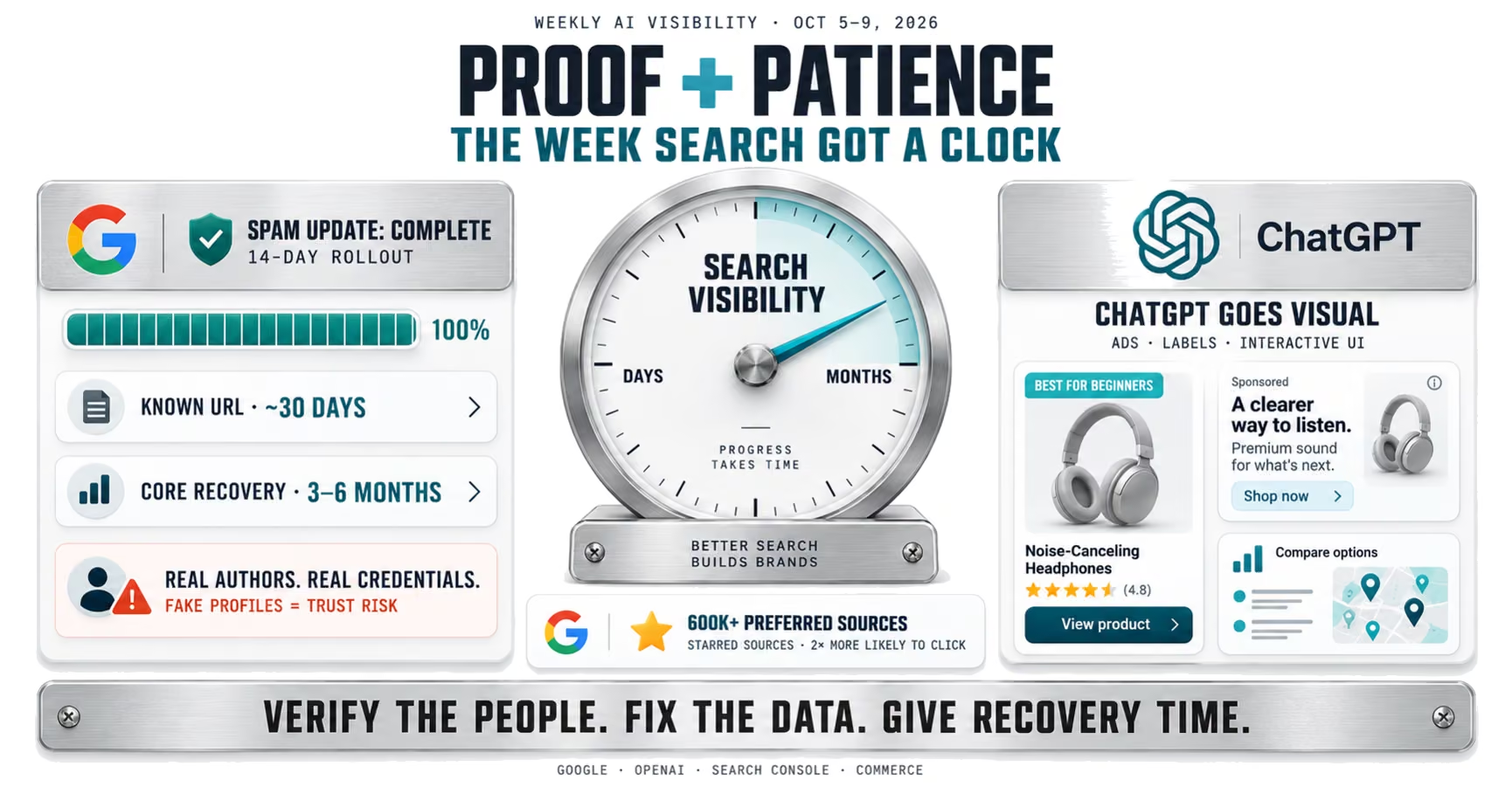

Google's spam update finished after 14 days, Google published crawl and recovery timelines, and ChatGPT added visual ads, labels and a new interface.
Read now →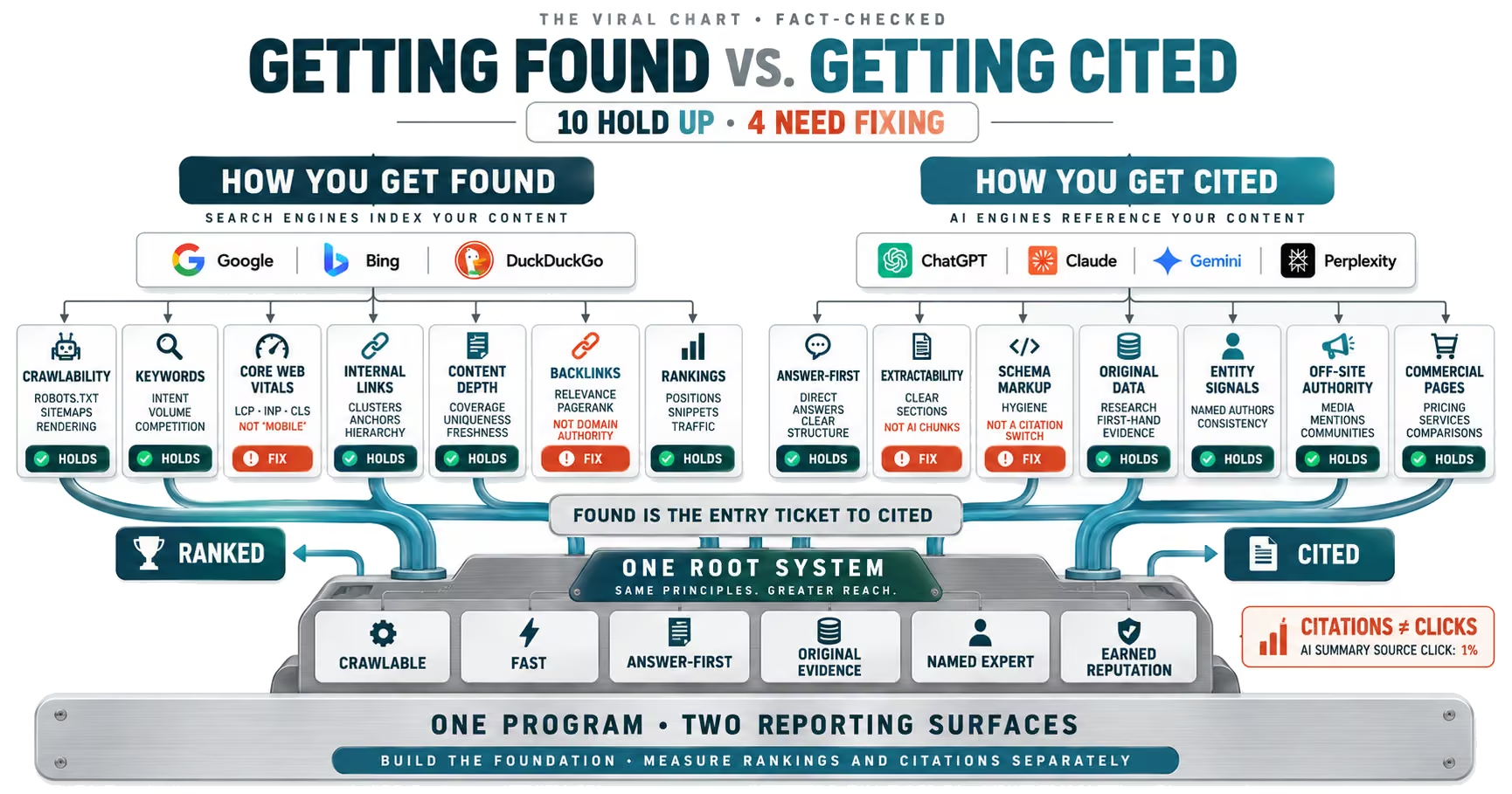
A viral chart splits SEO and AI citations into 14 boxes. We checked each one against Google, OpenAI and the research. Ten hold up. Four need fixing.
Read now →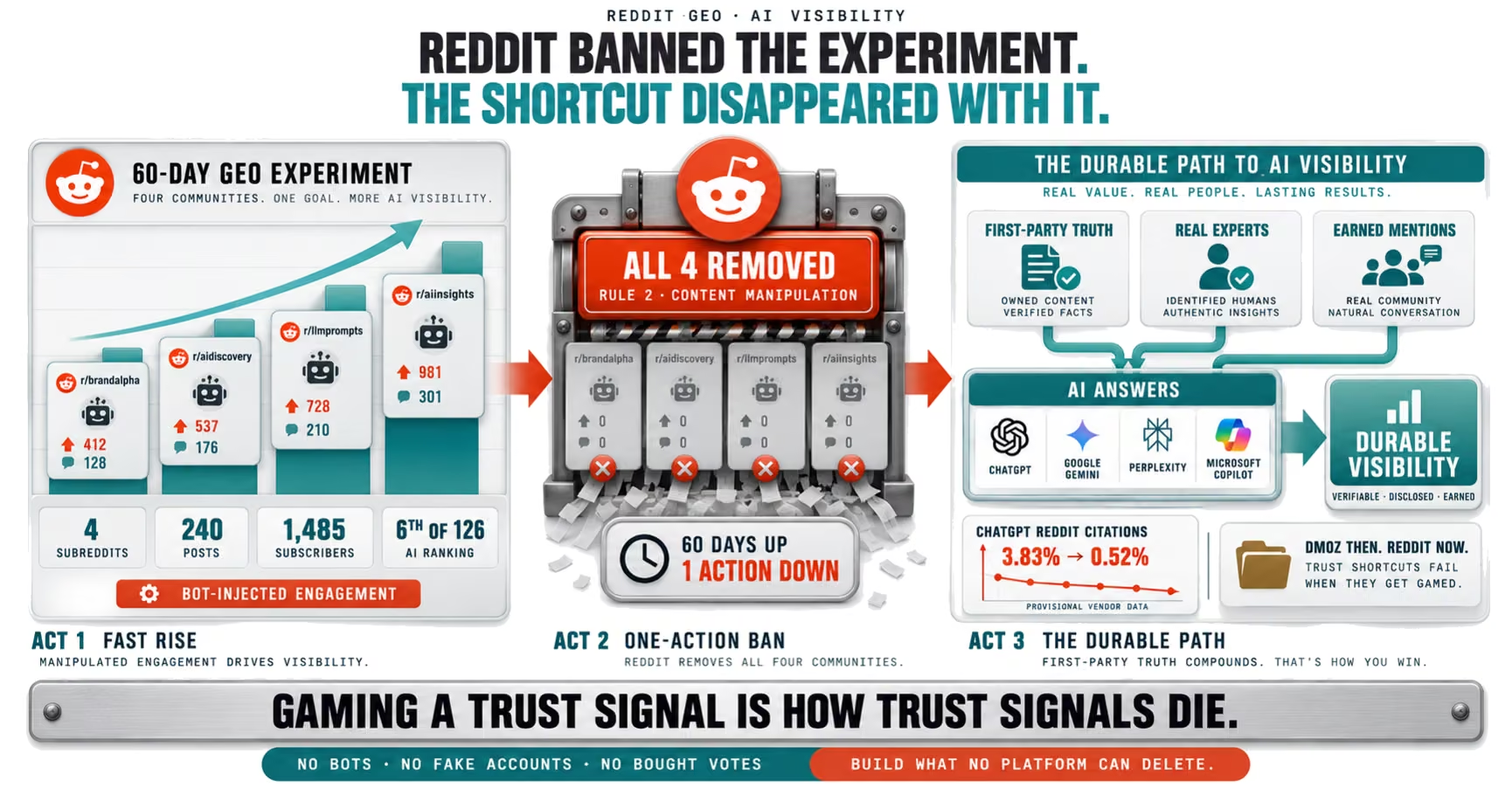
A Reddit GEO test built on injected engagement was banned in 60 days. Here is why gaming AI citations fails, and what durable AI visibility takes.
Read now →An audit takes 15 minutes of your time and gives you a prioritized 30‑60‑90 plan, whether or not we ever work together.