





 Preferred source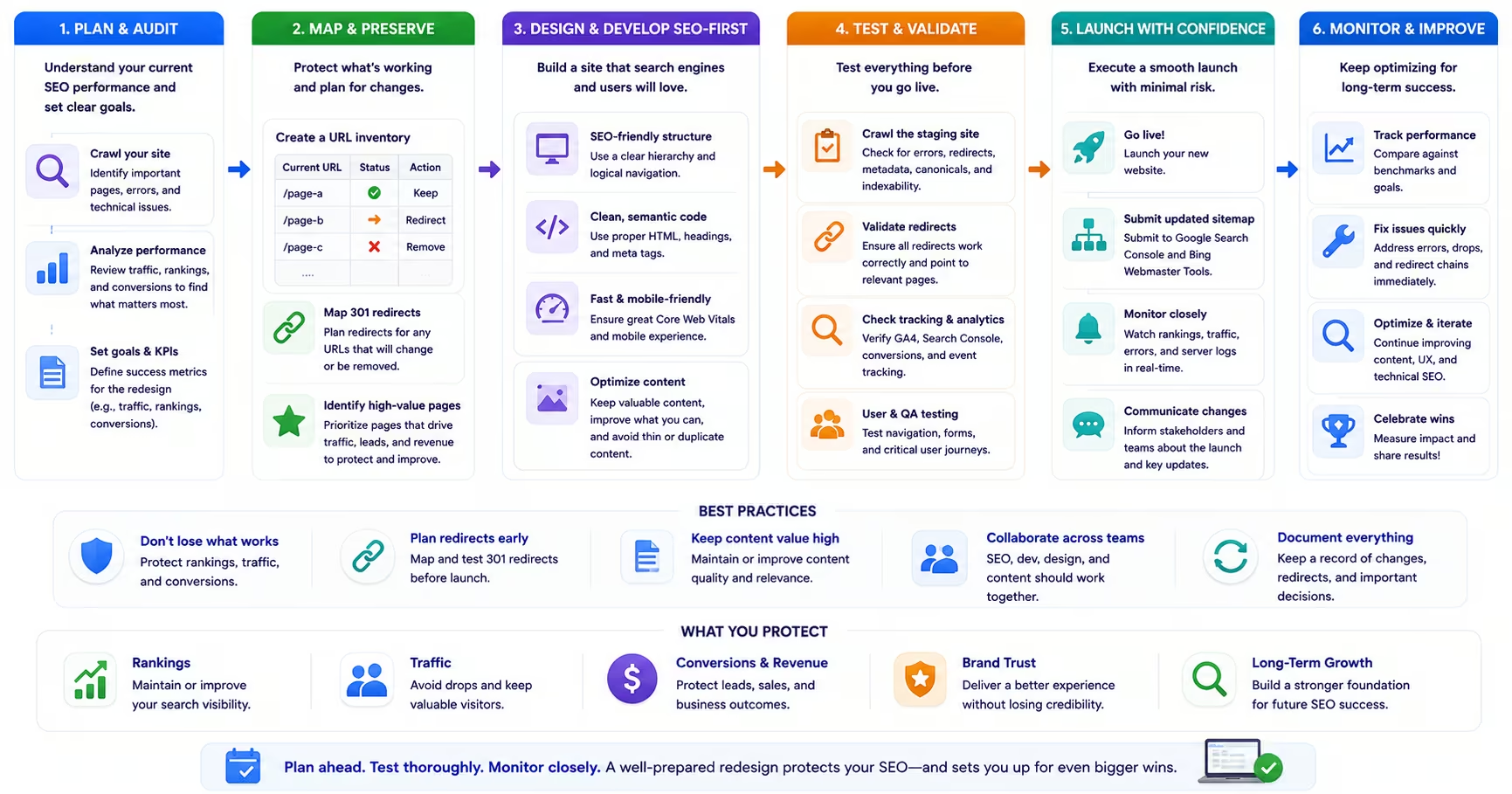
A website redesign is one of the highest-risk events in a company's digital marketing lifecycle. Done correctly, it can meaningfully improve organic performance, conversion rates, and brand credibility simultaneously. Done without adequate SEO planning, it can erase years of ranking progress within weeks of launch. Search Engine Journal's study of 892 domain migrations found that it took an average of 523 days for organic traffic to return to pre-migration levels, and 17 percent of migrations never recovered even after 1,000 days. Those losses are often preventable, but recovering from them after the fact is far harder than avoiding them in the first place.
The fundamental challenge is that website redesigns touch every element that search engines use to evaluate and rank your site: URL structures, page content, internal link architecture, metadata, structured data, site speed, and crawlability. Website migration SEO exists to protect that equity through the transition. Change too many of those elements at once without a clear migration plan, and you hand search engines a version of your site they do not recognize. They respond by reducing rankings while they re-evaluate, and that re-evaluation period can last months. This article covers the steps that protect your organic performance through a redesign and, ideally, improve it.
Audit Before You Redesign
The first step in any redesign SEO process is documenting your current site's performance before a single design decision is made. This baseline audit serves two purposes: it tells you what you need to protect, and it identifies existing SEO problems that the redesign should fix rather than perpetuate. Redesigning a site that has crawlability issues, thin content, or poor Core Web Vitals without addressing those problems in the new design just produces a new version of the same problems.
Your baseline audit should capture your top-performing pages by organic traffic, your highest-ranking keywords and which pages own those rankings, your current backlink profile with emphasis on the URLs that have earned the most external links, your Core Web Vitals scores, and your full crawl profile including any existing errors, redirect chains, or canonical issues. Export this data and preserve it before any development work begins. It becomes the benchmark against which you measure post-launch performance and the priority list for redirect mapping.
URL Structure and Redirect Mapping
If your redesign changes any URL structures, comprehensive 301 redirect mapping is not optional. Our Website Migration SEO Checklist walks through redirect mapping, content parity, and launch QA in detail. Redirects preserve the link equity that external sites have built into your old URLs over months or years of acquisition. Without redirects, that equity is lost, and pages that ranked on the strength of their backlink profiles will lose rankings immediately.
Build your redirect map by cross-referencing your old URL inventory against the new URL structure and mapping each old URL to its closest equivalent on the new site. Avoid redirect chains longer than two hops; search engine crawlers treat deep chains as a signal of poor site maintenance and may stop following them before reaching the destination. Test every redirect in your staging environment before launch, and verify that all redirects resolve correctly within 24 hours of the production launch.
Content Migration and Preservation
Content is consistently treated as an afterthought in redesign projects, often finalized in parallel with development or handed off as a post-launch task. This is one of the most common causes of post-redesign traffic loss. If pages that currently rank are revised, shortened, or removed without equivalent content on the new site, their rankings go with them.
Before the redesign begins, audit your existing content against your organic performance data and classify each page. High-traffic, high-ranking pages should be preserved with at least equivalent content depth and quality, with only the design and technical improvements applied. Underperforming pages with low traffic and no backlink equity are candidates for consolidation or removal, which can improve crawl efficiency and reduce thin-content signals on the new site. Pages with strong backlinks but thin content need content enhancement before migration.
Technical SEO Requirements for the New Site
Your development team needs a clear SEO technical specification before the new site is built, not after. Web design and development projects go smoother when that spec is part of the brief from day one. This specification should cover the required XML sitemap format and update frequency, the robots.txt configuration, the canonical tag implementation on all page types, the structured data and schema requirements for each page template, the Core Web Vitals performance targets, the HTTPS configuration, and the mobile responsiveness standards. Implementing these requirements retroactively after development is complete is significantly more expensive and time-consuming than building them in from the start.
Pay particular attention to schema markup in the new design. CMS template changes frequently break existing schema implementations by removing JSON-LD blocks that were hardcoded in templates rather than managed through a schema plugin. See why structured data matters for AI search for what to preserve and validate.
Staging Environment Review
Before any page of the new site goes live, run a full technical crawl of the staging environment using your SEO audit tool of choice. The crawl will surface broken internal links, missing metadata, incorrect canonical tags, JavaScript rendering issues, missing redirects, and schema errors before they affect live rankings. This staging crawl should happen at least two weeks before the planned launch date to allow sufficient time to address identified issues without compressing the launch timeline.
Also verify that the staging environment is properly blocked from search engine indexation. Staging sites that are accidentally indexed create duplicate content problems that can persist long after launch, because search engines may continue to reference the staging URLs in their index even after the production site is live.
Post-Launch Monitoring
The 90 days following a redesign launch require more intensive monitoring than your normal SEO review cadence. Check Google Search Console daily in the first two weeks for coverage errors, crawl anomalies, and any decline in indexed page count. Monitor your Core Web Vitals report for new performance problems introduced by the new design. Watch your organic traffic and ranking trends for your highest-priority pages closely, and compare against your pre-launch baseline data to identify any pages that have lost rankings and require immediate attention.
If significant ranking losses appear within the first four weeks, the most common causes are missing or incorrect redirects, content that was substantially shortened or altered during migration, and technical issues in the new site that are preventing pages from being correctly indexed. Having your baseline audit data from Step 1 makes diagnosing and resolving these issues significantly faster.
Frequently Asked Questions
Common questions about GEO, SEO, and AI-driven search visibility.
SEO planning should begin at project initiation, before design or development work starts, because the decisions that create migration risk get made early: information architecture, URL structure, template design, and platform selection all harden long before anyone thinks to loop in SEO. At minimum, the baseline audit and content inventory should be complete before the first design wireframe is reviewed, so the pages that earn your traffic are identified before anything is scheduled for consolidation or removal. For larger sites, four to six months of SEO preparation before launch is not excessive once you account for crawling the existing site, mapping redirects, preserving high-value content, and testing in staging. The pattern behind most failed migrations is the same: SEO was brought in weeks before launch to bless decisions that were already irreversible.
Every URL that has earned organic traffic or external backlinks should be redirected to its closest equivalent on the new site, one to one, because those URLs hold the accumulated equity the redesign needs to inherit. URLs with no traffic and no backlinks are lower priority, but redirecting them still prevents waves of 404 errors that waste crawl capacity and degrade user experience for anyone arriving through old bookmarks or stale links. The redirect map should be built from data rather than memory: crawl the existing site, pull every URL that received organic entrances from analytics, and pull every URL with referring domains from your backlink data, then reconcile the three lists. Avoid the shortcut of pointing everything at the homepage, as those blanket redirects are treated like soft 404s and pass little value. When in doubt about an individual URL, redirect it.
Not necessarily, and the distinction is preparation rather than luck. Sites that complete comprehensive SEO preparation before launch, meaning a full content inventory, a tested one-to-one redirect map, preserved on-page elements for top-performing pages, and a staged technical review, frequently maintain their organic performance through launch and improve on it afterward, since a well-executed redesign usually ships better site structure and faster templates. Some short-term movement is normal even in clean migrations while search engines recrawl and re-evaluate the new structure, typically settling within a few weeks. The lasting losses that give redesigns their reputation trace back to identifiable skipped steps: redirects written from memory, high-traffic pages consolidated without checking what they earned, or titles and content rewritten wholesale on pages that ranked. Traffic loss is a symptom of process debt, not an inherent cost of redesigning.
Migration needs both teams working from a shared plan from the start, with ownership split by artifact rather than by phase. The SEO team should own the technical specification: the content inventory, the redirect map, the on-page elements that must be preserved, and the post-launch validation checklist. The development team should own implementation: executing redirects at the server level, preserving rendering and performance budgets, and flagging any platform constraint that makes part of the specification impractical so it can be resolved together before launch rather than discovered after. The failure mode to avoid is treating the workstreams as sequential, where development finishes and SEO inspects the result, because by then the expensive mistakes are live. A standing check-in between the two teams through the build, plus a joint launch-day checklist, costs little and prevents the majority of migration incidents.
Work the diagnosis in order of likelihood. First, check Search Console for indexing errors and crawl anomalies, because a spike in 404s or excluded pages usually points straight at the problem. Second, verify that redirects from old URLs are actually functioning as single-hop 301s, since redirect chains, loops, or rules that quietly broke in a deploy are the most common culprit. Third, compare the content on declining pages against their pre-migration versions, looking for shortened copy, removed headings, changed titles, or lost internal links, because content changes shipped alongside a migration are routinely mistaken for migration damage. These three checks resolve the majority of post-launch ranking losses. If nothing surfaces, run a crawl comparison between the archived old site and the new one to diff every technical attribute at scale. Speed matters here: issues corrected within weeks recover far faster than those left for a quarter.
A redesign does not reset domain authority unless you change your domain name. Authority lives in the accumulated backlinks, brand signals, and history attached to your domain, and if the domain stays the same while redirects correctly connect old URLs to their new equivalents, that equity carries through the transition largely intact. What a redesign can do is disrupt how effectively authority flows internally: if the new site drops or reshuffles internal links, pages that once benefited from strong linking can weaken even though the domain itself is fine. Changing the domain name is the highest-risk scenario, because every external link then depends on redirects to pass value and search engines must re-learn the entity from scratch; it demands additional preparation, including a change of address notice in Search Console and a longer stabilization window. If the domain change is optional, weigh it separately from the redesign rather than bundling the two risks.
Recovery timelines vary with the severity of the damage, how quickly it is identified and corrected, and the authority of the domain absorbing the mistake. Minor issues caught quickly, such as a batch of broken redirects fixed within days, often resolve within four to six weeks as affected pages are recrawled. Significant failures left running for months, such as content losses or redirect gaps on high-authority pages, can take six months or more to claw back, and some late-discovered losses never fully recover because competitors absorbed the displaced rankings in the meantime. Two factors bend the curve in your favor. Speed of correction matters most, which is why daily monitoring in the first weeks after launch pays for itself. And stronger domains rebound faster, because search engines re-evaluate well-established sites more quickly. The honest framing: recovery is always slower than prevention, usually by an order of magnitude.
Sources
- Google Search Central: Site moves with URL changes (opens in a new tab)
- Google Search Central: Redirects and Google Search (opens in a new tab)
- Google Search Console: Change of Address tool (opens in a new tab)
- Google Search Central: Sitemaps (opens in a new tab)
- Search Engine Journal: How long should an SEO migration take (892-migration study) (opens in a new tab)