

Your AI Isn't Bad at Writing. Your Prompt Is.
 Preferred source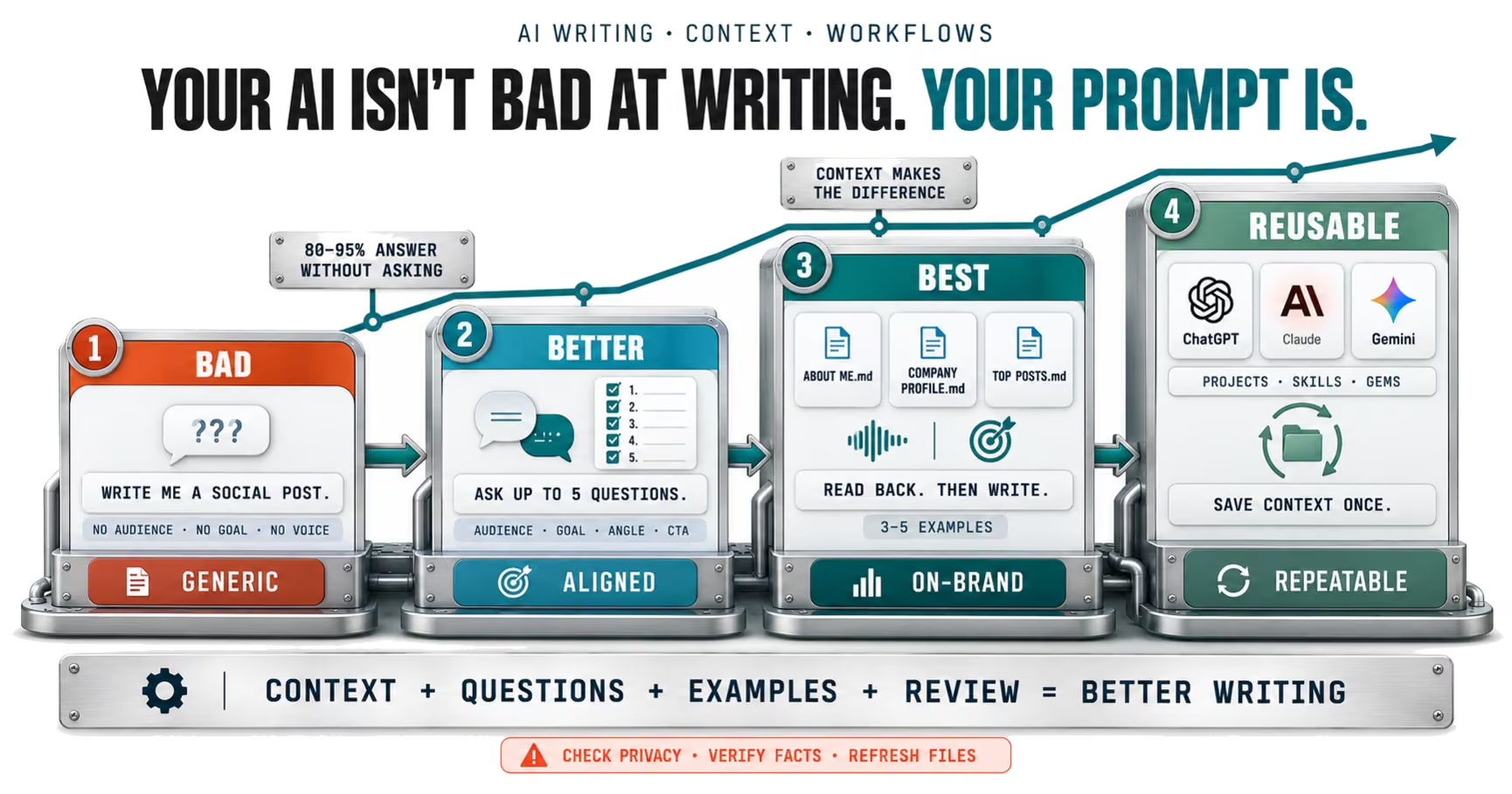
Why the same AI gives two people different answers
Two people open the same model on the same day and ask for a LinkedIn post. One gets something generic enough to post for any company on earth. The other gets a draft that sounds like them, speaks to their buyers and ends with the right call to action. The model did not change. The context did.
That is the whole idea behind the meme, and it matches what the AI companies themselves say. Anthropic's prompting best practices put it plainly.
Think of Claude as a brilliant but new employee who lacks context on your norms and workflows. The more precisely you explain what you want, the better the result.
The same page offers a "golden rule" that is worth taping to your monitor: show your prompt to a colleague with minimal context and ask them to follow it. If they would be confused, the model will be too. This matters more every year, because far more people are now handing work to these tools. Pew's 2026 survey found about half of U.S. adults use AI chatbots, up from a third in 2024.
Level one: the bad prompt, and everything it forces the model to guess
"Write me a brief social media post" is not a bad request because it is short. It is bad because every important decision is left to the model. Here is what it has to guess.
| Missing detail | Model's guess |
|---|---|
| Platform | Something generic, often all of them |
| Audience | Everyone, which means no one |
| Goal | Engagement, vaguely |
| Voice | Upbeat, polished, anonymous |
| Topic depth | Surface level |
| Call to action | A stock question |
The problem is not that the model guesses. It is that it guesses confidently and does not tell you. Researchers at Cornell published a study in May 2026 titled Knowing but Not Showing, which found models recognized ambiguous questions with roughly 60 to 80% accuracy when asked to judge them, yet 80 to 95% of their responses simply answered rather than asking for clarification. Claude models asked most often, at around 5% of ambiguous questions without added context.
The study found something even more relevant to the meme: adding retrieved context improved answer accuracy but further reduced how often models asked for clarification. In other words, handing the model more material makes it more confident, not more curious. That is exactly why the best prompt in the meme does both.
Level two: the better prompt, making the model interview you
The better prompt adds two instructions: "Don't start yet" and "ask me clarifying questions first so we align on my industry, my target audience, and the key message." This flips the default. Instead of guessing, the model has to surface what it does not know.
Research on AI agents shows why this works when done well. A study submitted in March 2026, Ask or Assume?, tested agents on deliberately underspecified software tasks and found a setup that asked for missing information when uncertain resolved 69.4% of tasks, significantly outperforming a standard agent that proceeded on its own. The better systems asked sparingly on simple tasks and proactively on complex ones.
That last point is the catch. OpenAI's current prompt guidance for its models says to "prefer making progress over stopping for clarification when the request is already clear enough to attempt," and to ask only when missing information would materially change the answer or create meaningful risk. Clarifying questions are a tool, not a ritual.
So make the better prompt a little smarter. Tell the model how many questions you want, and which kind.
- Cap the questions. Ask for no more than five, most important first, so you are not buried in a survey.
- Ask for questions that change the output. Audience, goal, angle and call to action matter; font preferences do not.
- Let it state assumptions. For anything it does not ask about, have it list the assumption it made so you can correct it.
- Skip the interview when you already know. If your prompt covers audience, goal and format, tell it to proceed.
Level three: the best prompt, bringing your own context
The best prompt in the meme uploads three files before it asks anything: ABOUT ME.md, COMPANY PROFILE.md and TOP POSTS.md. Then it tells the model to read them fully, not to start writing, and to work through the hook, structure and call to action together.
Each file maps onto advice the AI companies publish. Google's Gemini guidance says strong prompts cover persona, task, context and format, and its tips for custom Gems tell you to "provide as much background as possible."
| File | What it adds | Official guidance |
|---|---|---|
| ABOUT ME | Your voice, expertise, opinions | Context and motivation |
| COMPANY PROFILE | Audience, offer, positioning | Background and constraints |
| TOP POSTS | Proven examples of what works | Three to five examples |
The examples file is the most powerful of the three. Anthropic's documentation calls examples "one of the most reliable ways to steer Claude's output format, tone, and structure," and recommends three to five examples that are relevant, diverse and clearly marked. Anthropic's prompting blog adds that modern models pay close attention to the details of examples, which cuts both ways, as we will see.
Placement matters too. For long inputs, Anthropic recommends putting documents at the top of the prompt, above your instructions, and says queries at the end "can improve response quality by up to 30 percent in tests, especially with complex, multidocument inputs." It also suggests asking the model to quote the relevant parts of long documents before doing the task, which is a more reliable version of the meme's "read the uploaded files completely."
Finally, explain why. Anthropic's guidance shows that "never use ellipses" works less well than explaining the output will be read aloud by a text-to-speech engine that cannot pronounce them. The model generalizes from the reason. "Keep it under 150 words because my audience reads on mobile" beats "keep it short."
What the meme gets right, and what it leaves out
The meme is a good teaching tool. It is also a single image, so a few important things did not fit. None of these are reasons to avoid the best prompt. They are what separates using it from using it well.
- "Read completely" is not a guarantee. The model processes what is in its context, but long files still dilute focus. Ask it to summarize the key points of each file back to you before it writes.
- Examples get copied. Because models attend closely to examples, your top posts can come back as near-duplicates. Tell it to match the voice and structure, not reuse phrases.
- Context files go stale. An About Me from last year describes last year's you. Put a review date at the top of each file.
- Uploads have privacy settings. What you share may be used for training depending on your plan and settings, so check before uploading client or company data.
- Confident is not correct. Even with perfect context, check every fact, figure and claim before posting. Anthropic recommends explicitly allowing the model to say when it does not know.
- The model in the screenshot will change. The meme shows Opus 4.6. OpenAI advises starting from a fresh baseline when you move to a new model rather than carrying every old instruction over.
On privacy specifically, the rules differ by product and plan. OpenAI says it does not use content from ChatGPT Business, Enterprise or Edu workspaces for training by default, while Free and Plus users must turn off the "Improve the model for everyone" setting to opt out. Anthropic says consumer Claude chats are used for training only if you choose to allow it, and incognito chats are never used for training. Your company's policy should decide what goes in those files, not convenience.
Level four: stop re-uploading the same files
Here is the upgrade the meme hints at but does not show. If you are uploading ABOUT ME.md every time you write a post, you are doing manual work the tools now do for you.
All three major assistants let you save context once and reuse it. ChatGPT Projects keep related chats, files and instructions together, with up to 25 files per project on Plus and 40 on business plans. Claude Skills are "folders of instructions, scripts, and resources that Claude loads dynamically," and they only load when relevant, so they do not crowd every conversation. Google's Gems let you attach knowledge files, and Google says Gems will transition to skills starting in November 2026 for personal accounts, carrying supported files across automatically.
This is how we work at Silverback. Our blog posts, including this one, are drafted from a written spec file that defines the format, sourcing rules and voice, and our weekly roundup runs from a saved skill. The skill holds the rules that do not change: source only primary and trade publications, credit vendors by name, never use em dashes. What changes each time goes in the prompt: the topic, the date, the angle. That split is the whole trick.
| Saved context | The prompt |
|---|---|
| Voice and style rules | Today's topic |
| Company and audience profile | The specific goal |
| Examples of great past work | Deadline or date |
| Sourcing and fact rules | Anything unusual this time |
If you want to see what longer-lived system prompts look like in practice, our AI SEO system prompts resource is a working example.
A best-prompt template you can steal
Here is the meme's best prompt, rebuilt with the gaps filled. Adapt the bracketed parts.
- Attach your context: ABOUT ME, COMPANY PROFILE and three to five TOP POSTS, or open the Project, Skill or Gem that holds them.
- State the task and the reason: "I want a LinkedIn post about [topic] because [goal, for example booking discovery calls from operations leaders]."
- Ask for a read-back: "Before writing, summarize in three bullets what you learned about my voice, audience and best-performing post structure."
- Ask for focused questions: "Then ask me up to five questions that would change the hook, structure or call to action. For anything you do not ask about, state your assumption."
- Set the guardrails: "Match my voice, but do not reuse phrases from my examples. Do not invent statistics or quotes; flag anything you are unsure of."
- Set the format: "Keep it under [length], short paragraphs for mobile, and end with [type of call to action]."
- Iterate: "Give me two hook options before writing the full draft."
That template takes about a minute longer than the bad prompt. It usually saves far more than a minute of rewriting.
Which level should you actually use?
The honest answer is that it depends on the task, and part of getting good with AI is knowing when not to overdo it.
| Task | Best level | Why |
|---|---|---|
| Quick rewrite of your own text | Level one or two | The context is already in the text |
| One-off post on a new topic | Level two | Questions fill the gaps fast |
| Anything in your brand voice | Level three | Examples carry the voice |
| Work you repeat weekly | Level four | Save context once, reuse forever |
| Client or regulated content | Level three plus review | Accuracy and privacy matter most |
We have written before about the limits of prompts on their own, including whether one prompt can replace an agency and what a realistic AI tool stack looks like in 2026. The short version: good prompts make good people faster. They do not replace judgment about what is true and what is worth saying.
- Would a smart new hire understand this prompt without asking me anything?
- Have I told the AI who this is for and what it should achieve?
- Have I shown it examples of what good looks like?
- Am I allowed to upload this information under my plan and company policy?
- Who is checking the facts before this goes out?
What to do this week
- Write your three context files. One page each for About Me and Company Profile, plus three to five of your best-performing posts with a line on why each worked.
- Save them once. Put them in a ChatGPT Project, a Claude Skill or Project, or a Gemini Gem so you stop re-uploading.
- Add a read-back step. Have the model summarize your files before it writes, so you can catch misunderstandings early.
- Cap and focus the questions. Ask for up to five questions that would change the output, plus stated assumptions for the rest.
- Check your data settings. Confirm whether your plan trains on your content, and use business plans or incognito modes where appropriate.
- Review before you post. Verify every fact and figure, and put a review date on each context file.
The meme's real lesson is not about clever wording. It is that AI does its best work when you treat it like a capable new teammate: give it the background, show it what good looks like, invite its questions, and check its work. Do that once, save it, and every prompt after gets easier.
Frequently Asked Questions
Common questions about GEO, SEO, and AI-driven search visibility.
A good writing prompt tells the model who it is writing for, what the piece must achieve, the context behind it, and the format you want. Google's Gemini guidance calls these persona, task, context and format, and Anthropic advises explaining the reason behind each instruction. Adding a few examples of writing you like is one of the most reliable ways to steer tone and structure.
Usually yes when your request is open-ended. A Cornell study published in May 2026 found models often recognize ambiguity but answer without asking 80 to 95% of the time, so you need to request questions explicitly. OpenAI's 2026 guidance adds a limit: when the task is already clear, ask the model to proceed rather than stop for questions that would not change the result.
Start with three: a short profile of you and your voice, a profile of your company and audience, and three to five examples of past work that performed well. Anthropic's documentation recommends three to five examples for best results and placing long documents above your request. Keep the files current and tell the model to match your voice rather than reuse lines.
It depends on your plan and settings. OpenAI says it does not use content from ChatGPT Business, Enterprise or Edu workspaces for training by default, while Free and Plus users must turn off the Improve the model for everyone setting to opt out. Anthropic says consumer Claude chats are used for training only if you allow it, and incognito chats are never used. Never upload anything your company policy prohibits.
All three let you save context so you do not re-upload it each time. ChatGPT Projects keep chats, files and instructions together, with up to 25 files on Plus and 40 on business plans. Claude Skills are folders of instructions and resources that load only when relevant, and Google says Gemini Gems will transition to skills starting in November 2026 for personal accounts.
Because the model only knows what is in the prompt and any files or memory attached to it. Anthropic compares Claude to a brilliant new employee who lacks context on your norms and workflows, and says the more precisely you explain what you want, the better the result. Two people with the same model but different context will get very different work.
Sources
- Claude Platform Docs: Prompting best practices (opens in a new tab)
- Claude Blog: Prompt engineering best practices (opens in a new tab)
- OpenAI API Docs: Prompt guidance (opens in a new tab)
- Google Workspace: Writing effective prompts (opens in a new tab)
- Gemini Apps Help: Tips for creating custom Gems (opens in a new tab)
- Gemini Apps Help: About the transition from Gems to skills (opens in a new tab)
- OpenAI Help Center: Projects in ChatGPT (opens in a new tab)
- Claude Help Center: What are skills? (opens in a new tab)
- arXiv: Knowing but Not Showing, LLMs recognize ambiguity but rarely ask clarifying questions (opens in a new tab)
- arXiv: Ask or Assume? Uncertainty-aware clarification-seeking in coding agents (opens in a new tab)
- Anthropic Privacy Center: Is my data used for model training? (opens in a new tab)
- OpenAI Help Center: Data controls in ChatGPT (opens in a new tab)
- Pew Research Center: Americans and AI 2026 (opens in a new tab)