

ChatGPT's Business Hub Is Not Search Console, but You Should Claim It
 Preferred source
Why everyone is calling it ChatGPT's Search Console
The comparison is understandable. For two years, the only way to know how often ChatGPT mentioned your brand was to run prompts yourself or pay for a panel. Now the platform reports it directly.
OpenAI described the launch this way, as quoted by Search Engine Roundtable:
"We're introducing Businesses in ChatGPT in beta, giving businesses a new way to connect with the 1.2 billion people who use ChatGPT each week."
The same announcement says that through Business Hub, businesses "can claim their business, manage their information, and see insights on how people engage with them on ChatGPT." Search Engine Roundtable had reported a week earlier that the feature was in testing behind a "Claim your business in ChatGPT" banner, so the launch came quickly. We flagged it in our November 2 to 6 roundup.
The excitement on LinkedIn is mostly right about the headline and mostly wrong about the details. It is a measurement tool, a profile manager and the front door to a new agent product. It is not a diagnostics tool, and it does not tell you how to show up more often.
What Business Hub shows you
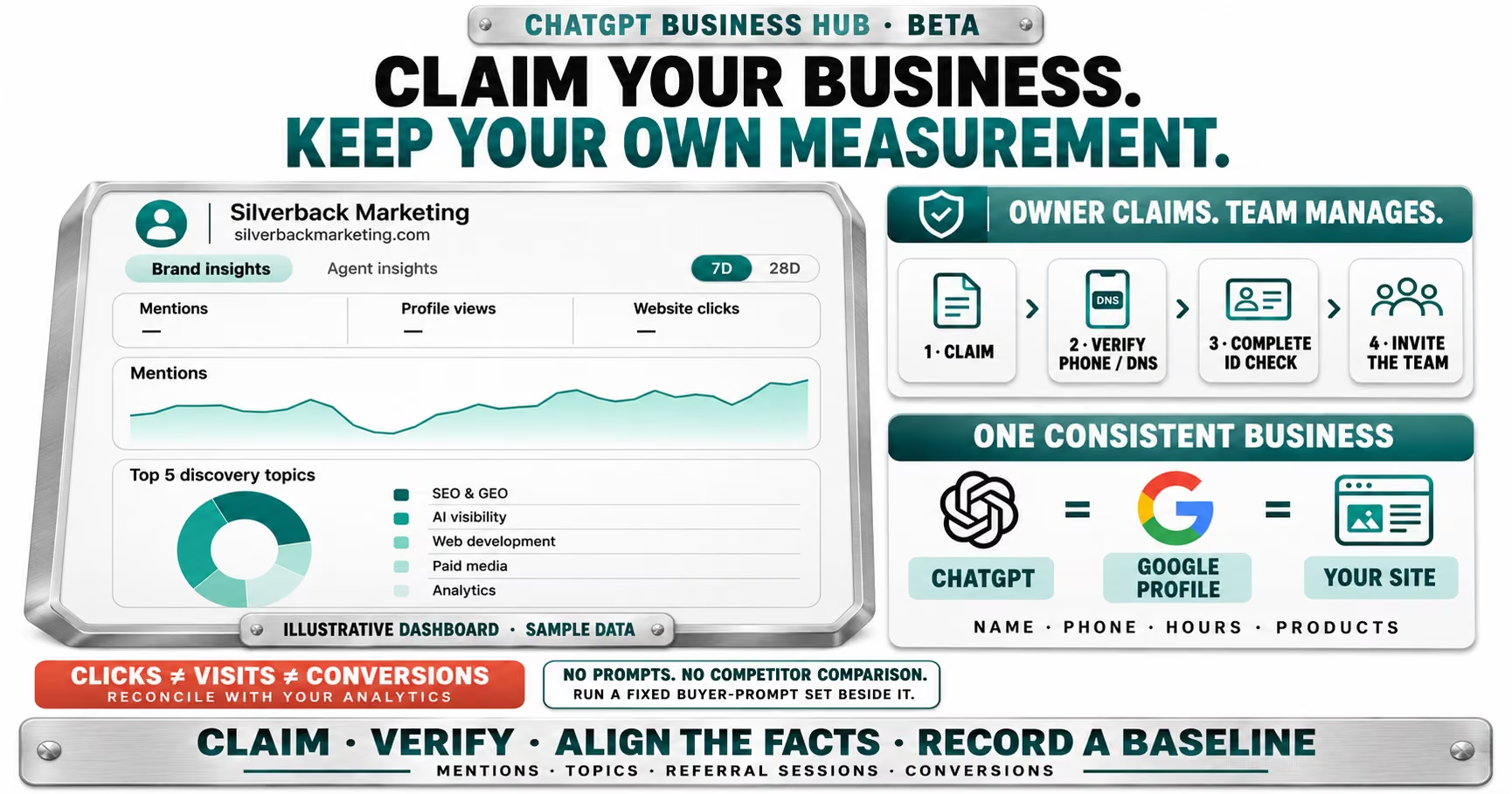
The Brand insights tab in screenshots published by Search Engine Roundtable has four parts, with a toggle between 7 days and 28 days.
| Metric | What it counts | Watch for |
|---|---|---|
| Mentions | Times ChatGPT mentions your business | No prompt detail |
| Profile views | Views of your ChatGPT business profile | New surface, no baseline |
| Website clicks | Recorded clicks on links to your site | Not confirmed visits |
| Discovery topics | Top five themes where your site is cited | Topics, not queries |
OpenAI's announcement says the insights show the "number of mentions and website clicks a business receives," and that businesses "can also explore discovery topics, common themes across conversations where their website is cited." OpenAI positions these as a way to "understand how they're represented and find opportunities to improve the information they share."
The tooltip on clicks is the most useful sentence in the product. It reads: "Number of recorded clicks on links to your website in ChatGPT. Clicks don't confirm website visits or conversions." In other words, a click in Business Hub is an event inside ChatGPT, not a session in your analytics. Expect the two numbers to differ, sometimes by a lot.
Data needs volume to appear. In the empty dashboard Search Engine Roundtable published, the mentions chart reads, "Once there are enough mentions, you'll see trends here," and discovery topics wait for "enough mentions" too. Smaller businesses may see dashes for a while.
What it leaves out
Before launch, the person who first spotted the tool told Search Engine Roundtable that it shows no prompt data, no user data and no competitor benchmark or ranking. Nothing in the launch coverage suggests that changed.
That limits what you can learn from it:
- A rise in mentions will not tell you which questions drove it.
- A drop will not tell you which competitor took your place.
- Discovery topics are grouped themes, so you cannot map them to the exact wording buyers use.
- There is no crawl, indexing or technical report, so you still need your own logs to see how OpenAI's crawlers reach your site.
- It is a beta. OpenAI labels the launch a beta, so metric definitions and access may change without notice.
- Mentions are OpenAI's count. The launch coverage does not explain what counts as a mention, so treat early trends as directional.
- Clicks are not traffic. OpenAI says clicks do not confirm visits or conversions, so reconcile them with referral sessions before reporting them.
- Small samples stay hidden. Trends and topics only appear once there are enough mentions.
How Google's AI reporting compares
One viral post this week claimed that Google "still doesn't tell you how often AI Overviews or AI Mode mention your business." That is partly true. Google's generative AI performance report, which Google says rolled out to all websites worldwide on August 31, 2026, shows impressions for AI Overviews and AI Mode by page, country, date and device.
The difference is in the definition. Google counts an impression as "how many times links to your site were shown to a user in a generative AI feature." A brand named in an AI answer without a link to your site does not register. ChatGPT counts mentions of the business itself, linked or not, which is closer to what brand teams want to know.
Neither platform gives you the full picture. Google's Gary Illyes said in early November that Google doesn't have anything to announce yet on more AI click data, and AI Overview and AI Mode clicks still sit inside the standard performance report. ChatGPT gives you mentions and clicks but no queries. If you want to know which buyer questions name you on each platform, you still have to ask them.
| Question | Business Hub | Search Console |
|---|---|---|
| Brand mentions | Yes | No |
| Link impressions | No | Yes |
| Clicks | Recorded clicks | Bundled with web |
| Queries or prompts | No | Web queries only |
| Competitor data | No | No |
How to set up your business in ChatGPT, step by step
The flow below follows the screens Search Engine Roundtable published when it claimed its own business on launch day. OpenAI's help article on setting up your business is the official reference, and because this is a beta, screens may change.
Step one: decide whose account owns it
Claim from a ChatGPT account tied to a company email address that someone senior controls. The review decision goes to that account's email, so a departing employee's personal login is the wrong place for it.
Step two: open Business Hub and search for your business
Go to Business Hub and search for your business name. The search returns existing listings with addresses, plus an option to create a new one. Pick the listing that matches your legal name and address rather than creating a duplicate.
Step three: start the claim
The claim screen promises three things: track how often your business is mentioned, add products and keep your information current, and let a business agent answer questions "with context you control." It also warns that you will need to verify you are authorized to represent the business.
Step four: verify ownership
Choose a call or text to the main business number, or a DNS record on your domain. If the main line goes to a phone tree or answering service, DNS is usually faster. Search Engine Roundtable verified through DNS.
Step five: wait for the review
The status page moves through "Claim received," "Review in progress" and "Decision reached," and OpenAI says it will email its decision or ask for more information. You can withdraw the claim during the review.
Step six: verify your identity
Once approved, the dashboard asks for "a government-issued ID," which it says is "required before editing business info or publishing your business agent." Plan for the owner or an officer to do this step.
Step seven: complete the profile
Use Edit business info to match your Google Business Profile exactly, add products in the Products section if you sell online, and confirm the Website access panel shows your domain as confirmed.
Step eight: invite the rest of the team
The dashboard has an Invite option, so the business keeps ownership and the agency or in-house marketers get access. An agency should not claim a client's business under its own account.
Step nine: hold off on the agent until the facts are clean
Agent builder asks you to review the agent's guidelines and business context before publishing. Business Agents start with eligible ecommerce and online service businesses in the U.S., so the option may not appear for everyone.
Search Engine Roundtable's Barry Schwartz flagged the risk of people hijacking business listings. Claiming early is the simplest protection, the same lesson businesses learned with Google listings years ago.
Business Agents are where the product is heading
The second half of the launch is Business Agents. OpenAI said it is "adding a powerful new way for businesses to interact with users via Business Agents, starting with eligible ecommerce and online service businesses in the U.S." Customers "can choose to start a conversation with the business to explore its offerings and ask follow-up questions."
The dashboard already points toward paid distribution. A "Reach more people" card invites businesses to "promote your business agent across ChatGPT so you can chat with more potential customers." OpenAI began testing Sponsored Agents in ChatGPT ads in September, where a user who clicks an ad can start a conversation with a brand's agent. OpenAI has not said how the two products connect, but the direction is easy to read.
Why it matters. An agent that answers product questions is only as good as the information behind it. If your product data, policies and pricing are inconsistent across your site, your feeds and your profiles, the agent will repeat the inconsistency to buyers at the moment they decide.
Is this the end of Google Business Profile?
No. Google Business Profile still feeds Google's local results, including the AI Overview local packs Google is testing. Search Engine Roundtable reported on November 10 that one test version uses Business Profile data while stripping out reviews, photos and action buttons, which would cut calls and website visits. That is a reason to watch Google closely, not to walk away from it.
What has changed is that "claim your business" now has two homes that matter. Keep the facts identical in both: name, address, phone, hours, categories and the website URL. AI systems compare sources, and a mismatch between your Google profile, your ChatGPT profile and your site gives them a reason to hedge.
Timing adds pressure. Google began the November 2026 core update on the same day. Google says the rollout may take up to two weeks, and you can follow it on the Search status dashboard. Export your Search Console data now, so you can separate ranking movement from anything you change in ChatGPT.
The fundamentals still decide who gets mentioned
Claiming a profile does not make ChatGPT recommend you. OpenAI says the hub helps people "explore products and services using the most accurate and up-to-date details," which is a data accuracy promise, not a visibility one. OpenAI has not said that claiming raises how often a business is mentioned.
What earns mentions is the same work that earns citations elsewhere: pages that answer buyer questions directly, content that crawlers can reach, and coverage on other sites that AI systems trust. Google says the same about its own AI features in its guide to optimizing for generative AI: they are "rooted in our core Search ranking and quality systems." We cover how this plays out on OpenAI's side in our look inside ChatGPT's search index, and why GEO and SEO overlap so heavily in GEO is SEO: where they differ.
Where to start
- Claim and verify this week. Get the owner or office manager on the business phone line, or have IT add the DNS record, then complete the ID check so you can edit details.
- Invite your team instead of sharing logins. Use the Invite option so access stays with the business, not with whoever claimed it.
- Match every fact to Google Business Profile. Name, address, phone, hours, categories and URL should be identical across ChatGPT, Google and your site.
- Record a baseline before the numbers move. Note mentions, profile views and clicks at 7 and 28 days, and export Search Console data before the core update settles.
- Run a fixed prompt set beside the dashboard. Pick 20 to 30 buyer questions, record who ChatGPT names, and repeat monthly so mention trends have an explanation.
- Reconcile clicks with analytics. Compare Business Hub clicks with ChatGPT referral sessions and conversions, and report the gap rather than the bigger number.
Business Hub is the first time a major AI assistant has told businesses how often it talks about them, and that alone makes it worth claiming. But a count without the question behind it is a scoreboard, not a strategy. The teams that pair OpenAI's numbers with their own prompt tracking will know why the line moved, while everyone else just watches it.
Frequently Asked Questions
Common questions about GEO, SEO, and AI-driven search visibility.
Business Hub is where companies claim and manage their presence in ChatGPT. OpenAI launched it in beta on November 10, 2026 as part of Businesses in ChatGPT, according to Search Engine Roundtable. Verified businesses can manage their information and see insights on mentions, profile views and website clicks.
No. Business Hub shows mentions, profile views, website clicks and top discovery topics over 7 or 28 days, but no prompts, rankings, crawl data or competitor comparisons. Search Console covers indexing, technical issues and query data, and its generative AI report counts impressions of links to your site in AI Overviews and AI Mode.
Search Engine Roundtable reported on November 10, 2026 that businesses can verify through a call or text to the main business number, or through DNS verification. A screenshot of the dashboard also shows a government-issued ID check is required before editing business info or publishing a Business Agent.
No. OpenAI's tooltip in Business Hub says clicks are the number of recorded clicks on links to your website in ChatGPT and that clicks do not confirm website visits or conversions, as reported by Search Engine Roundtable. Compare them with referral sessions in your own analytics.
Partly. Google's generative AI performance report, rolled out to all sites on August 31, 2026, shows impressions when links to your site appear in AI Overviews and AI Mode. It does not count brand mentions without a link, which is the gap ChatGPT's mentions metric covers.
OpenAI says claiming lets businesses give ChatGPT accurate, current details to help people explore products and services, according to Search Engine Roundtable's coverage of the launch. OpenAI has not said that claiming raises how often a business is mentioned, so treat it as data hygiene and measurement, not a ranking lever.
Sources
- OpenAI: Introducing Businesses in ChatGPT (opens in a new tab)
- Search Engine Roundtable: Businesses in ChatGPT Business Hub Live With Click Data (opens in a new tab)
- Search Engine Roundtable: OpenAI Working On ChatGPT Tools For Business For Analytics & Citations (opens in a new tab)
- OpenAI Help Center: Setting up your business on ChatGPT (opens in a new tab)
- ChatGPT: Business Hub (opens in a new tab)
- Search Console Help: Generative AI performance report (Search) (opens in a new tab)
- Search Engine Journal: Google Says No AI Click Reporting News Yet, Ahead Of UK Deadline (opens in a new tab)
- Search Engine Roundtable: Google AI Overview Local Pack Dropping Action Buttons, Photos & Reviews (opens in a new tab)
- The Next Web: A clearly labeled conversation, OpenAI tests Sponsored Agents in ChatGPT (opens in a new tab)
- Search Engine Roundtable: Google November 2026 Core Update Is Rolling Out (opens in a new tab)
- Google Search Status Dashboard: November 2026 core update (opens in a new tab)
- Google Search Central: Google's Guide to Optimizing for Generative AI Features on Google Search (opens in a new tab)