



How to Measure AI Overview Clicks Search Console Won't Show
 Preferred source
What Google gives you, and what it holds back
Start with what exists, because it is more than most teams realize. Google's help documentation says the generative AI performance report was rolled out to all websites worldwide as of August 31, 2026. It shows how often links to your site appeared in AI Overviews and AI Mode, with four dimensions: pages, countries, devices and dates. Search Engine Roundtable reported when it first appeared in the UK that the data starts on May 18, 2026.
What it leaves out is everything you would use to judge value. There are no clicks, no click-through rate and no queries. Asked about click data, Gary Illyes wrote on November 2:
The team is super interested in giving more data, data that makes sense, but we don't have anything to announce yet.
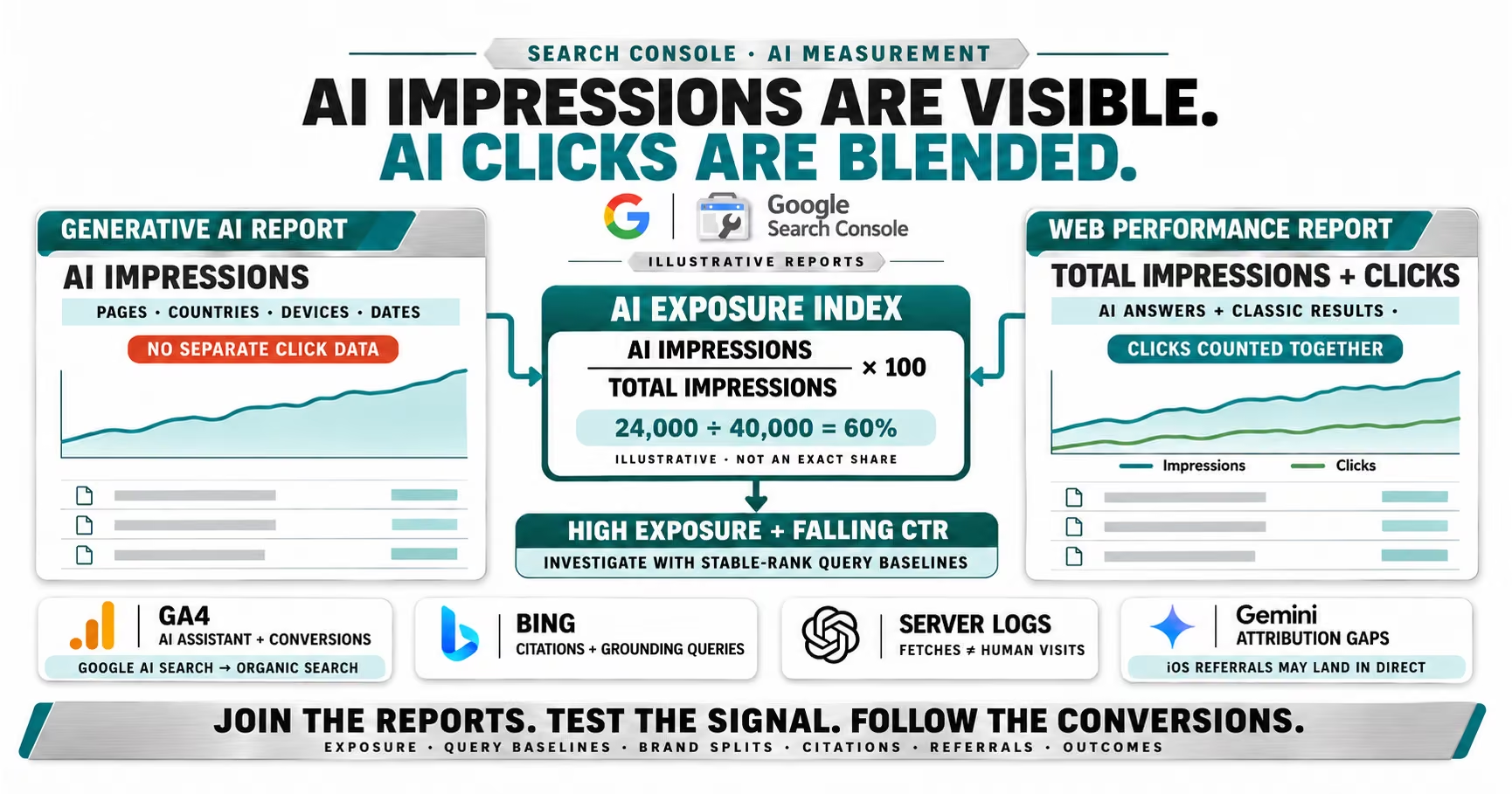
The clicks are not missing from Search Console. They are mixed in. Google's AI features documentation says sites appearing in AI Overviews and AI Mode are reported in the Performance report within the "Web" search type. The counting rules add three details that matter for any analysis:
- Clicking a link to an external page in an AI Overview or AI Mode counts as a click.
- An AI Overview occupies a single position, and every link inside it is assigned that same position.
- A follow-up question in AI Mode is counted as a new query, with its own impressions and clicks.
That second rule explains a pattern many teams have misread. A page cited in an AI Overview at the top of the results can show an average position near 1 with a click-through rate that looks broken. The position is real. The click opportunity it used to represent is not.
Where each AI surface shows up in your data
Before you measure anything, know where each source lands. Most reporting errors come from looking for AI traffic in the wrong place.
| Surface | Search Console | GA4 channel |
|---|---|---|
| AI Overviews | Web, blended | Organic Search |
| AI Mode | Web, blended | Organic Search |
| ChatGPT | Not included | AI Assistant |
| Gemini web | Not included | AI Assistant |
| Gemini iOS app | Not included | Direct |
| Copilot | Bing Webmaster Tools | AI Assistant |
The GA4 column comes from Google Analytics' default channel definitions. The AI Assistant channel covers sources "like ChatGPT, Gemini, Deepseek, Copilot, or Grok," and the documentation states plainly that it "excludes Google's AI Overviews and AI Mode." Google's AI answers arrive as Google organic traffic, which is why no analytics setting will ever isolate them.
Method one: calculate an AI exposure ratio for every page
This is the method to build first, because it uses only Google's own data and works at page level. For each page, divide its impressions in the generative AI report by its impressions in the regular Performance report, using the same date range, country and device filters. The result is the share of that page's search visibility that happened inside an AI feature.
Then sort. A page with a 60% exposure ratio and a click-through rate that dropped by half since last year is a strong candidate for AI absorption. A page with a 5% ratio and the same drop has a different problem, usually rankings, intent or a SERP feature that is not AI.
Here is how the arithmetic works on an illustrative page. Say the Performance report shows 40,000 impressions and 600 clicks for a month, a 1.5% click-through rate. The generative AI report shows 24,000 AI impressions for the same page and period, so the exposure ratio is 60%. If the same page earned 3% on similar impressions before AI Overviews covered its queries, you have a defensible estimate that AI exposure is costing it roughly half its clicks.
- The two reports are not a clean subset. Both follow standard impression rules, but a page can be counted in an AI feature and the classic results on the same search, so treat the ratio as an index, not a precise share.
- AI Overviews and AI Mode are combined. The generative AI report does not separate them, so you cannot tell which surface drove the exposure.
- The history is short. AI report data only goes back to May 18, 2026, so year-over-year comparisons need the Performance report alone.
Method two: build a query baseline before and after
The exposure ratio tells you where. A query baseline tells you how much. In the Performance report, export query and page data for a period before AI Overviews were common on your queries, and a recent period of the same length. Keep only queries where your average position stayed roughly stable, within one position. If position held and click-through rate fell, something on the page took the click.
AI Overviews are the main suspect on most informational queries. Search Engine Roundtable reported on October 26 that they now appear on more than 80% of Google searches, citing data from Semrush, SE Ranking and seoClarity, three companies that sell SEO tools. But they are not the only suspect. Rankings were volatile through October, with unconfirmed update spikes on October 24 and 27, so check your date ranges against known volatility before blaming AI.
Method three: split branded from non-branded and by intent
AI answers do not hit every query equally. A searcher typing your brand name usually wants your site, and AI summaries rarely satisfy that intent. A searcher asking how something works is often satisfied by the summary. Filter the Performance report by a regex of your brand terms, then compare click-through rate trends for branded and non-branded queries separately.
Then go one level further on non-branded queries. Question-style and long queries are the ones most likely to trigger AI summaries. Pew Research found that 8% of one- or two-word Google searches produced an AI summary in March 2025, against 53% of searches with ten words or more. If your long, question-style queries lost clicks while short commercial ones held, you have a strong signal pointing at AI answers rather than at your content.
Method four: track which queries show AI answers and cite you
Search Console tells you that a page appeared in an AI feature. It does not tell you which query triggered it. A rank tracker that records AI Overview presence and citations for a fixed keyword set fills that gap. Track the queries that matter commercially, record weekly whether an AI Overview appeared and whether your domain was cited, and join that to Search Console clicks for the same queries.
Third-party tracking has its own limits. Search Engine Roundtable reported in October that rank trackers are still struggling after Google's anti-scraping changes, and Google may be testing the removal of citation cards beside AI Overviews, so treat tracker data as a sample, not a census. A few hundred well-chosen queries tracked consistently will tell you more than thousands tracked badly.
Method five: measure AI assistants with GA4 and server logs
ChatGPT, Gemini and Copilot are a separate problem, because their traffic leaves Google entirely. Start with GA4's AI Assistant channel, which assigns the medium "ai-assistant" when the referrer matches Google's list of AI assistants, according to the channel definitions.
Then account for what it misses. Search Engine Journal reported that ChatGPT adds UTM parameters to links in answers grounded in web sources. Gemini added utm_source=gemini in early September, then, per Search Engine Roundtable, stopped around September 28. Gemini on the desktop web still passes a referrer. Its iOS app opens links in its own WebView and sends none, so those visits land in Direct. Watch for a rise in Direct traffic to deep content pages that nobody types by hand: that is often unattributed AI traffic.
Server logs add a third view. OpenAI's crawler documentation says ChatGPT-User visits a page when a user asks ChatGPT a question and it fetches that page, while OAI-SearchBot crawls for ChatGPT's search features. A ChatGPT-User request is not a visit, but a page that ChatGPT fetches often is a page it is using to answer questions. Count those requests by URL each month.
For Microsoft, Bing Webmaster Tools offers what Google does not. Its AI Performance report, public since February, shows citations across Copilot and Bing's AI summaries, cited pages and sampled grounding queries. It still has no clicks, but grounding queries are the closest thing to AI query data any engine provides.
Method six: the opt-out test, if you can afford it
The cleanest measurement is also the most expensive. Search Console's Search generative AI control lets a site opt out of AI Overviews and AI Mode, and Google says opted-out sites will not receive traffic or impressions from those features, per Search Engine Roundtable's coverage of the launch.
One public case study shows both the value and the risk. Cyrus Shepard, who runs an SEO consultancy, opted a site out and compared Search Console data before, during and after, as reported by Search Engine Roundtable on October 30. He estimated AI impressions earned about a 0.9% click-through rate. Regular organic clicks also fell while the site was opted out, which suggests AI citations may support clicks elsewhere on the page.
- One site is not a benchmark. Shepard called it a small case study, and it has not been replicated.
- You lose more than AI clicks. His regular organic clicks dropped too, so the test can cost traffic you were not trying to measure.
- Run it on a section, not the whole site. If your structure allows it, test on a subdomain or a low-stakes section first.
What the independent numbers say, and how to use them
Borrowed benchmarks are useful for sanity checks and dangerous as forecasts. The strongest independent one is still Pew Research Center's analysis of 68,879 Google searches by 900 U.S. adults in March 2025. Users clicked a traditional result on 8% of visits when an AI summary appeared, versus 15% when none did. They clicked a link inside the summary on 1% of visits.
The largest first-party disclosure came last month. Reddit's Q3 2026 shareholder letter said search traffic dropped by more than 1 million referrals per week, on average, during October, and its CEO named AI Overviews and AI Mode as the biggest part of the company's working theory. Google sees it differently: its documentation says clicks from results pages with AI Overviews are "higher quality," meaning users are more likely to spend more time on the site.
Both can be true, which is why your own measurement matters. If you track fewer clicks, check engagement and conversion rate on the clicks you keep. A page that lost 40% of its clicks but kept its conversions has a reporting problem, not a revenue problem.
For how to present this to leadership, our guide to SEO reporting for executives covers framing, and our Search Console strategy guide covers the exports these methods depend on. For how AI Overviews have changed through the year, see our running notes on AI Overviews updates in 2026.
Where to start
- Export both reports this week. Pull page-level data from the generative AI report and the Performance report for the same 90 days, and calculate an exposure ratio for your top 100 pages.
- Flag the pages with high exposure and falling CTR. Those are your AI-affected pages, and they need a different plan from pages losing rankings.
- Split branded and non-branded queries. Report them separately from now on, because AI answers move them in opposite directions.
- Fix AI assistant attribution in GA4. Confirm the AI Assistant channel is in your reports, and watch Direct traffic to deep pages for unattributed Gemini visits.
- Add log and Bing data to the monthly report. Count ChatGPT-User fetches by URL and pull Bing citations, so AI usage is visible even when clicks are not.
- Judge AI-affected pages on conversions. Compare conversion rate and engagement before and after, not just sessions.
Google has decided, for now, that you can see where AI uses your pages but not what that use is worth. That is a reporting gap, not a dead end. Teams that build their own estimate this quarter will be arguing from evidence when the next budget conversation starts, and everyone else will be arguing from screenshots.
Frequently Asked Questions
Common questions about GEO, SEO, and AI-driven search visibility.
Not separately. Google's generative AI performance report in Search Console, rolled out to all sites worldwide as of August 31, 2026, shows impressions by page, country, device and date, but no clicks or queries. Google's documentation says clicks from AI Overviews and AI Mode are counted in the regular Performance report under the Web search type, blended with all other results.
According to Google's Search Console help documentation, clicking a link to an external page in an AI Overview counts as a click, and standard impression rules apply. An AI Overview occupies a single position in the results, and every link inside it is assigned that same position. Follow-up questions in AI Mode are counted as new queries.
Clicks from AI Overviews and AI Mode arrive with a Google referrer and land in the Organic Search channel. Google Analytics' AI Assistant default channel covers sources like ChatGPT, Gemini, DeepSeek, Copilot and Grok, but Google's help documentation says it explicitly excludes AI Overviews and AI Mode.
Search Engine Roundtable reported in October 2026 that Gemini stopped adding utm_source=gemini to cited links around September 28, after adding them in early September. Gemini on the desktop web still passes a gemini.google.com referrer, but its iOS app opens links in its own WebView and sends no referrer, so those visits are recorded as Direct.
The strongest independent estimate comes from Pew Research Center, which tracked 68,879 Google searches by 900 U.S. adults in March 2025. Users clicked a traditional result on 8% of visits when an AI summary appeared, versus 15% when none appeared, and clicked a link inside the summary on just 1% of visits. Results vary widely by site and query type, so measure your own.
Yes. Search Console's Search generative AI control lets a site opt out of AI Overviews and AI Mode, and Google says opted-out sites will not receive traffic or impressions from those features. A small case study reported by Search Engine Roundtable in October 2026 found organic clicks also dropped during the opt-out, so treat it as a costly last-resort test.
Sources
- Google Search Console Help: Generative AI performance report (Search) (opens in a new tab)
- Google Search Console Help: How are impressions, position, and clicks counted? (opens in a new tab)
- Google Search Central: AI features and your website (opens in a new tab)
- Search Engine Roundtable: Gary Illyes Implies Click Data Not Coming To Search Console AI Reporting (opens in a new tab)
- Search Engine Roundtable: Google Search Console AI Performance Report & AI Blocking Controls (opens in a new tab)
- Google Analytics Help: Default channel group (opens in a new tab)
- Pew Research Center: Google users are less likely to click on links when an AI summary appears in the results (opens in a new tab)
- SEC: Reddit Q3 2026 letter to shareholders (opens in a new tab)
- Search Engine Roundtable: Google AI Overviews & AI Mode 0.9% Click-Through Rate Says Small Opt Out Study (opens in a new tab)
- Search Engine Roundtable: Over 80% Of Google Searches Have AI Overviews (opens in a new tab)
- Search Engine Roundtable: Google Search Ranking Volatility Spike Again October 27th (opens in a new tab)
- Search Engine Roundtable: Google Testing Dropping Citations Cards From AI Overviews (opens in a new tab)
- Search Engine Journal: Google Gemini Adds UTM Parameters For Referral Attribution (opens in a new tab)
- Search Engine Roundtable: Gemini Stops Adding UTM Parameters To Cited URLs (opens in a new tab)
- OpenAI: Overview of OpenAI crawlers (opens in a new tab)
- Search Engine Roundtable: Bing Webmaster Tools AI Performance Reports Go Live (opens in a new tab)